代码、内容参考来自于包括《操作系统真象还原》、《一个64位操作系统的设计与实现》以及《ORANGE’S:一个操作系统的实现》。
1.获取当前目录
linux可以通过pwd获取当前目录
在任何目录中都有目录项”..”,它表示父目录。 先通过”..”获取当前目录的父目录,在父目录中搜索当前目录的目录项,从目录项中获取当前目录名称,然后再向上找父目录的父目录,沿着目录树层层而上,就能构建出当前目录的绝对路径。
修改fs/fs.c
/* 获得父目录的inode编号 */
static uint32_t get_parent_dir_inode_nr(uint32_t child_inode_nr, void* io_buf) {
    struct inode* child_dir_inode = inode_open(cur_part, child_inode_nr);
    /* 目录中的目录项".."中包括父目录inode编号,".."位于目录的第0块 */
    uint32_t block_lba = child_dir_inode->i_sectors[0];
    ASSERT(block_lba >= cur_part->sb->data_start_lba);
    inode_close(child_dir_inode);
    ide_read(cur_part->my_disk, block_lba, io_buf, 1);
    struct dir_entry* dir_e = (struct dir_entry*)io_buf;
    /* 第0个目录项是".",第1个目录项是".." */
    ASSERT(dir_e[1].i_no < 4096 && dir_e[1].f_type == FT_DIRECTORY);
    return dir_e[1].i_no;      // 返回..即父目录的inode编号
}

/* 在inode编号为p_inode_nr的目录中查找inode编号为c_inode_nr的子目录的名字,
 * 将名字存入缓冲区path.成功返回0,失败返-1 */
static int get_child_dir_name(uint32_t p_inode_nr, uint32_t c_inode_nr, char* path, void* io_buf) {
    struct inode* parent_dir_inode = inode_open(cur_part, p_inode_nr);
    /* 填充all_blocks,将该目录的所占扇区地址全部写入all_blocks */
    uint8_t block_idx = 0;
    uint32_t all_blocks[140] = {0}, block_cnt = 12;
    while (block_idx < 12) {
        all_blocks[block_idx] = parent_dir_inode->i_sectors[block_idx];
        block_idx++;
    }
    if (parent_dir_inode->i_sectors[12]) {  // 若包含了一级间接块表,将共读入all_blocks.
        ide_read(cur_part->my_disk, parent_dir_inode->i_sectors[12], all_blocks + 12, 1);
        block_cnt = 140;
    }
    inode_close(parent_dir_inode);

    struct dir_entry* dir_e = (struct dir_entry*)io_buf;
    uint32_t dir_entry_size = cur_part->sb->dir_entry_size;
    uint32_t dir_entrys_per_sec = (512 / dir_entry_size);
    block_idx = 0;
    /* 遍历所有块 */
    while(block_idx < block_cnt) {
        if(all_blocks[block_idx]) {      // 如果相应块不为空则读入相应块
            ide_read(cur_part->my_disk, all_blocks[block_idx], io_buf, 1);
            uint8_t dir_e_idx = 0;
            /* 遍历每个目录项 */
            while(dir_e_idx < dir_entrys_per_sec) {
                if ((dir_e + dir_e_idx)->i_no == c_inode_nr) {
                    strcat(path, "/");
                    strcat(path, (dir_e + dir_e_idx)->filename);
                    return 0;
                }
                dir_e_idx++;
            }
        }
        block_idx++;
    }
    return -1;
}
get_parent_dir_inode_nr函数接受2个参数,子目录inode编号child_inode_nr、缓冲区io_buf,功能是获得父目录的 inode 编号。
此函数是利用子目录中目录项”.”来实现的,在函数开头先通过inode_open获得子目录的inode,用指针child_dir_inode保存其地址。目录项”.”和”..”是在执行sys_mkdir创建空目录的时候生成的,它们位于目录第0个直接块中,即i_sectors[0]中,因此先将该块中的数据读入到io_buf中。块中第0个目录项是”.”,第1个目录项是”..”,return dir_e[1].i_no返回第1个目录项的inode编号,函数结束。
函数get_child_dir_name接受4个参数,父目录inode编号p_inode_nr、子目录inode编号c_inode_nr、存储路径的缓冲区path、硬盘读写缓冲区io_buf,功能是在inode编号为p_inode_nr的目录中查找inode编号为c_inode_nr的子目录,将子目录的名字存入缓冲区path,成功返回0,失败返-1。名称是在目录项中存储,故获取名称必然免不了读取目录项所在的块,因此先打开父目录的inode,接着很老套地把目录的所有块地址收集到all_blocks,while(block_idx < block_cnt)遍历所有块,然后在每一个块中遍历所有目录项。在if ((dir_e + dir_e_idx)->i_no == c_inode_nr) 如果发现目录项的i_no等于c_inode_nr,就在strcat(path, “/”)用函数strcat将路径分隔符追加到path中,然后在下一行将目录项的名称追加到”/”之后,最后通过 return 返回 0,函数结束。
Linux 中用 getewd 函数来获取当前工作路径。
对应的,我们实现内核sys_getcwd函数
先修改下pcb,我们要在pcb中加个记录当前工作目录的成员cwd_inode_nr,用它来记录工作目录的 inode 编号。
修改thread/thread.h
/* 进程或线程的pcb,程序控制块 */
struct task_struct {
    uint32_t* self_kstack;   // 各内核线程都用自己的内核栈
    pid_t pid;
    enum task_status status;
    char name[16];
    uint8_t priority;
    uint8_t ticks;     // 每次在处理器上执行的时间嘀嗒数
    /* 此任务自上cpu运行后至今占用了多少cpu嘀嗒数,
    * 也就是此任务执行了多久*/
    uint32_t elapsed_ticks;
    /* general_tag的作用是用于线程在一般的队列中的结点 */
    struct list_elem general_tag;
    /* all_list_tag的作用是用于线程队列thread_all_list中的结点 */
    struct list_elem all_list_tag;
    uint32_t* pgdir;              // 进程自己页表的虚拟地址
    struct virtual_addr userprog_vaddr;   // 用户进程的虚拟地址
    struct mem_block_desc u_block_desc[DESC_CNT];   // 用户进程内存块描述符
    int32_t fd_table[MAX_FILES_OPEN_PER_PROC];  // 已打开文件数组
    uint32_t cwd_inode_nr;   // 进程所在的工作目录的inode编号
    uint32_t stack_magic;    // 用这串数字做栈的边界标记,用于检测栈的溢出
};
接着还要修改初始化线程函数 init_thread,为 cwd_inode_nr 初始化
修改thread/thread.c
/* 初始化线程基本信息 */
void init_thread(struct task_struct* pthread, char* name, int prio) {
    memset(pthread, 0, sizeof(*pthread));
    pthread->pid = allocate_pid();
    strcpy(pthread->name, name);

    if (pthread == main_thread) {
    /* 由于把main函数也封装成一个线程,并且它一直是运行的,故将其直接设为TASK_RUNNING */
        pthread->status = TASK_RUNNING;
    } else {
        pthread->status = TASK_READY;
    }

    /* self_kstack是线程自己在内核态下使用的栈顶地址 */
    pthread->self_kstack = (uint32_t*)((uint32_t)pthread + PG_SIZE);
    pthread->priority = prio;
    pthread->ticks = prio;
    pthread->elapsed_ticks = 0;
    pthread->pgdir = NULL;

    /* 标准输入输出先空出来 */
    pthread->fd_table[0] = 0;
    pthread->fd_table[1] = 1;
    pthread->fd_table[2] = 2;
    /* 其余的全置为-1 */
    uint8_t fd_idx = 3;
    while (fd_idx < MAX_FILES_OPEN_PER_PROC) {
        pthread->fd_table[fd_idx] = -1;
        fd_idx++;
    }
    pthread->cwd_inode_nr = 0;      // 以根目录做为默认工作路径
    pthread->stack_magic = 0x19870916;    // 自定义的魔数
}
修改fs/fs.c
/* 把当前工作目录绝对路径写入buf, size是buf的大小.
 当buf为NULL时,由操作系统分配存储工作路径的空间并返回地址
 失败则返回NULL */
char* sys_getcwd(char* buf, uint32_t size) {
    /* 确保buf不为空,若用户进程提供的buf为NULL,
    系统调用getcwd中要为用户进程通过malloc分配内存 */
    ASSERT(buf != NULL);
    void* io_buf = sys_malloc(SECTOR_SIZE);
    if (io_buf == NULL) {
        return NULL;
    }

    struct task_struct* cur_thread = running_thread();
    int32_t parent_inode_nr = 0;
    int32_t child_inode_nr = cur_thread->cwd_inode_nr;
    ASSERT(child_inode_nr >= 0 && child_inode_nr < 4096);      // 最大支持4096个inode
    /* 若当前目录是根目录,直接返回'/' */
    if (child_inode_nr == 0) {
        buf[0] = '/';
        buf[1] = 0;
        sys_free(io_buf);
        return buf;
    }

    memset(buf, 0, size);
    char full_path_reverse[MAX_PATH_LEN] = {0};   // 用来做全路径缓冲区

    /* 从下往上逐层找父目录,直到找到根目录为止.
     * 当child_inode_nr为根目录的inode编号(0)时停止,
     * 即已经查看完根目录中的目录项 */
    while ((child_inode_nr)) {
        parent_inode_nr = get_parent_dir_inode_nr(child_inode_nr, io_buf);
        if (get_child_dir_name(parent_inode_nr, child_inode_nr, full_path_reverse, io_buf) == -1) {   // 或未找到名字,失败退出
            sys_free(io_buf);
            return NULL;
        }
        child_inode_nr = parent_inode_nr;
    }
    ASSERT(strlen(full_path_reverse) <= size);
/* 至此full_path_reverse中的路径是反着的,
 * 即子目录在前(左),父目录在后(右) ,
 * 现将full_path_reverse中的路径反置 */
    char* last_slash;   // 用于记录字符串中最后一个斜杠地址
    while ((last_slash = strrchr(full_path_reverse, '/'))) {
        uint16_t len = strlen(buf);
        strcpy(buf + len, last_slash);
        /* 在full_path_reverse中添加结束字符,做为下一次执行strcpy中last_slash的边界 */
        *last_slash = 0;
    }
    sys_free(io_buf);
    return buf;
}
sys_getewd函数接受两个参数,存储绝对路径的缓冲区buf、缓冲区大小size,功能是把当前工作目录的绝对路径写入buf,成功返回buf地址,失败返回NULL。
函数开头用”ASSERT(buf != NULL)”限制了buf不为空,buf可以由用户进程提供,也可以由操作系统提供,若用户进程传给buf的实参是NULL,也就是未提供缓冲区,我们会在系统调用getcwd中为buf通过malloc分配内存。 接着是为缓冲区io_buf申请1扇区大小的内存。
先获得当前任务工作目录的inode编号,即存储在pcb中的cwd_inode_nr,将其赋值给child_inode_nr。
if (child_inode_nr == 0)判断如果child_inode_nr是0,这说明是根目录的inode编号,因此把buf直接置为”/”后返回。 接着定义了数组full_path_reverse[MAX_PATH_LEN],它用于存储工作目录所在的全路径,即绝对路径,不过从名字上看,它是反转的绝对路径,因此它只是临时数据,一会还要将其反转回来。 注意,这里只是反转目录顺序,目录名本身不反转。 如若原路径为”/ab/c”,在full_path_reverse的将是”/c/ab”,并不是”/c/ba”。
从当前目录向上回溯,逐层找父目录,一直找到根目录为止。 parent_inode_nr = get_parent_dir_inode_nr(child_inode_nr, io_buf)调用 get_parentdir_inode_nr获得父目录的inode编号存入parent_inode_nr,接着调用get_child_dir_name把当前工作目录的名字写入full_path_reverse中。 然后将child_inode_nr更新为parent_inode_nr开始下一轮循环。 循环过后,在full_path_reverse中得到了绝对路径的反转形式,下面将其转换为正常的顺序。 代码while ((last_slash = strrchr(full_path_reverse, ‘/’)))通过while循环逐层解析目录名,将最终的路径写入buf中。
2.切换当前目录
linux还会通过cd命令来切换目录,用函数chdir来实现
同样修改fs/fs.c
/* 更改当前工作目录为绝对路径path,成功则返回0,失败返回-1 */
int32_t sys_chdir(const char* path) {
    int32_t ret = -1;
    struct path_search_record searched_record;
    memset(&searched_record, 0, sizeof(struct path_search_record));
    int inode_no = search_file(path, &searched_record);
    if (inode_no != -1) {
        if (searched_record.file_type == FT_DIRECTORY) {
            running_thread()->cwd_inode_nr = inode_no;
            ret = 0;
        } else {
            printk("sys_chdir: %s is regular file or other!\n", path);
        }
    }
    dir_close(searched_record.parent_dir);
    return ret;
}
sys_chdir函数接受1个参数,新工作目录的绝对路径path,功能是更改当前工作目录为绝对路径path,成功则返回0,失败返回-1。任务的工作目录记录在pcb中的cwd_inode_nr,因此更改工作目录的核心原理就是修改cwd_inode_nr,工作目录必须是在硬盘上存在的,因此在更改工作目录之前,先要保证新路径path 是存在的。
搜索path,如果未找到,也就是返回值inode_no为-1,直接返回默认的返回值ret,即-1,如果找到了 path,要确认 path 是否为目录,万一要是普通文件也会失败。 if (searched_record.file_type == FT_DIRECTORY)判断如果是目录,就用目录path的inode号inode_no给任务的cwd_inode_nr赋值,从而完成了工作目录的更改,然后将返回值ret置为0。 最后关闭目录,返回ret。
对应fs/fs.h加入函数声明
char* sys_getcwd(char* buf, uint32_t size);
int32_t sys_chdir(const char* path);
修改main.c测试
int main(void) {
    put_str("I am kernel\n");
    init_all();
    /********  测试代码  ********/
    char cwd_buf[32] = {0};
    sys_getcwd(cwd_buf, 32);
    printf("cwd:%s\n", cwd_buf);
    sys_chdir("/dir1");
    printf("change cwd now\n");
    sys_getcwd(cwd_buf, 32);
    printf("cwd:%s\n", cwd_buf);
    /********  测试代码  ********/
    while(1);
    return 0;
}
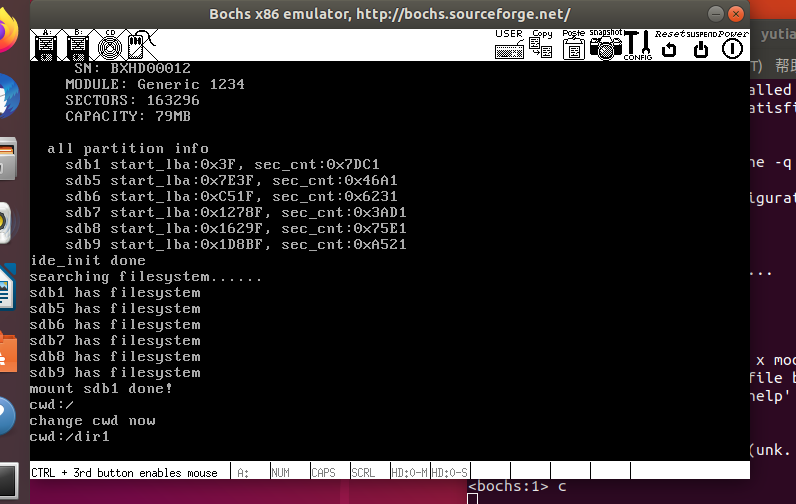
执行结果如下:
3.显示文件属性
同样的linux执行ls命令时会输出文件的属性
修改fs/fs.h,添加上文件属性结构
/* 文件属性结构体 */
struct stat {
    uint32_t st_ino;        // inode编号
    uint32_t st_size;       // 尺寸
    enum file_types st_filetype;     // 文件类型
};
修改fs/fs.c
/* 在buf中填充文件结构相关信息,成功时返回0,失败返回-1 */
int32_t sys_stat(const char* path, struct stat* buf) {
    /* 若直接查看根目录'/' */
    if (!strcmp(path, "/") || !strcmp(path, "/.") || !strcmp(path, "/..")) {
        buf->st_filetype = FT_DIRECTORY;
        buf->st_ino = 0;
        buf->st_size = root_dir.inode->i_size;
        return 0;
    }

    int32_t ret = -1;   // 默认返回值
    struct path_search_record searched_record;
    memset(&searched_record, 0, sizeof(struct path_search_record));   // 记得初始化或清0,否则栈中信息不知道是什么
    int inode_no = search_file(path, &searched_record);
    if (inode_no != -1) {
        struct inode* obj_inode = inode_open(cur_part, inode_no);   // 只为获得文件大小
        buf->st_size = obj_inode->i_size;
        inode_close(obj_inode);
        buf->st_filetype = searched_record.file_type;
        buf->st_ino = inode_no;
        ret = 0;
    } else {
        printk("sys_stat: %s not found\n", path);
    }
    dir_close(searched_record.parent_dir);
    return ret;
}
sys_stat函数接受2个参数,待获取属性的文件路径path、存储属性的缓冲区buf,功能是在buf中填充文件结构相关信息,成功时返回 0,失败返回-1。函数开头判断path是否为根目录,如果是就直接在buf中写入根目录的信息并成功返回。int32_t ret = -1定义了返回值ret,默认为-1。然后在文件系统上查找文件path,如果文件存在,struct inode* obj_inode = inode_open(cur_part, inode_no)打开文件的inode,这是为了获取文件大小。下面分别填充buf中的st_size,st_filetype和st_ino,并将ret置为0。如果文件不存在,输出文件不存在的提示。最后关闭目录,返回 ret。
对应fs/fs.h也加入声明
int32_t sys_stat(const char* path, struct stat* buf);
修改main.c测试
int main(void) {
    put_str("I am kernel\n");
    init_all();
    /********  测试代码  ********/
    struct stat obj_stat;
    sys_stat("/", &obj_stat);
    printf("/`s info\n   i_no:%d\n   size:%d\n   filetype:%s\n", \
    obj_stat.st_ino, obj_stat.st_size, \
    obj_stat.st_filetype == 2 ? "directory" : "regular");
    sys_stat("/dir1", &obj_stat);
    printf("/dir1`s info\n   i_no:%d\n   size:%d\n   filetype:%s\n", \
    obj_stat.st_ino, obj_stat.st_size, \
    obj_stat.st_filetype == 2 ? "directory" : "regular");
    /********  测试代码  ********/
    while (1);
    return 0;
}
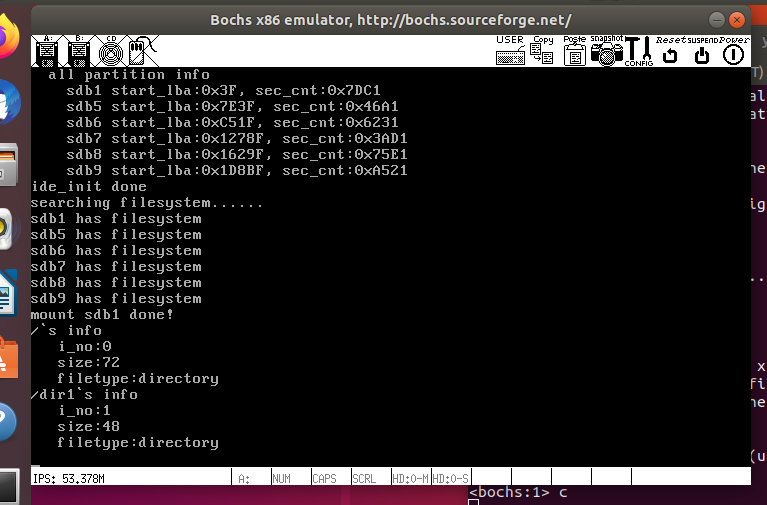
执行结果如下:
可以看到成功输出了属性了
4.参考
郑钢著操作系统真象还原
田宇著一个64位操作系统的设计与实现
丁渊著ORANGE’S:一个操作系统的实现