代码、内容参考来自于包括《操作系统真象还原》、《一个64位操作系统的设计与实现》以及《ORANGE’S:一个操作系统的实现》。
1.添加shell的系统调用
简单的shell要还蛮多的系统调用
修改lib/user/syscall.h
#ifndef __LIB_USER_SYSCALL_H
#define __LIB_USER_SYSCALL_H
#include "stdint.h"
#include "fs.h"

enum SYSCALL_NR {
    SYS_GETPID,
    SYS_WRITE,
    SYS_MALLOC,
    SYS_FREE,
    SYS_FORK,
    SYS_READ,
    SYS_PUTCHAR,
    SYS_CLEAR,
    SYS_GETCWD,
    SYS_OPEN,
    SYS_CLOSE,
    SYS_LSEEK,
    SYS_UNLINK,
    SYS_MKDIR,
    SYS_OPENDIR,
    SYS_CLOSEDIR,
    SYS_CHDIR,
    SYS_RMDIR,
    SYS_READDIR,
    SYS_REWINDDIR,
    SYS_STAT,
    SYS_PS
};
uint32_t getpid(void);
uint32_t write(int32_t fd, const void* buf, uint32_t count);
void* malloc(uint32_t size);
void free(void* ptr);
int16_t fork(void);
int32_t read(int32_t fd, void* buf, uint32_t count);
void putchar(char char_asci);
void clear(void);
char* getcwd(char* buf, uint32_t size);
int32_t open(char* pathname, uint8_t flag);
int32_t close(int32_t fd);
int32_t lseek(int32_t fd, int32_t offset, uint8_t whence);
int32_t unlink(const char* pathname);
int32_t mkdir(const char* pathname);
struct dir* opendir(const char* name);
int32_t closedir(struct dir* dir);
int32_t rmdir(const char* pathname);
struct dir_entry* readdir(struct dir* dir);
void rewinddir(struct dir* dir);
int32_t stat(const char* path, struct stat* buf);
int32_t chdir(const char* path);
void ps(void);
#endif
修改lib/user/syscall.c
/* 获取当前工作目录 */
char* getcwd(char* buf, uint32_t size) {
    return (char*)_syscall2(SYS_GETCWD, buf, size);
}

/* 以flag方式打开文件pathname */
int32_t open(char* pathname, uint8_t flag) {
    return _syscall2(SYS_OPEN, pathname, flag);
}

/* 关闭文件fd */
int32_t close(int32_t fd) {
    return _syscall1(SYS_CLOSE, fd);
}

/* 设置文件偏移量 */
int32_t lseek(int32_t fd, int32_t offset, uint8_t whence) {
    return _syscall3(SYS_LSEEK, fd, offset, whence);
}

/* 删除文件pathname */
int32_t unlink(const char* pathname) {
    return _syscall1(SYS_UNLINK, pathname);
}

/* 创建目录pathname */
int32_t mkdir(const char* pathname) {
    return _syscall1(SYS_MKDIR, pathname);
}

/* 打开目录name */
struct dir* opendir(const char* name) {
    return (struct dir*)_syscall1(SYS_OPENDIR, name);
}

/* 关闭目录dir */
int32_t closedir(struct dir* dir) {
    return _syscall1(SYS_CLOSEDIR, dir);
}

/* 删除目录pathname */
int32_t rmdir(const char* pathname) {
    return _syscall1(SYS_RMDIR, pathname);
}

/* 读取目录dir */
struct dir_entry* readdir(struct dir* dir) {
    return (struct dir_entry*)_syscall1(SYS_READDIR, dir);
}

/* 回归目录指针 */
void rewinddir(struct dir* dir) {
    _syscall1(SYS_REWINDDIR, dir);
}

/* 获取path属性到buf中 */
int32_t stat(const char* path, struct stat* buf) {
    return _syscall2(SYS_STAT, path, buf);
}

/* 改变工作目录为path */
int32_t chdir(const char* path) {
    return _syscall1(SYS_CHDIR, path);
}

/* 显示任务列表 */
void ps(void) {
    _syscall0(SYS_PS);
}
修改/userprog/syscall-init.c,对这些系统调用在 syscall_table 中注册
/* 初始化系统调用 */
void syscall_init(void) {
    put_str("syscall_init start\n");
    syscall_table[SYS_GETPID]     = sys_getpid;
    syscall_table[SYS_WRITE]      = sys_write;
    syscall_table[SYS_MALLOC]     = sys_malloc;
    syscall_table[SYS_FREE]       = sys_free;
    syscall_table[SYS_FORK]       = sys_fork;
    syscall_table[SYS_READ]       = sys_read;
    syscall_table[SYS_PUTCHAR]    = sys_putchar;
    syscall_table[SYS_CLEAR]      = cls_screen;
    syscall_table[SYS_GETCWD]     = sys_getcwd;
    syscall_table[SYS_OPEN]       = sys_open;
    syscall_table[SYS_CLOSE]      = sys_close;
    syscall_table[SYS_LSEEK]     = sys_lseek;
    syscall_table[SYS_UNLINK]    = sys_unlink;
    syscall_table[SYS_MKDIR]     = sys_mkdir;
    syscall_table[SYS_OPENDIR]   = sys_opendir;
    syscall_table[SYS_CLOSEDIR]   = sys_closedir;
    syscall_table[SYS_CHDIR]     = sys_chdir;
    syscall_table[SYS_RMDIR]     = sys_rmdir;
    syscall_table[SYS_READDIR]   = sys_readdir;
    syscall_table[SYS_REWINDDIR]     = sys_rewinddir;
    syscall_table[SYS_STAT]  = sys_stat;
    syscall_table[SYS_PS]    = sys_ps;
    put_str("syscall_init done\n");
}
上面的ps命令是打印出进程的pid、ppid、状态、运行时间片和进程名。
所以修改thread/thread.c
/* 以填充空格的方式输出buf */
static void pad_print(char* buf, int32_t buf_len, void* ptr, char format) {
    memset(buf, 0, buf_len);
    uint8_t out_pad_0idx = 0;
    switch(format) {
        case 's':
            out_pad_0idx = sprintf(buf, "%s", ptr);
            break;
        case 'd':
            out_pad_0idx = sprintf(buf, "%d", *((int16_t*)ptr));
        case 'x':
            out_pad_0idx = sprintf(buf, "%x", *((uint32_t*)ptr));
    }
    while(out_pad_0idx < buf_len) { // 以空格填充
        buf[out_pad_0idx] = ' ';
        out_pad_0idx++;
    }
    sys_write(stdout_no, buf, buf_len - 1);
}

/* 用于在list_traversal函数中的回调函数,用于针对线程队列的处理 */
static bool elem2thread_info(struct list_elem* pelem, int arg UNUSED) {
    struct task_struct* pthread = elem2entry(struct task_struct, all_list_tag, pelem);
    char out_pad[16] = {0};

    pad_print(out_pad, 16, &pthread->pid, 'd');

    if (pthread->parent_pid == -1) {
        pad_print(out_pad, 16, "NULL", 's');
    } else {
        pad_print(out_pad, 16, &pthread->parent_pid, 'd');
    }

    switch (pthread->status) {
        case 0:
            pad_print(out_pad, 16, "RUNNING", 's');
            break;
        case 1:
            pad_print(out_pad, 16, "READY", 's');
            break;
        case 2:
            pad_print(out_pad, 16, "BLOCKED", 's');
            break;
        case 3:
            pad_print(out_pad, 16, "WAITING", 's');
            break;
        case 4:
            pad_print(out_pad, 16, "HANGING", 's');
            break;
        case 5:
            pad_print(out_pad, 16, "DIED", 's');
    }
    pad_print(out_pad, 16, &pthread->elapsed_ticks, 'x');

    memset(out_pad, 0, 16);
    ASSERT(strlen(pthread->name) < 17);
    memcpy(out_pad, pthread->name, strlen(pthread->name));
    strcat(out_pad, "\n");
    sys_write(stdout_no, out_pad, strlen(out_pad));
    return false;   // 此处返回false是为了迎合主调函数list_traversal,只有回调函数返回false时才会继续调用此函数
}

/* 打印任务列表 */
void sys_ps(void) {
    char* ps_title = "PID            PPID           STAT           TICKS          COMMAND\n";
    sys_write(stdout_no, ps_title, strlen(ps_title));
    list_traversal(&thread_all_list, elem2thread_info, 0);
}
pad_print函数用于对齐输出,原理是先用switch结构中sprintf函数把待输出的字符串ptr写入缓冲区buf,buf的长度是buf_len,这是固定的值,无论字符串ptr是多少字符,永远输出buf_len长度,如果ptr长度不足buf_len,就以空格来填充,这是用while循环完成的。在pad_print中的switch中有三种case,case’s’用来处理字符串,case ‘d’用来处理16位整数,case’x’用来处理32位整数。
elem2thread_info函数用于打印任务信息,它是list_traversal函数中的回调函数,用于线程队列的处理。 函数原理是输出每个任务的pid、ppid,然后通过switch结构根据任务的status输出不同的任务状态,任务状态包括”RUNNING” “READY” “BLOCKED” “WAITING” “HANGING” “DIED”,调用pad_print 函数把输出的信息对齐为16个字符的固定长度,然后通过sys_write输出。
sys_ps函数是系统调用ps的内核部分。
对应thread/thread.h加入声明
void sys_ps(void);
2.路径解析转换
路径输入发生在用户态,而系统调用通过中断的方式发生在内核态,操作系统是中断驱动的,但是我们要为内核代码减荷,让它们尽量快点从内核态返回,以处理更多的中断。
我们不应该把路径转换的工作交给内核态下的文件系统函数,最好由用户态的程序完成,提交给内核态下文件系统函数的路径参数应该是由用户态程序转换后的绝对路径。
新建/shell/buildin_cmd.c
#include "buildin_cmd.h"
#include "syscall.h"
#include "stdio.h"
#include "string.h"
#include "fs.h"
#include "global.h"
#include "dir.h"
#include "shell.h"
#include "assert.h"

/* 将路径old_abs_path中的..和.转换为实际路径后存入new_abs_path */
static void wash_path(char* old_abs_path, char* new_abs_path) {
   assert(old_abs_path[0] == '/');
   char name[MAX_FILE_NAME_LEN] = {0};
   char* sub_path = old_abs_path;
   sub_path = path_parse(sub_path, name);
   if (name[0] == 0) { // 若只键入了"/",直接将"/"存入new_abs_path后返回
      new_abs_path[0] = '/';
      new_abs_path[1] = 0;
      return;
   }
   new_abs_path[0] = 0;    // 避免传给new_abs_path的缓冲区不干净
   strcat(new_abs_path, "/");
   while (name[0]) {
      /* 如果是上一级目录“..” */
      if (!strcmp("..", name)) {
     char* slash_ptr =  strrchr(new_abs_path, '/');
       /*如果未到new_abs_path中的顶层目录,就将最右边的'/'替换为0,
     这样便去除了new_abs_path中最后一层路径,相当于到了上一级目录 */
     if (slash_ptr != new_abs_path) {  // 如new_abs_path为“/a/b”,".."之后则变为“/a”
        *slash_ptr = 0;
     } else {        // 如new_abs_path为"/a",".."之后则变为"/"
      /* 若new_abs_path中只有1个'/',即表示已经到了顶层目录,
     就将下一个字符置为结束符0. */
        *(slash_ptr + 1) = 0;
     }
      } else if (strcmp(".", name)) {     // 如果路径不是‘.’,就将name拼接到new_abs_path
     if (strcmp(new_abs_path, "/")) {    // 如果new_abs_path不是"/",就拼接一个"/",此处的判断是为了避免路径开头变成这样"//"
        strcat(new_abs_path, "/");
     }
     strcat(new_abs_path, name);
      }  // 若name为当前目录".",无须处理new_abs_path

      /* 继续遍历下一层路径 */
      memset(name, 0, MAX_FILE_NAME_LEN);
      if (sub_path) {
     sub_path = path_parse(sub_path, name);
      }
   }
}

/* 将path处理成不含..和.的绝对路径,存储在final_path */
void make_clear_abs_path(char* path, char* final_path) {
   char abs_path[MAX_PATH_LEN] = {0};
   /* 先判断是否输入的是绝对路径 */
   if (path[0] != '/') {      // 若输入的不是绝对路径,就拼接成绝对路径
      memset(abs_path, 0, MAX_PATH_LEN);
      if (getcwd(abs_path, MAX_PATH_LEN) != NULL) {
     if (!((abs_path[0] == '/') && (abs_path[1] == 0))) {       // 若abs_path表示的当前目录不是根目录/
        strcat(abs_path, "/");
     }
      }
   }
   strcat(abs_path, path);
   wash_path(abs_path, final_path);
}
wash_path函数接受两个参数,转换前的旧绝对路径old_abs_path和转换后的新绝对路径 new_abs_path,功能是将路径old_abs_path中的”..”和”.”转换为实际路径后存入new_abs_path。 其中 old_abs_path肯定是绝对目录,这是由主调函数传入的,因此new_abs_path必然也是绝对路径,这两者的区别就是old_abs_path中可能包括”.”或”.”,但new_abs_path中绝对不包括它们。
wash_path的原理是调用函数path_parse从左到右解析old_abs_path路径中的每一层,若解析出来的目录名不是”.”,就将其连接到new_abs_path,若是”.”,,就将new_abs_path的最后一层目录去掉。new_abs_path是转换后的绝对路径的结果,在路径解析中遇到”.”时就是去修改new_abs_path.
函数开头定义了数组name[MAX_FILE_NAME_LEN],用它来存储路径中解析出来的各层目录名。
make_clear_abs_path函数接受2个参数,原目录path和转换后的绝对路径final_path。其中path是用户键入的路径,可能是相对路径,也可能是绝对路径,也可能包含”.”和”..”的相对路径或绝对路径,而final_path是不含”.”和”..”的绝对路径。
对应/shell/buildin_cmd.h
#ifndef __SHELL_BUILDIN_CMD_H
#define __SHELL_BUILDIN_CMD_H
#include "stdint.h"
void make_clear_abs_path(char* path, char* wash_buf);
#endif
3.实现shell基本命令
现在就可以来实现 Is、cd、mkdir、ps、rm 等命令了
修改/shell/buildin_cmd.c
/* pwd命令的内建函数 */
void buildin_pwd(uint32_t argc, char** argv UNUSED) {
    if (argc != 1) {
        printf("pwd: no argument support!\n");
        return;
    } else {
        if (NULL != getcwd(final_path, MAX_PATH_LEN)) {
            printf("%s\n", final_path);
        } else {
            printf("pwd: get current work directory failed.\n");
        }
    }
}

/* cd命令的内建函数 */
char* buildin_cd(uint32_t argc, char** argv) {
    if (argc > 2) {
        printf("cd: only support 1 argument!\n");
        return NULL;
    }

    /* 若是只键入cd而无参数,直接返回到根目录. */
    if (argc == 1) {
        final_path[0] = '/';
        final_path[1] = 0;
    } else {
        make_clear_abs_path(argv[1], final_path);
    }

    if (chdir(final_path) == -1) {
        printf("cd: no such directory %s\n", final_path);
        return NULL;
    }
    return final_path;
}

/* ls命令的内建函数 */
void buildin_ls(uint32_t argc, char** argv) {
    char* pathname = NULL;
    struct stat file_stat;
    memset(&file_stat, 0, sizeof(struct stat));
    bool long_info = false;
    uint32_t arg_path_nr = 0;
    uint32_t arg_idx = 1;   // 跨过argv[0],argv[0]是字符串“ls”
    while (arg_idx < argc) {
        if (argv[arg_idx][0] == '-') {    // 如果是选项,单词的首字符是-
            if (!strcmp("-l", argv[arg_idx])) {         // 如果是参数-l
                long_info = true;
            } else if (!strcmp("-h", argv[arg_idx])) {   // 参数-h
                printf("usage: -l list all infomation about the file.\n-h for help\nlist all files in the current dirctory if no option\n");
                return;
            } else {    // 只支持-h -l两个选项
                printf("ls: invalid option %s\nTry `ls -h' for more information.\n", argv[arg_idx]);
                return;
            }
        } else {         // ls的路径参数
            if (arg_path_nr == 0) {
                pathname = argv[arg_idx];
                arg_path_nr = 1;
            } else {
                printf("ls: only support one path\n");
                return;
            }
        }
        arg_idx++;
    }

    if (pathname == NULL) {  // 若只输入了ls 或 ls -l,没有输入操作路径,默认以当前路径的绝对路径为参数.
        if (NULL != getcwd(final_path, MAX_PATH_LEN)) {
            pathname = final_path;
        } else {
            printf("ls: getcwd for default path failed\n");
            return;
        }
    } else {
        make_clear_abs_path(pathname, final_path);
        pathname = final_path;
    }

    if (stat(pathname, &file_stat) == -1) {
        printf("ls: cannot access %s: No such file or directory\n", pathname);
        return;
    }
    if (file_stat.st_filetype == FT_DIRECTORY) {
        struct dir* dir = opendir(pathname);
        struct dir_entry* dir_e = NULL;
        char sub_pathname[MAX_PATH_LEN] = {0};
        uint32_t pathname_len = strlen(pathname);
        uint32_t last_char_idx = pathname_len - 1;
        memcpy(sub_pathname, pathname, pathname_len);
        if (sub_pathname[last_char_idx] != '/') {
            sub_pathname[pathname_len] = '/';
            pathname_len++;
        }
        rewinddir(dir);
        if (long_info) {
            char ftype;
            printf("total: %d\n", file_stat.st_size);
            while((dir_e = readdir(dir))) {
                ftype = 'd';
                if (dir_e->f_type == FT_REGULAR) {
                    ftype = '-';
                }
                sub_pathname[pathname_len] = 0;
                strcat(sub_pathname, dir_e->filename);
                memset(&file_stat, 0, sizeof(struct stat));
                if (stat(sub_pathname, &file_stat) == -1) {
                    printf("ls: cannot access %s: No such file or directory\n", dir_e->filename);
                    return;
                }
                printf("%c  %d  %d  %s\n", ftype, dir_e->i_no, file_stat.st_size, dir_e->filename);
            }
        } else {
            while((dir_e = readdir(dir))) {
                printf("%s ", dir_e->filename);
            }
            printf("\n");
        }
        closedir(dir);
    } else {
        if (long_info) {
            printf("-  %d  %d  %s\n", file_stat.st_ino, file_stat.st_size, pathname);
        } else {
            printf("%s\n", pathname);
        }
    }
}

/* ps命令内建函数 */
void buildin_ps(uint32_t argc, char** argv UNUSED) {
    if (argc != 1) {
        printf("ps: no argument support!\n");
        return;
    }
    ps();
}

/* clear命令内建函数 */
void buildin_clear(uint32_t argc, char** argv UNUSED) {
    if (argc != 1) {
        printf("clear: no argument support!\n");
        return;
    }
    clear();
}

/* mkdir命令内建函数 */
int32_t buildin_mkdir(uint32_t argc, char** argv) {
    int32_t ret = -1;
    if (argc != 2) {
        printf("mkdir: only support 1 argument!\n");
    } else {
        make_clear_abs_path(argv[1], final_path);
        /* 若创建的不是根目录 */
        if (strcmp("/", final_path)) {
            if (mkdir(final_path) == 0) {
                ret = 0;
            } else {
                printf("mkdir: create directory %s failed.\n", argv[1]);
            }
        }
    }
    return ret;
}

/* rmdir命令内建函数 */
int32_t buildin_rmdir(uint32_t argc, char** argv) {
    int32_t ret = -1;
    if (argc != 2) {
        printf("rmdir: only support 1 argument!\n");
    } else {
        make_clear_abs_path(argv[1], final_path);
        /* 若删除的不是根目录 */
        if (strcmp("/", final_path)) {
            if (rmdir(final_path) == 0) {
                ret = 0;
            } else {
                printf("rmdir: remove %s failed.\n", argv[1]);
            }
        }
    }
    return ret;
}

/* rm命令内建函数 */
int32_t buildin_rm(uint32_t argc, char** argv) {
    int32_t ret = -1;
    if (argc != 2) {
        printf("rm: only support 1 argument!\n");
    } else {
        make_clear_abs_path(argv[1], final_path);
        /* 若删除的不是根目录 */
        if (strcmp("/", final_path)) {
            if (unlink(final_path) == 0) {
                ret = 0;
            } else {
                printf("rm: delete %s failed.\n", argv[1]);
            }

        }
    }
    return ret;
}
大致就是调用之前实现的逻辑了
在/shell/buildin_cmd.h声明
#ifndef __SHELL_BUILDIN_CMD_H
#define __SHELL_BUILDIN_CMD_H
#include "stdint.h"
void buildin_ls(uint32_t argc, char** argv);
char* buildin_cd(uint32_t argc, char** argv);
int32_t buildin_mkdir(uint32_t argc, char** argv);
int32_t buildin_rmdir(uint32_t argc, char** argv);
int32_t buildin_rm(uint32_t argc, char** argv);
void make_clear_abs_path(char* path, char* wash_buf);
void buildin_pwd(uint32_t argc, char** argv);
void buildin_ps(uint32_t argc, char** argv);
void buildin_clear(uint32_t argc, char** argv);
#endif
接下来就是在shell/shell.c调用了
/* 简单的shell */
void my_shell(void) {
    cwd_cache[0] = '/';
    while (1) {
        print_prompt();
        memset(final_path, 0, MAX_PATH_LEN);
        memset(cmd_line, 0, MAX_PATH_LEN);
        readline(cmd_line, MAX_PATH_LEN);
        if (cmd_line[0] == 0) {  // 若只键入了一个回车
            continue;
        }
        argc = -1;
        argc = cmd_parse(cmd_line, argv, ' ');
        if (argc == -1) {
            printf("num of arguments exceed %d\n", MAX_ARG_NR);
            continue;
        }
        if (!strcmp("ls", argv[0])) {
            buildin_ls(argc, argv);
        } else if (!strcmp("cd", argv[0])) {
            if (buildin_cd(argc, argv) != NULL) {
                memset(cwd_cache, 0, MAX_PATH_LEN);
                strcpy(cwd_cache, final_path);
            }
        } else if (!strcmp("pwd", argv[0])) {
            buildin_pwd(argc, argv);
        } else if (!strcmp("ps", argv[0])) {
            buildin_ps(argc, argv);
        } else if (!strcmp("clear", argv[0])) {
            buildin_clear(argc, argv);
        } else if (!strcmp("mkdir", argv[0])){
            buildin_mkdir(argc, argv);
        } else if (!strcmp("rmdir", argv[0])){
            buildin_rmdir(argc, argv);
        } else if (!strcmp("rm", argv[0])) {
            buildin_rm(argc, argv);
        } else {
            printf("external command\n");
        }
    }
    panic("my_shell: should not be here");
}
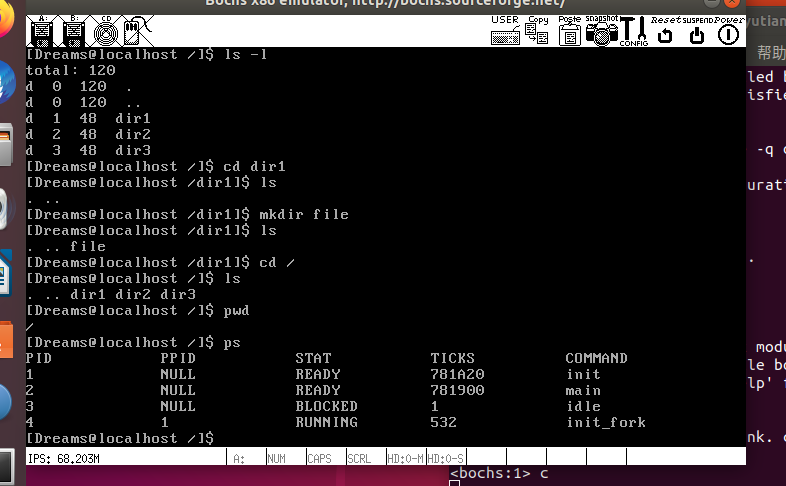
执行结果如下:
4.参考
郑钢著操作系统真象还原
田宇著一个64位操作系统的设计与实现
丁渊著ORANGE’S:一个操作系统的实现