代码、内容参考来自于包括《操作系统真象还原》、《一个64位操作系统的设计与实现》以及《ORANGE’S:一个操作系统的实现》。
我们已经实现了进程,但是还不能先相互通信。
进程间通信方式有很多种,有消息队列、共享内存、socket网络通信等,还有就是管道。
这里借助管道来实现进程间通信
1.管道
管道本质上是位于内核空间的环形缓冲区。
我们将管道也视为一个文件。
我们通过文件描述符进行对管道的读写操作。在进行父子进程之间的通信时,父进程首先创建一个管道,从而得到两个文件描述符,一个用于读,另一个用于写。随后,父进程使用fork创建子进程。子进程继承了父进程打开的文件,因此也可以通过这些文件描述符与管道进行通信,从而实现与父进程的交互。
管道有两端,一端用于从管道中读入数据,另一端用于往管道中写入数据。
这两端使用文件描述符的方式来读取,故进程创建管道实际上是内核为其返回了用于读取管道缓冲区的文件描述符,一个描述符用于读,另一个描述符用于写。通常情况下是用户进程为内核提供一个长度为2的文件描述符数组,内核会在该数组中写入管道操作的两个描述符,假设数组名为fd,那么fa[0]用于读取管道,fa[1]用于写入管道。
进程在创建管道之后,马上调用fork,克隆出一个子进程,子进程继承了管道的描述符,由此可以实现父子进程通信。
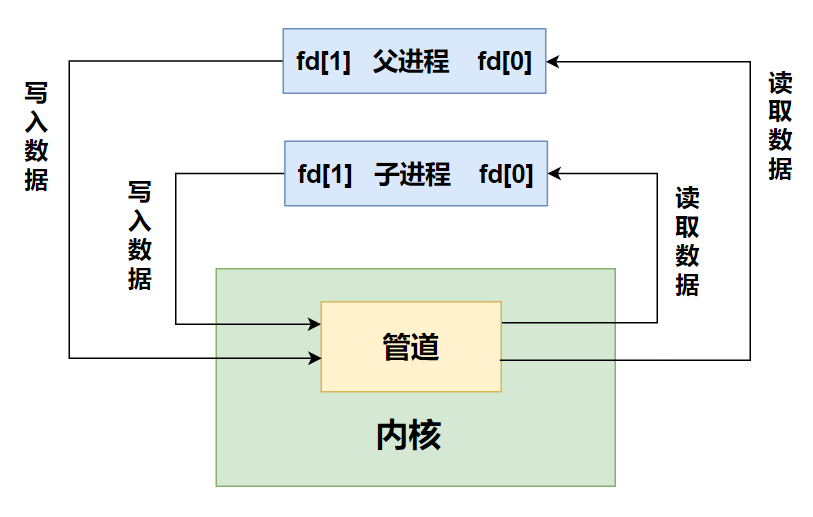
匿名管道:仅对创建它的进程及其子进程可见,其他进程无法访问。
有名管道:可以被系统中的所有进程访问。
Linux为了向上提供统一的接口, Linux加了一层中间层VFS,即 Virtual File System,虚拟文件 系统,向用户屏蔽了各种实现的细节,用户只和VFS打交道。
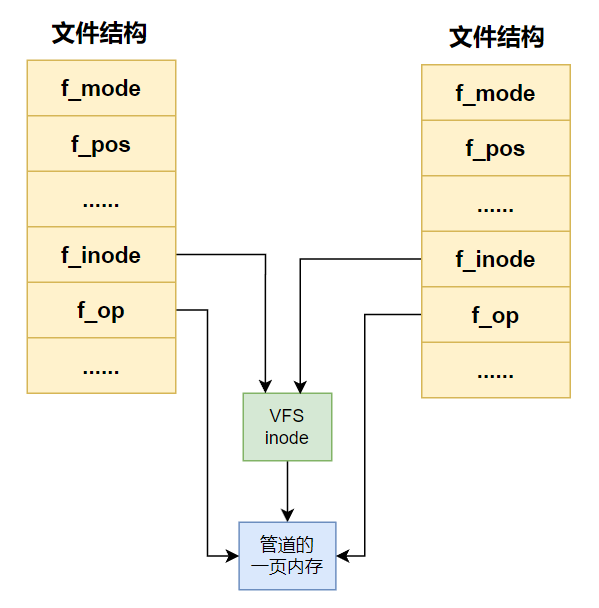
文件结构中的 f_inode 指向 VFS 的 inode,该 inode 指向 1 个页框大小的内存区域,该区域便是管道用于存储数据的内存空间。 也就是说,Linux的管道大小是 4096 字节。f_op用于指向操作(OPeration)方法,也就是说,不同的操作对象有不 同的操作方法,针对不同的操作对象,Linux会把f_op指向不同的操作例程。 对于管道来说,f_op会指向pipe_read和pipe_write,pipe_read会从管道的1页 内存中读取数据,pipe_write会往管道的1页内存中写入数据。
我们这里效仿Linux的思路来实现一个简单的管道
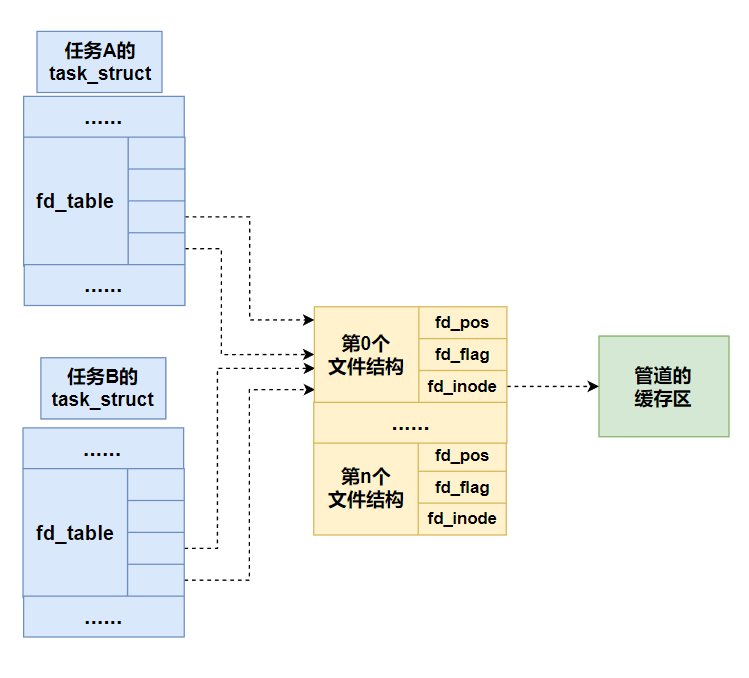
管道也是文件,但是需要与普通文件和目录文件有区分,可以复用原来的文件结构:
- fd_pos:记录管道的打开数
- fd_flags:0xFFFF,标识为管道
- fs_inode:指向内存缓冲区
我们的系统管道结构如下:
2.管道的实现
在Linux中创建管道的方法是系统调用pipe,其原型是”int pipe(int pipefd[2])”,成功返回0,失败返回-1,其中pipefd[2]是长度为2的整型数组,用来存储系统返回的文件描述符,文件描述符fa[0]用于读取管道,fa[1]用于写入管道。
先修改/device/ioqueue.c
/* 返回环形缓冲区中的数据长度 */
uint32_t ioq_length(struct ioqueue* ioq) {
    uint32_t len = 0;
    if (ioq->head >= ioq->tail) {
        len = ioq->head - ioq->tail;
    } else {
        len = bufsize - (ioq->tail - ioq->head);
    }
    return len;
}
ioq_length函数接受1个参数,环形缓冲区ioq,功能是返回环形缓冲区中的数据长度。
接下来就是管道的真正逻辑了
新建/shell/pipe.c
#include "pipe.h"
#include "memory.h"
#include "fs.h"
#include "file.h"
#include "ioqueue.h"
#include "thread.h"

/* 判断文件描述符local_fd是否是管道 */
bool is_pipe(uint32_t local_fd) {
   uint32_t global_fd = fd_local2global(local_fd);
   return file_table[global_fd].fd_flag == PIPE_FLAG;
}

/* 创建管道,成功返回0,失败返回-1 */
int32_t sys_pipe(int32_t pipefd[2]) {
   int32_t global_fd = get_free_slot_in_global();

   /* 申请一页内核内存做环形缓冲区 */
   file_table[global_fd].fd_inode = get_kernel_pages(1);

   /* 初始化环形缓冲区 */
   ioqueue_init((struct ioqueue*)file_table[global_fd].fd_inode);
   if (file_table[global_fd].fd_inode == NULL) {
      return -1;
   }

   /* 将fd_flag复用为管道标志 */
   file_table[global_fd].fd_flag = PIPE_FLAG;

   /* 将fd_pos复用为管道打开数 */
   file_table[global_fd].fd_pos = 2;
   pipefd[0] = pcb_fd_install(global_fd);
   pipefd[1] = pcb_fd_install(global_fd);
   return 0;
}

/* 从管道中读数据 */
uint32_t pipe_read(int32_t fd, void* buf, uint32_t count) {
   char* buffer = buf;
   uint32_t bytes_read = 0;
   uint32_t global_fd = fd_local2global(fd);

   /* 获取管道的环形缓冲区 */
   struct ioqueue* ioq = (struct ioqueue*)file_table[global_fd].fd_inode;

   /* 选择较小的数据读取量,避免阻塞 */
   uint32_t ioq_len = ioq_length(ioq);
   uint32_t size = ioq_len > count ? count : ioq_len;
   while (bytes_read < size) {
      *buffer = ioq_getchar(ioq);
      bytes_read++;
      buffer++;
   }
   return bytes_read;
}

/* 往管道中写数据 */
uint32_t pipe_write(int32_t fd, const void* buf, uint32_t count) {
   uint32_t bytes_write = 0;
   uint32_t global_fd = fd_local2global(fd);
   struct ioqueue* ioq = (struct ioqueue*)file_table[global_fd].fd_inode;

   /* 选择较小的数据写入量,避免阻塞 */
   uint32_t ioq_left = bufsize - ioq_length(ioq);
   uint32_t size = ioq_left > count ? count : ioq_left;

   const char* buffer = buf;
   while (bytes_write < size) {
      ioq_putchar(ioq, *buffer);
      bytes_write++;
      buffer++;
   }
   return bytes_write;
}
sys_pipe函数用于创建管道,核心就是创建了个全局打开文件结构,然后申请一页内核页,并让之前的文件结构内的fd_inode成员指向这个内核页(之前的文件系统中,该成员指向一个struct inode),之后再将这个内核页起始位置创建struct ioqueue并初始化。然后在进程中安装两个文件描述符,指向这个文件结构。最后记录下这两个文件描述符。
pipe_read函数传入管道的文件描述符、一个缓冲地址、读取字节数。通过管道的文件描述符找到环形缓冲区struct ioqueue,然后调用ioq_getchar从中读取数据即可。
pipe_write函数传入管道的文件描述符、一个缓冲地址、写入字节数。通过管道的文件描述符找到环形缓冲区struct ioqueue,然后调用ioq_putchar向其写入数据即可。
sys_pipe函数接受1个参数,存储管道文件描述符的数组pipefd,功能是创建管道,成功后描述符pipefd[0]可用于读取管道,pipefd[1]可用于写入管道,然后返回值为0,,否则返回-1,函数先调用get_free_slot_in_global从file_table中获得可用的文件结构空位下标,记为global_fd,然后为该文件结构中的 fd_inode分配一页内核内存做管道的环形缓冲区。 接着调用ioqueue_init初始化环形缓冲区。 将该文件结构的 fd_flag置为宏 PIPE_FLAG,宏 PIPE_FLAG定义是”#definePIPE_FLAG OxFFFF”,表示此文件结构对应的是管道。 接着把fd_pos置为2,表示有两个文件描述符对应这个管道,这两个文件描述符是通过pcb_fd_install来安装的,返回的描述符分别存储到pipefd[0]和pipefd[1]中,我们分别用它们来读取和写入管道。 最后通过return返回0,管道创建成功。
is_pipe函数接受1个参数,文件描述符local_fd,也就是pcb中数组fd_table 的下标,功能是判断文件描述符local_fd是否是管道。 判断的原理是先找出local_fd对应的file_table中的 下标global_fd,然后判断文件表file_talbe[global_fd]的fd_flag的值是否为PIPE_FLAG。
pipe_read函数接受3个参数,文件描述符fa、存储数据的缓冲区buf、读取数据的数量count,功能是从文件描述符 fd 中读取 count 字节到 buf,根据缓冲区中数据量ioq_len和待读取的数据量count的大小,选择两者中较小的值作为 读取的实际数据量size,通过while循环调用ioq_getchar 逐字节完成读取。
pipe_write函数功能是把缓冲区buf中的count个字节写入管道对应的文件描述符fd。
上面代码用到fs.c的fd_local2global函数,记得在fs.h声明即可。
对应shell/pipe.h,加入声明
#ifndef __SHELL_PIPE_H
#define __SHELL_PIPE_H
#include "stdint.h"
#include "global.h"

#define PIPE_FLAG 0xFFFF
bool is_pipe(uint32_t local_fd);
int32_t sys_pipe(int32_t pipefd[2]);
uint32_t pipe_read(int32_t fd, void* buf, uint32_t count);
uint32_t pipe_write(int32_t fd, const void* buf, uint32_t count);
#endif
管道的操作也是通过文件系统,因此要修改文件系统的代码。
修改/fs/fs.c
/* 关闭文件描述符fd指向的文件,成功返回0,否则返回-1 */
int32_t sys_close(int32_t fd) {
    int32_t ret = -1;   // 返回值默认为-1,即失败
    if (fd > 2) {
        uint32_t global_fd = fd_local2global(fd);
        if (is_pipe(fd)) {
            /* 如果此管道上的描述符都被关闭,释放管道的环形缓冲区 */
            if (--file_table[global_fd].fd_pos == 0) {
                mfree_page(PF_KERNEL, file_table[global_fd].fd_inode, 1);
                file_table[global_fd].fd_inode = NULL;
            }
            ret = 0;
        } else {
            ret = file_close(&file_table[global_fd]);
        }
        running_thread()->fd_table[fd] = -1; // 使该文件描述符位可用
    }
    return ret;
}

/* 将buf中连续count个字节写入文件描述符fd,成功则返回写入的字节数,失败返回-1 */
int32_t sys_write(int32_t fd, const void* buf, uint32_t count) {
    if (fd < 0) {
        printk("sys_write: fd error\n");
        return -1;
    }
    if (fd == stdout_no) {
        /* 标准输出有可能被重定向为管道缓冲区, 因此要判断 */
        if (is_pipe(fd)) {
            return pipe_write(fd, buf, count);
        } else {
            char tmp_buf[1024] = {0};
            memcpy(tmp_buf, buf, count);
            console_put_str(tmp_buf);
            return count;
        }
    } else if (is_pipe(fd)){        /* 若是管道就调用管道的方法 */
        return pipe_write(fd, buf, count);
    } else {
        uint32_t _fd = fd_local2global(fd);
        struct file* wr_file = &file_table[_fd];
        if (wr_file->fd_flag & O_WRONLY || wr_file->fd_flag & O_RDWR) {
            uint32_t bytes_written  = file_write(wr_file, buf, count);
            return bytes_written;
        } else {
            console_put_str("sys_write: not allowed to write file without flag O_RDWR or O_WRONLY\n");
            return -1;
        }
    }
}

/* 从文件描述符fd指向的文件中读取count个字节到buf,若成功则返回读出的字节数,到文件尾则返回-1 */
int32_t sys_read(int32_t fd, void* buf, uint32_t count) {
    ASSERT(buf != NULL);
    int32_t ret = -1;
    uint32_t global_fd = 0;
    if (fd < 0 || fd == stdout_no || fd == stderr_no) {
        printk("sys_read: fd error\n");
    } else if (fd == stdin_no) {
        /* 标准输入有可能被重定向为管道缓冲区, 因此要判断 */
        if (is_pipe(fd)) {
            ret = pipe_read(fd, buf, count);
        } else {
            char* buffer = buf;
            uint32_t bytes_read = 0;
            while (bytes_read < count) {
                *buffer = ioq_getchar(&kbd_buf);
                bytes_read++;
                buffer++;
            }
            ret = (bytes_read == 0 ? -1 : (int32_t)bytes_read);
        }
    } else if (is_pipe(fd)) {    /* 若是管道就调用管道的方法 */
        ret = pipe_read(fd, buf, count);
    } else {
        global_fd = fd_local2global(fd);
        ret = file_read(&file_table[global_fd], buf, count);
    }
    return ret;
}

/* 向屏幕输出一个字符 */
void sys_putchar(char char_asci) {
    console_put_char(char_asci);
}
sys_close增加对管道文件的关闭代码,先调用is_pipe判断文件描述符对应的文件结构是管道文件,然后文件结构中的fd_pos -1(该成员记录管道文件的打开次数,在之前文件系统中,该成员记录文件当前操作的位置),如果此时fd_pos为0,那么直接释放环形缓冲区对应的那页内存即可。
sys_write增加对管道文件的写入代码,在fd == stdout_no增加调用is_pipe判断文件描述符对应的文件是不是管道文件(标准输出有可能会被重定向为管道文件),如果是,则调用pipe_write。然后增加fd即使不是标准输出判断是不是管道文件,如果是,调用pipe_write写入。
sys_read增加对管道文件的读入代码,在fd == stdoin_no增加调用is_pipe判断文件描述符对应的文件是不是管道文件(标准输入有可能会被重定向为管道文件),如果是,则调用pipe_read。然后增加fd即使不是标准输入判断是不是管道文件,如果是,调用pipe_read读出。
管道是由父子进程共享的,因此在fork时也要增加管道的打开数
修改/userprog/fork.c
调用is_pipe判断是否为管道,如果是,就在对应文件结构的fd_pos加1。
/* 更新inode打开数 */
static void update_inode_open_cnts(struct task_struct* thread) {
    int32_t local_fd = 3, global_fd = 0;
    while (local_fd < MAX_FILES_OPEN_PER_PROC) {
        global_fd = thread->fd_table[local_fd];
        ASSERT(global_fd < MAX_FILE_OPEN);
        if (global_fd != -1) {
            if (is_pipe(local_fd)) {
                file_table[global_fd].fd_pos++;
            } else {
                file_table[global_fd].fd_inode->i_open_cnts++;
            }
        }
        local_fd++;
    }
}
修改/userprog/wait_exit.c
/* 释放用户进程资源:
 * 1 页表中对应的物理页
 * 2 虚拟内存池占物理页框
 * 3 关闭打开的文件 */
static void release_prog_resource(struct task_struct* release_thread) {
    uint32_t* pgdir_vaddr = release_thread->pgdir;
    uint16_t user_pde_nr = 768, pde_idx = 0;
    uint32_t pde = 0;
    uint32_t* v_pde_ptr = NULL;     // v表示var,和函数pde_ptr区分

    uint16_t user_pte_nr = 1024, pte_idx = 0;
    uint32_t pte = 0;
    uint32_t* v_pte_ptr = NULL;     // 加个v表示var,和函数pte_ptr区分

    uint32_t* first_pte_vaddr_in_pde = NULL;    // 用来记录pde中第0个pte的地址
    uint32_t pg_phy_addr = 0;

    /* 回收页表中用户空间的页框 */
    while (pde_idx < user_pde_nr) {
        v_pde_ptr = pgdir_vaddr + pde_idx;
        pde = *v_pde_ptr;
        if (pde & 0x00000001) {   // 如果页目录项p位为1,表示该页目录项下可能有页表项
            first_pte_vaddr_in_pde = pte_ptr(pde_idx * 0x400000);     // 一个页表表示的内存容量是4M,即0x400000
            pte_idx = 0;
            while (pte_idx < user_pte_nr) {
                v_pte_ptr = first_pte_vaddr_in_pde + pte_idx;
                pte = *v_pte_ptr;
                if (pte & 0x00000001) {
                    /* 将pte中记录的物理页框直接在相应内存池的位图中清0 */
                    pg_phy_addr = pte & 0xfffff000;
                    free_a_phy_page(pg_phy_addr);
                }
                pte_idx++;
            }
            /* 将pde中记录的物理页框直接在相应内存池的位图中清0 */
            pg_phy_addr = pde & 0xfffff000;
            free_a_phy_page(pg_phy_addr);
        }
        pde_idx++;
    }

    /* 回收用户虚拟地址池所占的物理内存*/
    uint32_t bitmap_pg_cnt = (release_thread->userprog_vaddr.vaddr_bitmap.btmp_bytes_len) / PG_SIZE;
    uint8_t* user_vaddr_pool_bitmap = release_thread->userprog_vaddr.vaddr_bitmap.bits;
    mfree_page(PF_KERNEL, user_vaddr_pool_bitmap, bitmap_pg_cnt);

    /* 关闭进程打开的文件 */
    uint8_t local_fd = 3;
    while(local_fd < MAX_FILES_OPEN_PER_PROC) {
        if (release_thread->fd_table[local_fd] != -1) {
            if (is_pipe(local_fd)) {
                uint32_t global_fd = fd_local2global(local_fd);
                if (--file_table[global_fd].fd_pos == 0) {
                    mfree_page(PF_KERNEL, file_table[global_fd].fd_inode, 1);
                    file_table[global_fd].fd_inode = NULL;
                }
            } else {
                sys_close(local_fd);
            }
        }
        local_fd++;
    }
}
其实就是最后修改了几行代码
如果程序退出时忘记关闭打开的文件或管道,在函数release_prog_resource中要关闭它们。判断关闭的若是管道,就将对应文件结构的fd_pod减1,如果减1后的值为0,这说明没有进程再打开此管道了,此管道没用了,调用mfree_page回收管道环形缓冲区占用的一页内核页框。
接着把pipe改成系统调用
修改/userprog/syscall-init.c
/* 初始化系统调用 */
void syscall_init(void) {
    put_str("syscall_init start\n");
    syscall_table[SYS_GETPID]     = sys_getpid;
    syscall_table[SYS_WRITE]      = sys_write;
    syscall_table[SYS_MALLOC]     = sys_malloc;
    syscall_table[SYS_FREE]       = sys_free;
    syscall_table[SYS_FORK]       = sys_fork;
    syscall_table[SYS_READ]       = sys_read;
    syscall_table[SYS_PUTCHAR]    = sys_putchar;
    syscall_table[SYS_CLEAR]      = cls_screen;
    syscall_table[SYS_GETCWD]     = sys_getcwd;
    syscall_table[SYS_OPEN]       = sys_open;
    syscall_table[SYS_CLOSE]      = sys_close;
    syscall_table[SYS_LSEEK]     = sys_lseek;
    syscall_table[SYS_UNLINK]    = sys_unlink;
    syscall_table[SYS_MKDIR]     = sys_mkdir;
    syscall_table[SYS_OPENDIR]   = sys_opendir;
    syscall_table[SYS_CLOSEDIR]   = sys_closedir;
    syscall_table[SYS_CHDIR]     = sys_chdir;
    syscall_table[SYS_RMDIR]     = sys_rmdir;
    syscall_table[SYS_READDIR]   = sys_readdir;
    syscall_table[SYS_REWINDDIR]     = sys_rewinddir;
    syscall_table[SYS_STAT]  = sys_stat;
    syscall_table[SYS_PS]    = sys_ps;
    syscall_table[SYS_EXECV]     = sys_execv;
    syscall_table[SYS_EXIT]       = sys_exit;
    syscall_table[SYS_WAIT]       = sys_wait;
    syscall_table[SYS_PIPE]     = sys_pipe;
    put_str("syscall_init done\n");
}
/lib/user/syscall.c
/* 生成管道,pipefd[0]负责读入管道,pipefd[1]负责写入管道 */
int32_t pipe(int32_t pipefd[2]) {
    return _syscall1(SYS_PIPE, pipefd);
}
/lib/user/syscall.h修改
enum SYSCALL_NR {
    SYS_GETPID,
    SYS_WRITE,
    SYS_MALLOC,
    SYS_FREE,
    SYS_FORK,
    SYS_READ,
    SYS_PUTCHAR,
    SYS_CLEAR,
    SYS_GETCWD,
    SYS_OPEN,
    SYS_CLOSE,
    SYS_LSEEK,
    SYS_UNLINK,
    SYS_MKDIR,
    SYS_OPENDIR,
    SYS_CLOSEDIR,
    SYS_CHDIR,
    SYS_RMDIR,
    SYS_READDIR,
    SYS_REWINDDIR,
    SYS_STAT,
    SYS_PS,
    SYS_EXECV,
    SYS_EXIT,
    SYS_WAIT,
    SYS_PIPE
};
int32_t pipe(int32_t pipefd[2]);
3.实现进程间通信
现在我们可以在用户程序中创建管道来验证父子进程间的通信功能
/command/prog_pipe.c
#include "stdio.h"
#include "syscall.h"
#include "string.h"
int main(int argc, char** argv) {
   int32_t fd[2] = {-1};
   pipe(fd);
   int32_t pid = fork();
   if(pid) {      // 父进程
      close(fd[0]);  // 关闭输入
      write(fd[1], "Hi, my son, I love you!", 24);
      printf("\nI`m father, my pid is %d\n", getpid());
      return 8;
   } else {
      close(fd[1]);  // 关闭输出
      char buf[32] = {0};
      read(fd[0], buf, 24);
      printf("\nI`m child, my pid is %d\n", getpid());
      printf("I`m child, my father said to me: \"%s\"\n", buf);
      return 9;
   }
}
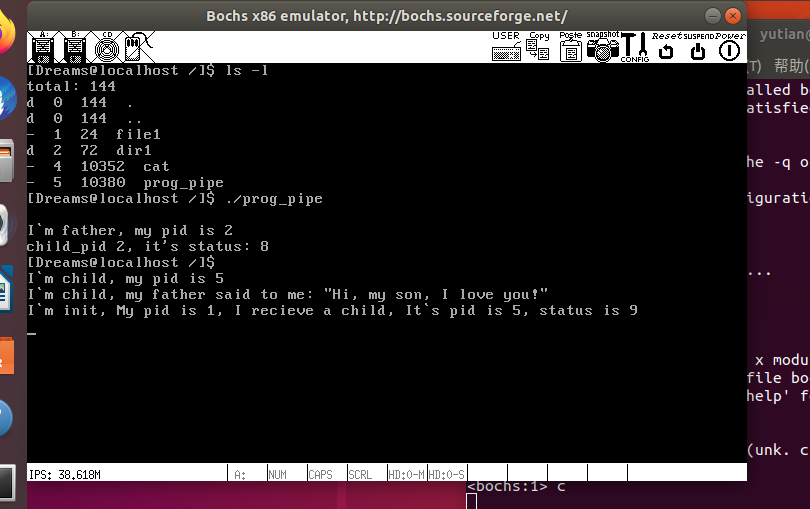
函数开头先定义了数组fa[2],它用来存储管道返回的两个文件描述符。接着调用”pipe(fd)”创建管道,此时数组fd中已经是管道的两个描述符,我们用fa[0]读管道,fd[1]写管道。接着调用fork派生子进程。父进程负责写管道,子进程读管道。
对应脚本
#!/bin/bash

if [[ ! -d "../lib" || ! -d "../build" ]];then
   echo "dependent dir don\`t exist!"
   cwd=$(pwd)
   cwd=${cwd##*/}
   cwd=${cwd%/}
   if [[ $cwd != "command" ]];then
      echo -e "you\`d better in command dir\n"
   fi
   exit
fi
CC="gcc"
BIN="prog_pipe"
CFLAGS="-Wall -c -fno-builtin -W -Wstrict-prototypes \
    -Wmissing-prototypes -Wsystem-headers -m32 -fno-stack-protector"
LIBS="-I ../lib/ -I ../lib/kernel/ -I ../lib/user/ -I \
      ../kernel/ -I ../device/ -I ../thread/ -I \
      ../userprog/ -I ../fs/ -I ../shell/"
OBJS="../build/string.o ../build/syscall.o \
      ../build/stdio.o ../build/assert.o start.o"
DD_IN=$BIN
DD_OUT="/bochs/bin/dreams.img"

nasm -f elf ./start.S -o ./start.o
ar rcs simple_crt.a $OBJS start.o
$CC $CFLAGS $LIBS -o $BIN".o" $BIN".c"
ld $BIN".o" simple_crt.a -o $BIN -m elf_i386
SEC_CNT=$(ls -l $BIN|awk '{printf("%d", ($5+511)/512)}')

if [[ -f $BIN ]];then
   dd if=./$DD_IN of=$DD_OUT bs=512 \
   count=$SEC_CNT seek=300 conv=notrunc
fi
main文件如下:
#include "print.h"
#include "init.h"
#include "thread.h"
#include "interrupt.h"
#include "console.h"
#include "process.h"
#include "syscall-init.h"
#include "syscall.h"
#include "stdio.h"
#include "memory.h"
#include "dir.h"
#include "fs.h"
#include "assert.h"
#include "shell.h"

#include "ide.h"
#include "stdio-kernel.h"

void init(void);

int main(void) {
    put_str("I am kernel\n");
    init_all();

/*************    写入应用程序    *************/
   uint32_t file_size = 10380;
   uint32_t sec_cnt = DIV_ROUND_UP(file_size, 512);
   struct disk* sda = &channels[0].devices[0];
   void* prog_buf = sys_malloc(file_size);
   ide_read(sda, 300, prog_buf, sec_cnt);
   int32_t fd = sys_open("/prog_pipe", O_CREAT|O_RDWR);
   if (fd != -1) {
      if(sys_write(fd, prog_buf, file_size) == -1) {
         printk("file write error!\n");
         while(1);
      }
   }
/*************    写入应用程序结束   *************/
    cls_screen();
    console_put_str("[Dreams@localhost /]$ ");
    thread_exit(running_thread(), true);
    return 0;
}

/* init进程 */
void init(void) {
    uint32_t ret_pid = fork();
    if(ret_pid) {  // 父进程
        int status;
        int child_pid;
        /* init在此处不停的回收僵尸进程 */
        while(1) {
            child_pid = wait(&status);
            printf("I`m init, My pid is 1, I recieve a child, It`s pid is %d, status is %d\n", child_pid, status);
        }
    } else {      // 子进程
        my_shell();
    }
    panic("init: should not be here");
}
执行结果
4.shell中支持管道
既然都实现管道了,就顺便实现在shell中支持管道
shell/pipe.c
/* 将文件描述符old_local_fd重定向为new_local_fd */
void sys_fd_redirect(uint32_t old_local_fd, uint32_t new_local_fd) {
    struct task_struct* cur = running_thread();
    /* 针对恢复标准描述符 */
    if (new_local_fd < 3) {
        cur->fd_table[old_local_fd] = new_local_fd;
    } else {
        uint32_t new_global_fd = cur->fd_table[new_local_fd];
        cur->fd_table[old_local_fd] = new_global_fd;
    }
}
sys_fd_redirect函数接受2个参数,旧文件描述符old_local_fd、新文件描述符new_local_fd,功能是将文件描述符old_local_fd重定向为new_local_fd。
我们知道文件描述符是pcb中数组fd_table的下标,数组元素的值是全局文件表 file_table的下标,文件描述符重定向的原理就是,将数组fd_table中下标为old_local_fd 的元素的值用下标为new_local_fd的元素的值替换。
另外, pcb 中文件描述符表 fd_table和全局文件表 file_table 中的前 3个元素都是预留的,它们分别作为标准输入、标准输出和标准错误,因此,如果new_local_fd小于3的话,不需要从fd_table 中获取元素值,可以直接把new_local_fd赋值给fd_table[old_local_fd],而这通常用于将输入输出恢复为标准的输入输出。
对应pipe.h加入声明
void sys_fd_redirect(uint32_t old_local_fd, uint32_t new_local_fd);
修改/device/ioqueue.h缓冲区大小
#define bufsize 2048
sys_fd_redirect做成系统调用
修改/lib/user/syscall.c
/* 将文件描述符old_local_fd重定向到new_local_fd */
void fd_redirect(uint32_t old_local_fd, uint32_t new_local_fd) {
    _syscall2(SYS_FD_REDIRECT, old_local_fd, new_local_fd);
}
lib/user/syscall.h, SYS_FD_REDIRECT加上功能,以及加上函数声明
......
SYS_FD_REDIRECT,
......
void fd_redirect(uint32_t old_local_fd, uint32_t new_local_fd);
修改/userprog/syscall-init.c在syscall_init函数初始化系统调用
syscall_table[SYS_FD_REDIRECT] = sys_fd_redirect;
接着修改shell/shell.c
/* 执行命令 */
static void cmd_execute(uint32_t argc, char** argv) {
    if (!strcmp("ls", argv[0])) {
        buildin_ls(argc, argv);
    } else if (!strcmp("cd", argv[0])) {
        if (buildin_cd(argc, argv) != NULL) {
            memset(cwd_cache, 0, MAX_PATH_LEN);
            strcpy(cwd_cache, final_path);
        }
    } else if (!strcmp("pwd", argv[0])) {
        buildin_pwd(argc, argv);
    } else if (!strcmp("ps", argv[0])) {
        buildin_ps(argc, argv);
    } else if (!strcmp("clear", argv[0])) {
        buildin_clear(argc, argv);
    } else if (!strcmp("mkdir", argv[0])){
        buildin_mkdir(argc, argv);
    } else if (!strcmp("rmdir", argv[0])){
        buildin_rmdir(argc, argv);
    } else if (!strcmp("rm", argv[0])) {
        buildin_rm(argc, argv);
    } else if (!strcmp("help", argv[0])) {
        buildin_help(argc, argv);
    } else {      // 如果是外部命令,需要从磁盘上加载
        int32_t pid = fork();
        if (pid) {     // 父进程
            int32_t status;
            int32_t child_pid = wait(&status);          // 此时子进程若没有执行exit,my_shell会被阻塞,不再响应键入的命令
            if (child_pid == -1) {     // 按理说程序正确的话不会执行到这句,fork出的进程便是shell子进程
                panic("my_shell: no child\n");
            }
            printf("child_pid %d, it's status: %d\n", child_pid, status);
        } else {       // 子进程
            make_clear_abs_path(argv[0], final_path);
            argv[0] = final_path;

            /* 先判断下文件是否存在 */
            struct stat file_stat;
            memset(&file_stat, 0, sizeof(struct stat));
            if (stat(argv[0], &file_stat) == -1) {
                printf("my_shell: cannot access %s: No such file or directory\n", argv[0]);
                exit(-1);
            } else {
                execv(argv[0], argv);
            }
        }
    }
}

char* argv[MAX_ARG_NR] = {NULL};
int32_t argc = -1;
/* 简单的shell */
void my_shell(void) {
    cwd_cache[0] = '/';
    while (1) {
        print_prompt();
        memset(final_path, 0, MAX_PATH_LEN);
        memset(cmd_line, 0, MAX_PATH_LEN);
        readline(cmd_line, MAX_PATH_LEN);
        if (cmd_line[0] == 0) {  // 若只键入了一个回车
            continue;
        }

        /* 针对管道的处理 */
        char* pipe_symbol = strchr(cmd_line, '|');
        if (pipe_symbol) {
            /* 支持多重管道操作,如cmd1|cmd2|..|cmdn,
             * cmd1的标准输出和cmdn的标准输入需要单独处理 */

            /*1 生成管道*/
            int32_t fd[2] = {-1};       // fd[0]用于输入,fd[1]用于输出
            pipe(fd);
            /* 将标准输出重定向到fd[1],使后面的输出信息重定向到内核环形缓冲区 */
            fd_redirect(1,fd[1]);

            /*2 第一个命令 */
            char* each_cmd = cmd_line;
            pipe_symbol = strchr(each_cmd, '|');
            *pipe_symbol = 0;

            /* 执行第一个命令,命令的输出会写入环形缓冲区 */
            argc = -1;
            argc = cmd_parse(each_cmd, argv, ' ');
            cmd_execute(argc, argv);

            /* 跨过'|',处理下一个命令 */
            each_cmd = pipe_symbol + 1;

            /* 将标准输入重定向到fd[0],使之指向内核环形缓冲区*/
            fd_redirect(0,fd[0]);
            /*3 中间的命令,命令的输入和输出都是指向环形缓冲区 */
            while ((pipe_symbol = strchr(each_cmd, '|'))) {
                *pipe_symbol = 0;
                argc = -1;
                argc = cmd_parse(each_cmd, argv, ' ');
                cmd_execute(argc, argv);
                each_cmd = pipe_symbol + 1;
            }

            /*4 处理管道中最后一个命令 */
            /* 将标准输出恢复屏幕 */
            fd_redirect(1,1);

            /* 执行最后一个命令 */
            argc = -1;
            argc = cmd_parse(each_cmd, argv, ' ');
            cmd_execute(argc, argv);

            /*5  将标准输入恢复为键盘 */
            fd_redirect(0,0);

            /*6 关闭管道 */
            close(fd[0]);
            close(fd[1]);
        } else {       // 一般无管道操作的命令
            argc = -1;
            argc = cmd_parse(cmd_line, argv, ' ');
            if (argc == -1) {
                printf("num of arguments exceed %d\n", MAX_ARG_NR);
                continue;
            }
            cmd_execute(argc, argv);
        }
    }
    panic("my_shell: should not be here");
}
修改之前的shell.c,新增的cmd_execute函数,这个函数实际上是把原来my_shell函数里的命令执行给单独封装出来了
然后修改了my_shell函数新增了对管道的处理:
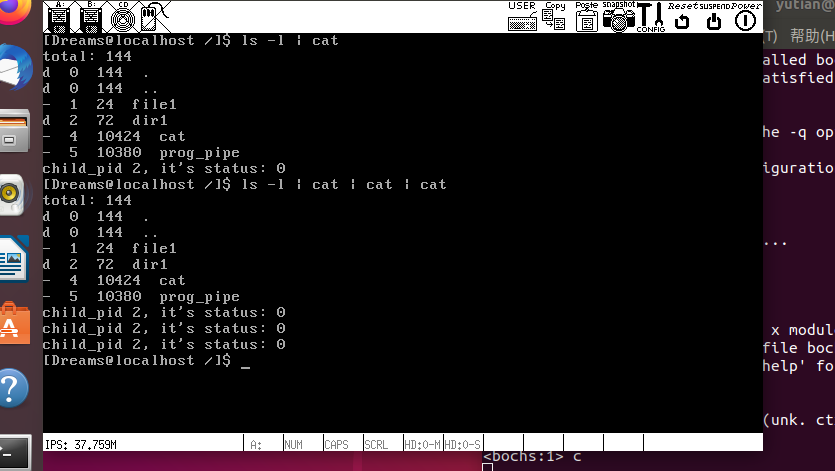
从左向右先找管道符|,找到了就生成管道,将当前进程的标准输出重定向到管道fd[1],执行第一个命令将输出写入环形缓冲区,跨过|,处理下一个命令,将标准输入重定向到fd[0],循环执行中间的命令,中间的命令输入输出都是环形缓冲区(标准输入输出的改变体现在命令的读写函数会使用不同的函数,而对于此处是透明的),最后一个命令将标准输出恢复到屏幕,执行最后一条命令,执行完毕之后,将标准输入恢复成键盘,关闭管道,如果无管道就直接解析命令执行,
修改cat.c
#include "syscall.h"
#include "stdio.h"
#include "string.h"
int main(int argc, char** argv) {
   if (argc > 2) {
      printf("cat: argument error\n");
      exit(-2);
   }

   if (argc == 1) {
      char buf[512] = {0};
      read(0, buf, 512);
      printf("%s",buf);
      exit(0);
   }

   int buf_size = 1024;
   char abs_path[512] = {0};
   void* buf = malloc(buf_size);
   if (buf == NULL) {
      printf("cat: malloc memory failed\n");
      return -1;
   }
   if (argv[1][0] != '/') {
      getcwd(abs_path, 512);
      strcat(abs_path, "/");
      strcat(abs_path, argv[1]);
   } else {
      strcpy(abs_path, argv[1]);
   }
   int fd = open(abs_path, O_RDONLY);
   if (fd == -1) {
      printf("cat: open: open %s failed\n", argv[1]);
      return -1;
   }
   int read_bytes= 0;
   while (1) {
      read_bytes = read(fd, buf, buf_size);
      if (read_bytes == -1) {
         break;
      }
      write(1, buf, read_bytes);
   }
   free(buf);
   close(fd);
   return 66;
}
对应脚本
#!/bin/bash

if [[ ! -d "../lib" || ! -d "../build" ]];then
   echo "dependent dir don\`t exist!"
   cwd=$(pwd)
   cwd=${cwd##*/}
   cwd=${cwd%/}
   if [[ $cwd != "command" ]];then
      echo -e "you\`d better in command dir\n"
   fi
   exit
fi
CC="gcc"
BIN="cat"
CFLAGS="-Wall -c -fno-builtin -W -Wstrict-prototypes \
    -Wmissing-prototypes -Wsystem-headers -m32 -fno-stack-protector"
LIBS="-I ../lib/ -I ../lib/kernel/ -I ../lib/user/ -I \
      ../kernel/ -I ../device/ -I ../thread/ -I \
      ../userprog/ -I ../fs/ -I ../shell/"
OBJS="../build/string.o ../build/syscall.o \
      ../build/stdio.o ../build/assert.o start.o"
DD_IN=$BIN
DD_OUT="/bochs/bin/dreams.img"

nasm -f elf ./start.S -o ./start.o
ar rcs simple_crt.a $OBJS start.o
$CC $CFLAGS $LIBS -o $BIN".o" $BIN".c"
ld $BIN".o" simple_crt.a -o $BIN -m elf_i386
SEC_CNT=$(ls -l $BIN|awk '{printf("%d", ($5+511)/512)}')

if [[ -f $BIN ]];then
   dd if=./$DD_IN of=$DD_OUT bs=512 \
   count=$SEC_CNT seek=300 conv=notrunc
fi
main文件如下:
#include "print.h"
#include "init.h"
#include "thread.h"
#include "interrupt.h"
#include "console.h"
#include "process.h"
#include "syscall-init.h"
#include "syscall.h"
#include "stdio.h"
#include "memory.h"
#include "dir.h"
#include "fs.h"
#include "assert.h"
#include "shell.h"

#include "ide.h"
#include "stdio-kernel.h"

void init(void);

int main(void) {
    put_str("I am kernel\n");
    init_all();

/*************    写入应用程序    *************/
   uint32_t file_size = 10424;
   uint32_t sec_cnt = DIV_ROUND_UP(file_size, 512);
   struct disk* sda = &channels[0].devices[0];
   void* prog_buf = sys_malloc(file_size);
   ide_read(sda, 300, prog_buf, sec_cnt);
   int32_t fd = sys_open("/cat", O_CREAT|O_RDWR);
   if (fd != -1) {
      if(sys_write(fd, prog_buf, file_size) == -1) {
         printk("file write error!\n");
         while(1);
      }
   }
/*************    写入应用程序结束   *************/
    cls_screen();
    console_put_str("[Dreams@localhost /]$ ");
    thread_exit(running_thread(), true);
    return 0;
}

/* init进程 */
void init(void) {
    uint32_t ret_pid = fork();
    if(ret_pid) {  // 父进程
        int status;
        int child_pid;
        /* init在此处不停的回收僵尸进程 */
        while(1) {
            child_pid = wait(&status);
            printf("I`m init, My pid is 1, I recieve a child, It`s pid is %d, status is %d\n", child_pid, status);
        }
    } else {      // 子进程
        my_shell();
    }
    panic("init: should not be here");
}
执行结果如下:
5.参考
郑钢著操作系统真象还原
田宇著一个64位操作系统的设计与实现
丁渊著ORANGE’S:一个操作系统的实现