1.基本使用
Netty是一个开源的、高性能的异步事件驱动的网络应用框架,用于快速开发可维护的高性能服务器和客户端。
加入依赖
<!--netty依赖-->
<dependency>
    <groupId>io.netty</groupId>
    <artifactId>netty-all</artifactId>
    <version>4.1.39.Final</version>
</dependency>


<!--辅助工具依赖-->
<!--lombok-->
<dependency>
    <groupId>org.projectlombok</groupId>
    <artifactId>lombok</artifactId>
    <version>1.16.18</version>
</dependency>
<!--做json转换的-->
<dependency>
    <groupId>com.google.code.gson</groupId>
    <artifactId>gson</artifactId>
    <version>2.8.5</version>
</dependency>
<!--谷歌工具类合集-->
<dependency>
    <groupId>com.google.guava</groupId>
    <artifactId>guava</artifactId>
    <version>19.0</version>
</dependency>
基本使用代码
服务端代码:
package com.dreams;

import io.netty.bootstrap.ServerBootstrap;
import io.netty.channel.ChannelHandlerContext;
import io.netty.channel.ChannelInboundHandlerAdapter;
import io.netty.channel.ChannelInitializer;
import io.netty.channel.nio.NioEventLoopGroup;
import io.netty.channel.socket.nio.NioServerSocketChannel;
import io.netty.channel.socket.nio.NioSocketChannel;
import io.netty.handler.codec.string.StringDecoder;
import io.netty.handler.logging.LoggingHandler;

public class HelloServer {
    public static void main(String[] args) {
        // 1. 启动器,负责组装 netty 组件,启动服务器
        new ServerBootstrap()
                // 2. BossEventLoop, WorkerEventLoop(selector,thread), group 组
                .group(new NioEventLoopGroup())
                // 3. 选择 服务器的 ServerSocketChannel 实现
                .channel(NioServerSocketChannel.class) // 还有OIO BIO
                // 4. boss 负责处理连接 worker(child) 负责处理读写,决定了 worker(child) 能执行哪些操作(handler)
                .childHandler(
                        // 5. channel 代表和客户端进行数据读写的通道 Initializer 初始化,负责添加别的 handler
                        new ChannelInitializer<NioSocketChannel>() {
                            @Override
                            protected void initChannel(NioSocketChannel ch) throws Exception {
                                // 6. 添加具体 handler
                                ch.pipeline().addLast(new LoggingHandler());
                                ch.pipeline().addLast(new StringDecoder()); // 将 ByteBuf 转换为字符串
                                ch.pipeline().addLast(new ChannelInboundHandlerAdapter() { // 自定义 handler
                                    @Override // 读事件
                                    public void channelRead(ChannelHandlerContext ctx, Object msg) throws Exception {
                                        System.out.println(msg); // 打印上一步转换好的字符串
                                    }
                                });
                            }
                        })
                // 7. 绑定监听端口
                .bind(8080);
    }
}
代码解释
- ServerBootstrap:是 Netty 的启动器,负责组装 Netty 组件并启动服务器。
- .group(new NioEventLoopGroup()):创建了两个事件循环组,一个用于处理连接的 boss 线程组,另一个用于处理读写的 worker 线程组。
- .channel(NioServerSocketChannel.class):选择了 NIO 实现的服务器端 Socket 通道类型为 NioServerSocketChannel。
- .childHandler():配置了当一个新的连接被接受时,怎样去初始化这个连接的 Channel。在这里,添加了一个 ChannelInitializer,用于初始化 NioSocketChannel。注意连接建立后才执行该代码。
- initChannel() 方法:在这个方法中,添加了三个 Handler:LoggingHandler、StringDecoder 和一个自定义的 ChannelInboundHandlerAdapter。
- LoggingHandler:用于在日志中打印所有收到的数据。
- StringDecoder:用于将bytebuf数据解码成字符串。
- 自定义的 ChannelInboundHandlerAdapter:重写了 channelRead() 方法,当接收到数据时会打印出来。
- .bind(8080):绑定监听端口为 8080。
这样,当有客户端连接到服务器时,服务器会打印出客户端发送的消息。
客户端代码:
package com.dreams;

import io.netty.bootstrap.Bootstrap;
import io.netty.channel.ChannelInitializer;
import io.netty.channel.nio.NioEventLoopGroup;
import io.netty.channel.socket.nio.NioSocketChannel;
import io.netty.handler.codec.string.StringEncoder;

import java.net.InetSocketAddress;

public class HelloClient {
    public static void main(String[] args) throws InterruptedException {
        // 1. 启动类
        new Bootstrap()
                // 2. 添加 EventLoop
                .group(new NioEventLoopGroup())
                // 3. 选择客户端 channel 实现
                .channel(NioSocketChannel.class)
                // 4. 添加处理器
                .handler(new ChannelInitializer<NioSocketChannel>() {
                    @Override // 在连接建立后被调用
                    protected void initChannel(NioSocketChannel ch) throws Exception {
                        ch.pipeline().addLast(new StringEncoder());
                    }
                })
                // 5. 连接到服务器
                .connect(new InetSocketAddress("localhost", 8080))
                .sync()
                .channel()
                // 6. 向服务器发送数据
                .writeAndFlush("hello, world");
    }
}
代码解释:
- Bootstrap:是 Netty 的客户端启动类,负责组装 Netty 组件并启动客户端。
- .group(new NioEventLoopGroup()):创建了一个事件循环组,用于处理客户端的 I/O 操作。
- .channel(NioSocketChannel.class):选择了 NIO 实现的客户端 Socket 通道类型为 NioSocketChannel。
- .handler():添加了一个 ChannelInitializer,用于初始化 NioSocketChannel。
- initChannel() 方法:在这个方法中,添加了一个 StringEncoder,用于将字符串编码为bytebuf数据。注意连接建立后才执行该代码。
- .connect(new InetSocketAddress(“localhost”, 8080)):连接到指定的服务器地址和端口。
- .sync():等待连接完成。
- .channel():获取连接的通道。
- .writeAndFlush(“hello, world”):向服务器发送消息。
这样,客户端会连接到指定的服务器并发送消息 “hello, world”。
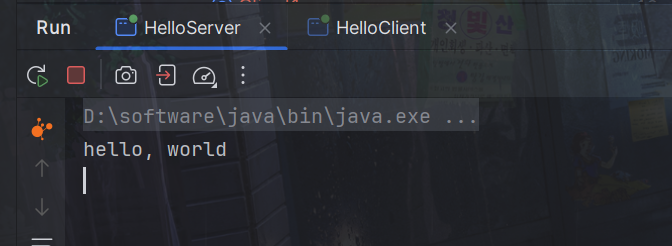
服务端就可以接收到
基本概念
Netty对原生的ServerSocketChannel做了封装,一般常用NioServerSocketChannel

ServerSocketChannel
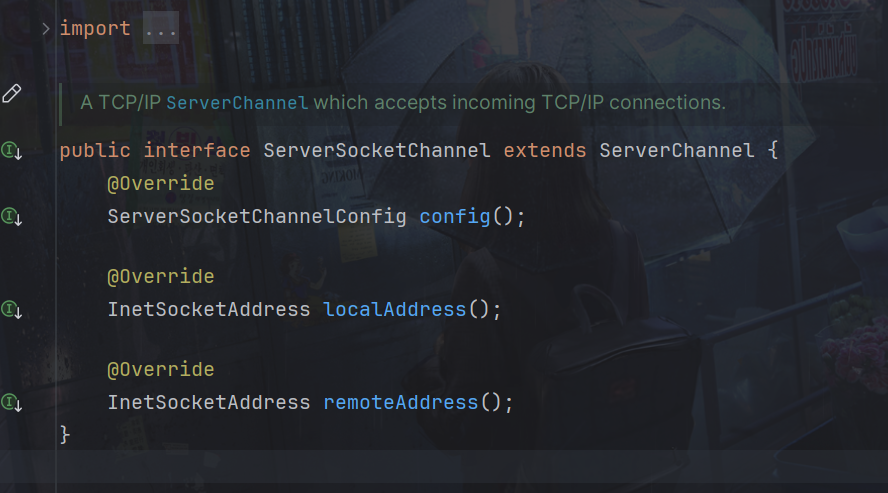
ServerSocketChannel有4种实现方式

解释:
- NioServerSocketChannel: 这是最常见的基于 NIO 的服务器端 Socket 通道实现方式。它使用 Java NIO 技术,具有非阻塞的特性,适用于构建高性能、异步的服务器端应用。
- EpollServerSocketChannel: 这是基于 Linux epoll() 机制的服务器端 Socket 通道实现方式。它在 Linux 系统上通常具有更好的性能表现,适用于构建高并发、高吞吐量的服务器端应用。
- KQueueServerSocketChannel: 这是基于 BSD kqueue 机制的服务器端 Socket 通道实现方式。它在 BSD 系统上使用,通常具有很好的性能和扩展性,适用于构建在 BSD 系统上运行的高性能服务器端应用。
- OioServerSocketChannel: 这是基于传统的阻塞式 I/O 的服务器端 Socket 通道实现方式。虽然它不具备 NIO 的非阻塞特性,但仍然可以用于构建简单的服务器端应用,适用于一些特定的场景。
处理链:
ch.pipeline().addLast(new StringDecoder());
ch.pipeline().addLast(…) 这行代码是在客户端的初始化阶段向 ChannelPipeline 中添加一个新的 ChannelHandler。
在 Netty 中,ChannelPipeline 是一个由 ChannelHandler 组成的处理链。数据在进入和离开通道时,会经过 Pipeline 中的每个 ChannelHandler,每个 Handler 可以对数据进行处理、转换或者触发特定的事件。
2.EventLoop
EventLoop(事件循环):
- EventLoop 是一个处理事件的循环,它负责处理通道的所有 I/O 操作、定时任务和用户自定义的事件。
- 每个 EventLoop 都运行在一个单独的线程中,并负责处理一个或多个通道的事件。
- EventLoop 会不断地从注册在它上面的 Channel 的事件队列中取出事件,并将这些事件分发给适当的处理器进行处理。
- 在 Netty 中,通常会使用 NioEventLoopGroup 来管理 EventLoop 实例。
Channel(通道):
- Channel 代表了一个可以进行 I/O 操作的连接,例如一个 TCP 连接或者一个 UDP 通道。
- 每个 Channel 都会被注册到一个 EventLoop 上,由该 EventLoop 负责处理这个 Channel 的所有事件。
- Channel 上的事件包括读取数据、写入数据、连接建立、连接关闭等。
- 一个 EventLoop 可以管理多个 Channel,并且一个 Channel 只能被一个 EventLoop 管理。
EventLoop继承关系
EventLoop继承与OrderedEventExecutor和ScheduledExecutorService
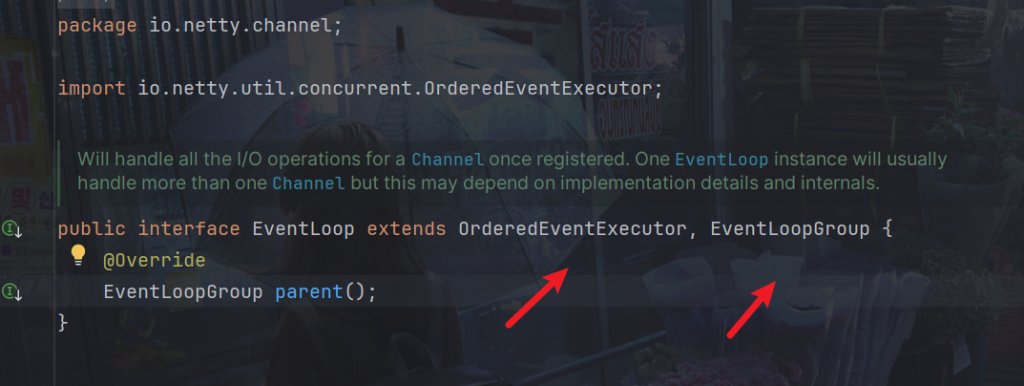
继承自 netty 自己的 OrderedEventExecutor,
还继承自 j.u.c.ScheduledExecutorService 因此包含了线程池中所有的方法
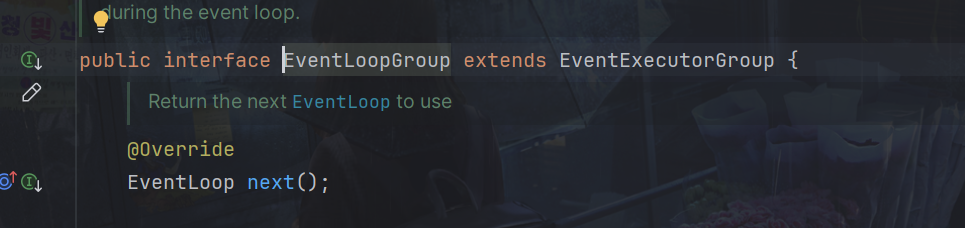

EventLoopGroup
EventLoopGroup 是用于管理 EventLoop 的接口。它负责管理一组 EventLoop 实例,并为每个 EventLoop 提供线程。通常情况下,一个 EventLoopGroup 实例会管理多个 EventLoop 实例,每个 EventLoop 都负责处理一组 Channel 的事件。Channel 一般会调用 EventLoopGroup 的 register 方法来绑定其中一个 EventLoop,后续这个 Channel 上的 io 事件都由此 EventLoop 来处理(保证了 io 事件处理时的线程安全)
创建
EventLoopGroup group = new NioEventLoopGroup(2);
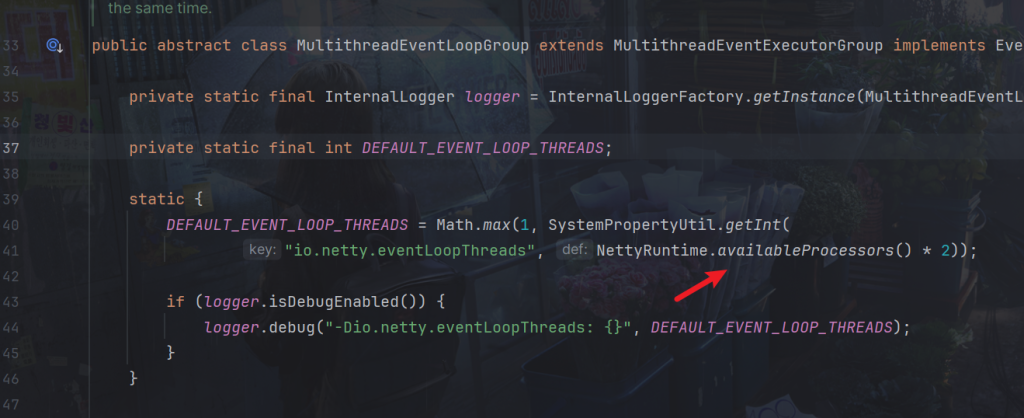
如果不指定默认,默认传入为0,但并不是创建0个线程

ctrl+B一直追入源码,可以看到当线程为零,使用DEFAULT_EVENT_LOOP_THREADS

ctrl+B进入DEFAULT_EVENT_LOOP_THREADS,可以看到默认为当前核数乘2
因为存在多个线程,所以我们可以使用日志功能
加入依赖
<dependency>
    <groupId>ch.qos.logback</groupId>
    <artifactId>logback-classic</artifactId>
    <version>1.2.3</version>
</dependency>
在resources目录下加入文件logback.xml
<?xml version="1.0" encoding="UTF-8"?>
<configuration
xmlns="http://ch.qos.logback/xml/ns/logback"
xmlns:xsi="http://www.w3.org/2001/XMLSchema-instance"
xsi:schemaLocation="http://ch.qos.logback/xml/ns/logback logback.xsd">
<!-- 输出控制,格式控制-->
<appender name="STDOUT" class="ch.qos.logback.core.ConsoleAppender">
<encoder>
<pattern>%date{HH:mm:ss} [%-5level] [%thread] %logger{17} - %m%n </pattern>
</encoder>
</appender>
<!--<appender name="FILE" class="ch.qos.logback.core.rolling.RollingFileAppender">
<!– 日志文件名称 –>
<file>logFile.log</file>
<rollingPolicy class="ch.qos.logback.core.rolling.TimeBasedRollingPolicy">
<!– 每天产生一个新的日志文件 –>
<fileNamePattern>logFile.%d{yyyy-MM-dd}.log</fileNamePattern>
<!– 保留 15 天的日志 –>
<maxHistory>15</maxHistory>
</rollingPolicy>
<encoder>
<pattern>%date{HH:mm:ss} [%-5level] [%thread] %logger{17} - %m%n </pattern>
</encoder>
</appender>-->
<!-- 用来控制查看那个类的日志内容(对mybatis name 代表命名空间) -->
<logger name="com.dreams" level="DEBUG" additivity="false">
<appender-ref ref="STDOUT"/>
</logger>
<logger name="io.netty.handler.logging.LoggingHandler" level="DEBUG" additivity="false">
<appender-ref ref="STDOUT"/>
</logger>
<root level="ERROR">
<appender-ref ref="STDOUT"/>
</root>
</configuration>
服务端
实际我们传入.group参数应传入两个,第一个 NioEventLoopGroup 实例用于处理 accept 事件,它只包含一个 NioEventLoop 实例。而第二个 NioEventLoopGroup 实例用于处理其他任务,这种分组方式可以根据应用程序的需求将不同类型的任务分配给不同的线程池处理,以提高性能和效率。
package com.dreams;

import io.netty.bootstrap.ServerBootstrap;
import io.netty.buffer.ByteBuf;
import io.netty.channel.ChannelHandlerContext;
import io.netty.channel.ChannelInboundHandlerAdapter;
import io.netty.channel.ChannelInitializer;
import io.netty.channel.nio.NioEventLoopGroup;
import io.netty.channel.socket.nio.NioServerSocketChannel;
import io.netty.channel.socket.nio.NioSocketChannel;
import lombok.extern.slf4j.Slf4j;

@Slf4j
public class ServerDemo {
    public static void main(String[] args) throws InterruptedException {
        new ServerBootstrap()
                .group(new NioEventLoopGroup(1), new NioEventLoopGroup(2))
                .channel(NioServerSocketChannel.class)
                .childHandler(new ChannelInitializer<NioSocketChannel>() {
                    @Override
                    protected void initChannel(NioSocketChannel ch) {
                        ch.pipeline().addLast(new ChannelInboundHandlerAdapter() {
                            @Override
                            public void channelRead(ChannelHandlerContext ctx, Object msg) {
                                ByteBuf byteBuf = msg instanceof ByteBuf ? ((ByteBuf) msg) : null;
                                if (byteBuf != null) {
                                    byte[] buf = new byte[16];
                                    ByteBuf len = byteBuf.readBytes(buf, 0, byteBuf.readableBytes());
                                    log.debug(new String(buf));
                                }
                            }
                        });
                    }
                }).bind(8080).sync();
    }
}
客户端
package com.dreams;

import io.netty.bootstrap.Bootstrap;
import io.netty.buffer.ByteBufAllocator;
import io.netty.channel.Channel;
import io.netty.channel.ChannelInitializer;
import io.netty.channel.nio.NioEventLoopGroup;
import io.netty.channel.socket.nio.NioSocketChannel;
import io.netty.handler.logging.LogLevel;
import io.netty.handler.logging.LoggingHandler;
import lombok.extern.slf4j.Slf4j;


@Slf4j
public class ClientDemo {
    public static void main(String[] args) throws InterruptedException {
        Channel channel = new Bootstrap()
                .group(new NioEventLoopGroup(1))
                .handler(new ChannelInitializer<NioSocketChannel>() {
                    @Override
                    protected void initChannel(NioSocketChannel ch) throws Exception {
                        System.out.println("init...");
                        ch.pipeline().addLast(new LoggingHandler());
                    }
                })
                .channel(NioSocketChannel.class).connect("localhost", 8080)
                .sync()
                .channel();

        channel.writeAndFlush(ByteBufAllocator.DEFAULT.buffer().writeBytes("111111111".getBytes()));
        Thread.sleep(2000);
        channel.writeAndFlush(ByteBufAllocator.DEFAULT.buffer().writeBytes("222222222".getBytes()));
        Thread.sleep(2000);
        channel.writeAndFlush(ByteBufAllocator.DEFAULT.buffer().writeBytes("333333333".getBytes()));
    }
}
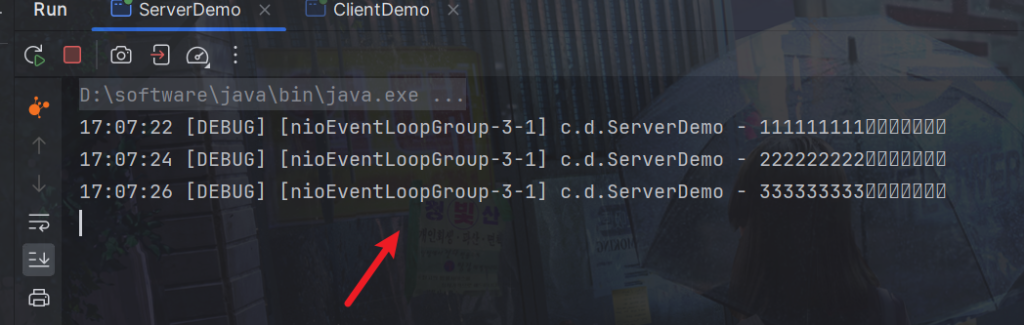
服务端输出,可以看到都是同一个线程
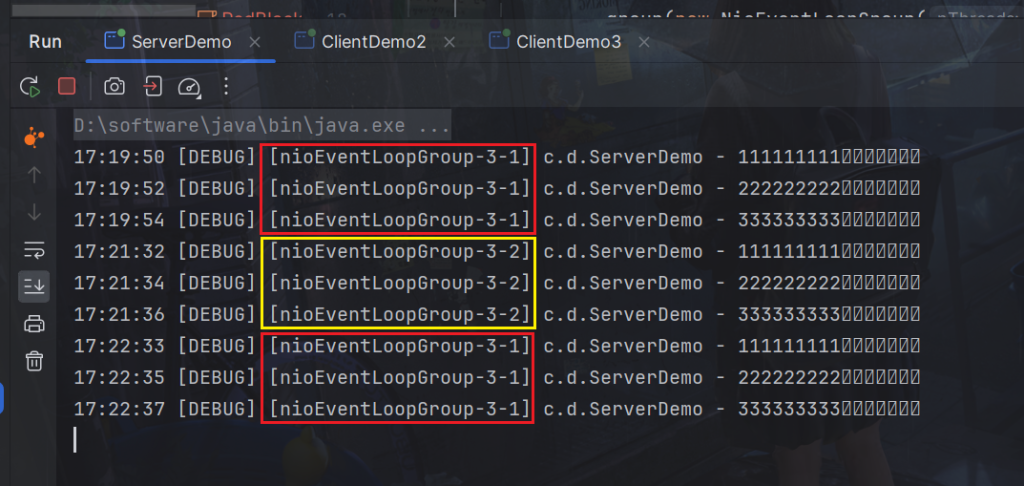
启动多个客户端后,可以看到每一个客户端连接服务端都使用一个线程,线程不够就多路复用。
服务端还可以再细分,创建一个名为 group 的 DefaultEventLoopGroup,用于处理一些耗时较长的任务,通常不涉及网络操作,例如处理文件IO或数据库操作等。
package com.dreams;

import io.netty.bootstrap.ServerBootstrap;
import io.netty.buffer.ByteBuf;
import io.netty.channel.*;
import io.netty.channel.nio.NioEventLoopGroup;
import io.netty.channel.socket.nio.NioServerSocketChannel;
import io.netty.channel.socket.nio.NioSocketChannel;
import lombok.extern.slf4j.Slf4j;

import java.nio.charset.Charset;

@Slf4j
public class EventLoopServer {
    public static void main(String[] args) {
        // 细分2:创建一个独立的 EventLoopGroup
        EventLoopGroup group = new DefaultEventLoopGroup();
        new ServerBootstrap()
                // boss 和 worker
                // 细分1:boss 只负责 ServerSocketChannel 上 accept 事件 worker 只负责 socketChannel 上的读写
                .group(new NioEventLoopGroup(), new NioEventLoopGroup(2))
                .channel(NioServerSocketChannel.class)
               .childHandler(new ChannelInitializer<NioSocketChannel>() {
                   @Override
                   protected void initChannel(NioSocketChannel ch) throws Exception {
                       ch.pipeline().addLast("handler1", new ChannelInboundHandlerAdapter() {
                                   @Override // ByteBuf
                                   public void channelRead(ChannelHandlerContext ctx, Object msg) throws Exception {
                                       ByteBuf buf = (ByteBuf) msg;
                                       log.debug(buf.toString(Charset.defaultCharset()));
                                       ctx.fireChannelRead(msg); // 让消息传递给下一个handler
                                   }
                               })
                               .addLast(group, "handler2", new ChannelInboundHandlerAdapter() {
                                   @Override // ByteBuf
                                   public void channelRead(ChannelHandlerContext ctx, Object msg) throws Exception {
                                       ByteBuf buf = (ByteBuf) msg;
                                       log.debug(buf.toString(Charset.defaultCharset()));
                                   }
                               });
                   }
               })
               .bind(8080);
    }
}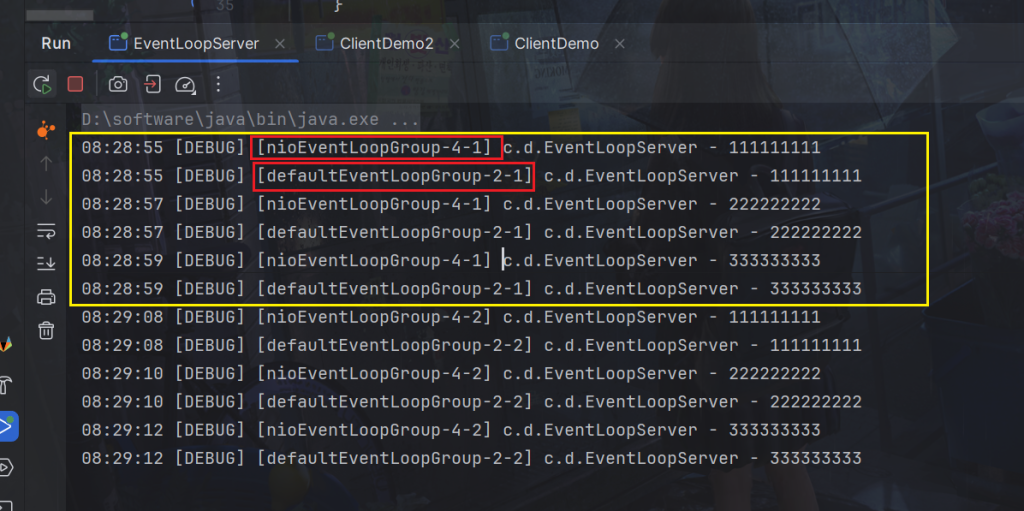
可以看到上述代码nioEventLoopGroup和defaultEventLoopGroup的切换。
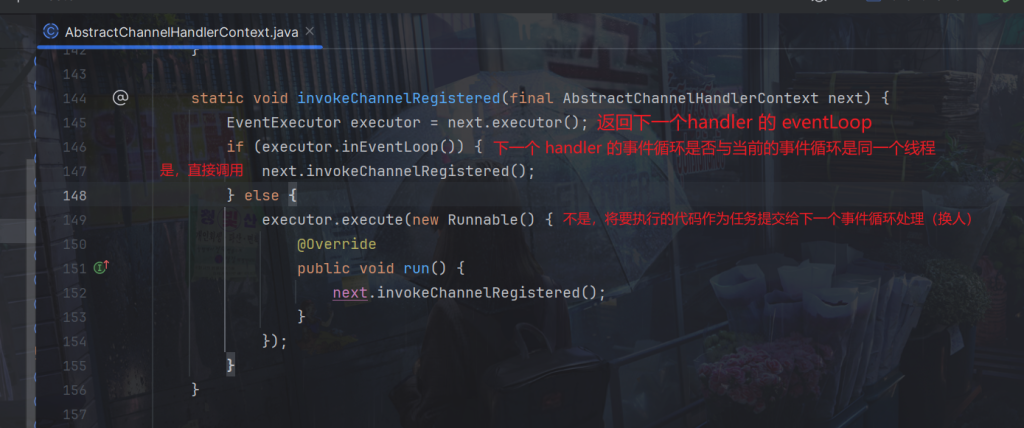
handler 执行中如何换人?
io.netty.channel.AbstractChannelHandlerContext类源码
如果两个handler绑定的是同一个线程,那么就直接调用否则,把要调用的代码封装为一个任务对象,由下一个handler的线程来调用
任务
代码演示
package com.dreams;

import io.netty.channel.EventLoopGroup;
import io.netty.channel.nio.NioEventLoopGroup;

public class EventLoopDemo {
    public static void main(String[] args) {
        // 1. 创建事件循环组
        EventLoopGroup group = new NioEventLoopGroup(2); // io 事件,普通任务,定时任务
        //EventLoopGroup group = new DefaultEventLoopGroup(); // 普通任务,定时任务

        // 2. 获取下一个事件循环对象
        System.out.println(group.next());
        System.out.println(group.next());
        System.out.println(group.next());
        System.out.println(group.next());

    }
}
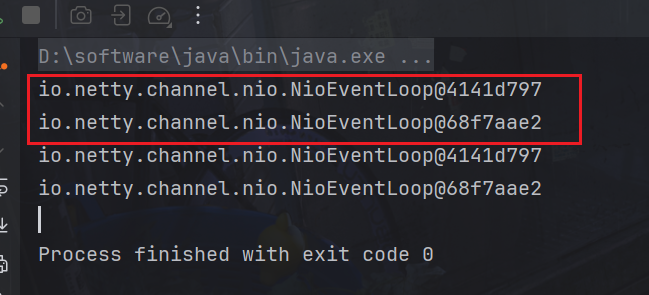
可以看到输出的任务是轮询的
普通任务
package com.dreams;

import io.netty.channel.EventLoopGroup;
import io.netty.channel.nio.NioEventLoopGroup;
import lombok.extern.slf4j.Slf4j;

import java.util.concurrent.TimeUnit;

@Slf4j
public class EventLoopDemo {
    public static void main(String[] args) {
        // 1. 创建事件循环组
        EventLoopGroup group = new NioEventLoopGroup(2); // io 事件,普通任务,定时任务

        // 执行普通任务
        group.next().execute(() -> {
            try {
                Thread.sleep(1000);
            } catch (InterruptedException e) {
                e.printStackTrace();
            }
            log.debug("ok");
        });

        log.debug("main");
    }
}
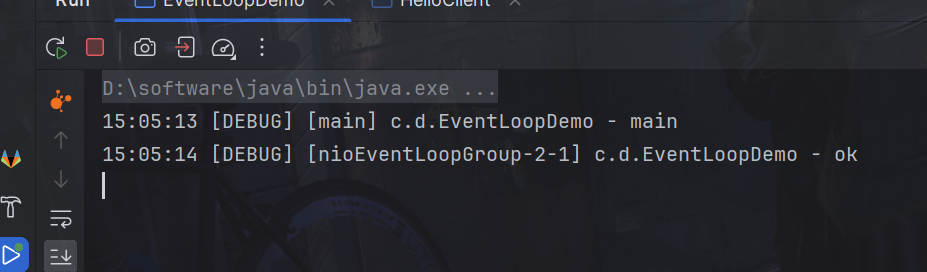
创建了一个 NioEventLoopGroup,该组包含了两个 NioEventLoop 实例,用于处理 I/O 事件、普通任务和定时任务。接着,它从 group 中选择下一个 EventLoop 实例(通过 next() 方法),并将一个普通任务提交给它执行。在 Netty 中,execute() 方法用于提交普通任务给 EventLoop 执行,这些任务会在 EventLoop 的线程上执行。
定时任务
package com.dreams;

import io.netty.channel.EventLoopGroup;
import io.netty.channel.nio.NioEventLoopGroup;
import lombok.extern.slf4j.Slf4j;

import java.util.concurrent.TimeUnit;

@Slf4j
public class EventLoopDemo {
    public static void main(String[] args) {
        // 1. 创建事件循环组
        EventLoopGroup group = new NioEventLoopGroup(2); // io 事件,普通任务,定时任务

        //执行定时任务
        group.next().scheduleAtFixedRate(() -> {
            log.debug("ok");
        }, 0, 1, TimeUnit.SECONDS);

        log.debug("main");
    }
}
参数解释:
- 0:表示初始延迟时间,即任务第一次执行前的延迟时间。在这里,设置为 0,表示任务会立即执行,而不需要等待。
- 1:表示任务的执行周期,即两次任务开始执行之间的间隔时间。这里设置为 1,表示每秒执行一次。
- TimeUnit.SECONDS:表示时间单位,即上述延迟时间和执行周期的时间单位。在这里,使用秒作为时间单位。
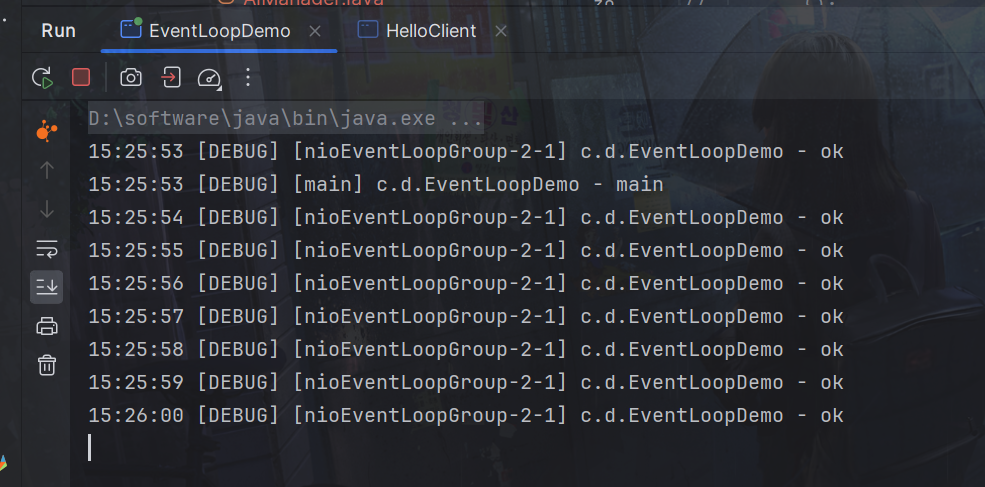
因此,EventLoop 上执行一个每秒执行一次的定时任务,输出 “ok”。
3.
channel 的主要作用:
close() 可以用来关闭 channel
closeFuture() 用来处理 channel 的关闭
sync 方法作用是同步等待 channel 关闭
而 addListener 方法是异步等待 channel 关闭
pipeline() 方法添加处理器
write() 方法将数据写入
之前我们发送数据使用的方法是writeAndFlush,能够直接发送,writeAndFlush() 方法用于将数据写入到通道并立即刷新通道。这意味着数据会被立即发送到对端,并且通道会被清空,确保数据不会停留在缓冲区中。
channel.writeAndFlush(ByteBufAllocator.DEFAULT.buffer().writeBytes("111111111".getBytes()));如果我们使用write() 方法将数据写入,还要调用flush()方法才能将发送
tx.write() 方法将其写入到通道中。需要调用 ctx.flush() 方法来手动刷新通道,确保数据被立即发送到客户端。
channel.write("3");
channel.flush();
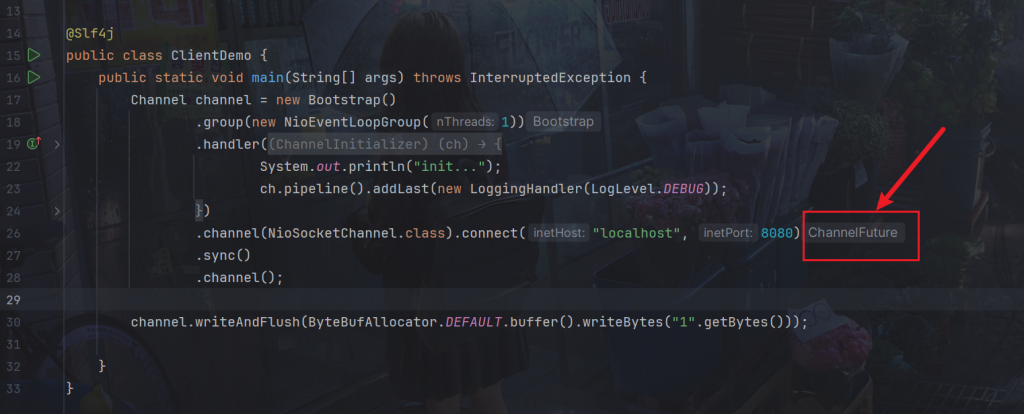
ChannelFuture 代表了一个尚未完成的 I/O 操作,它提供了一种异步处理操作结果的方式。通过 ChannelFuture,你可以注册监听器来处理操作的成功或失败,也可以通过同步方式等待操作完成。
如图可以看到,在未调用sync方法前返回一个
看看这些对象的关系
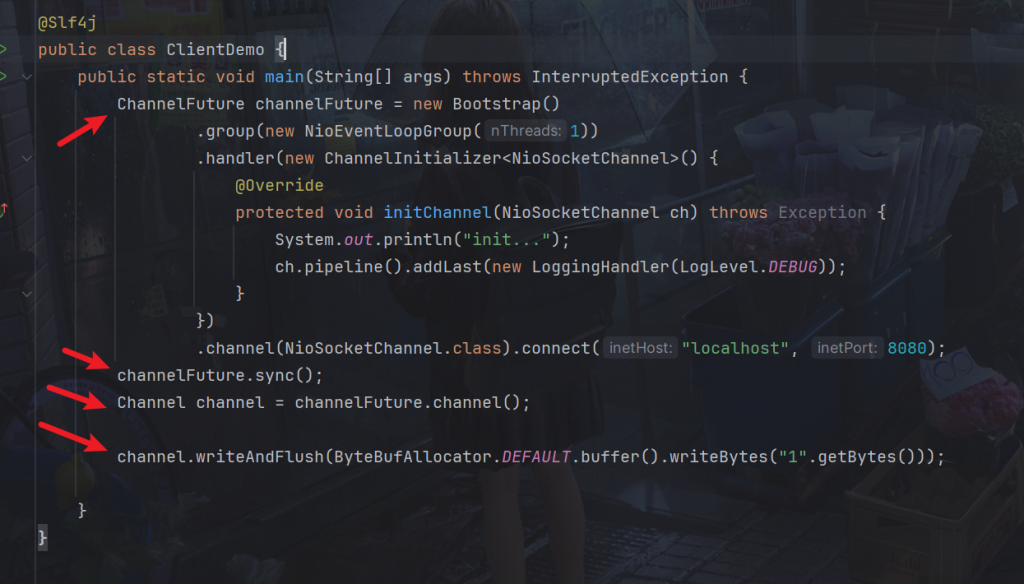
如果我们将channelFuture.sync();注释掉
package com.dreams;

import io.netty.bootstrap.Bootstrap;
import io.netty.buffer.ByteBufAllocator;
import io.netty.channel.Channel;
import io.netty.channel.ChannelFuture;
import io.netty.channel.ChannelInitializer;
import io.netty.channel.nio.NioEventLoopGroup;
import io.netty.channel.socket.nio.NioSocketChannel;
import io.netty.handler.logging.LogLevel;
import io.netty.handler.logging.LoggingHandler;
import lombok.extern.slf4j.Slf4j;


@Slf4j
public class ClientDemo {
    public static void main(String[] args) throws InterruptedException {
        ChannelFuture channelFuture = new Bootstrap()
                .group(new NioEventLoopGroup(1))
                .handler(new ChannelInitializer<NioSocketChannel>() {
                    @Override
                    protected void initChannel(NioSocketChannel ch) throws Exception {
                        System.out.println("init...");
                        Thread.sleep(1000);
                        ch.pipeline().addLast(new StringEncoder());
                    }
                })
                .channel(NioSocketChannel.class).connect("localhost", 8080);
        //channelFuture.sync();
        Channel channel = channelFuture.channel();
        log.debug("{}", channel);
        channel.writeAndFlush(ByteBufAllocator.DEFAULT.buffer().writeBytes("1".getBytes()));

    }
}
服务端就会一直接收不到信息
重点在.connect方法,异步非阻塞,main 发起了调用,真正执行 connect 是 nio 线程
如果没有调用ChannelFuture.sync() 方法,main线程会直接执行到Channel channel = channelFuture.channel();获取不到Channel
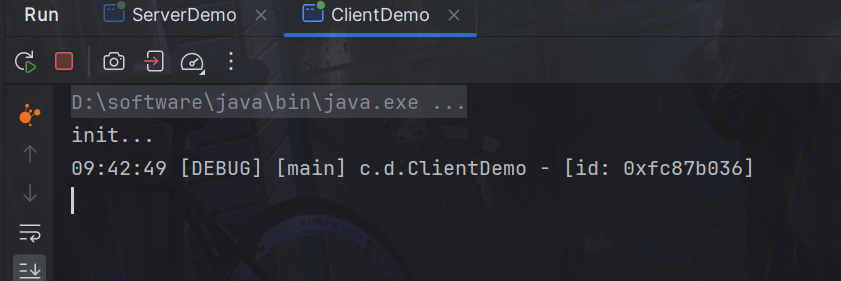
注意:当然有时候可能获取的到,所以在initChannel方法里加入睡眠sleep,模拟nio线程连接缓慢。
ChannelFuture.sync() 是一个同步阻塞方法,它会等待当前 I/O 操作完成(即等待操作结果),然后才会继续往下执行。本例中为阻塞住当前线程,直到nio线程连接建立完毕。
还有一种方法是使用 addListener(回调对象) 方法异步处理结果,即与上面由main线程完成不同,这里直接交给nio线程去调用。
package com.dreams;

import io.netty.bootstrap.Bootstrap;
import io.netty.channel.Channel;
import io.netty.channel.ChannelFuture;
import io.netty.channel.ChannelFutureListener;
import io.netty.channel.ChannelInitializer;
import io.netty.channel.nio.NioEventLoopGroup;
import io.netty.channel.socket.nio.NioSocketChannel;
import io.netty.handler.codec.string.StringEncoder;
import lombok.extern.slf4j.Slf4j;

import java.net.InetSocketAddress;

@Slf4j
public class EventLoopClient {
    public static void main(String[] args) throws InterruptedException {
        // 2. 带有 Future,Promise 的类型都是和异步方法配套使用,用来处理结果
        ChannelFuture channelFuture = new Bootstrap()
                .group(new NioEventLoopGroup())
                .channel(NioSocketChannel.class)
                .handler(new ChannelInitializer<NioSocketChannel>() {
                    @Override // 在连接建立后被调用
                    protected void initChannel(NioSocketChannel ch) throws Exception {
                        ch.pipeline().addLast(new LoggingHandler());
                    }
                })
                // 1. 连接到服务器
                // 异步非阻塞, main 发起了调用,真正执行 connect 是 nio 线程
               .connect(new InetSocketAddress("localhost", 8080)); // 1s 秒后

        // 2.2 使用 addListener(回调对象) 方法异步处理结果
        channelFuture.addListener(new ChannelFutureListener() {
            @Override
            // 在 nio 线程连接建立好之后,会调用 operationComplete
            public void operationComplete(ChannelFuture future) throws Exception {
                //这里的ChannelFuture与前面的ChannelFuture对象是同一个
                Channel channel = future.channel();
                log.debug("{}", channel);
                channel.writeAndFlush("hello, world");
            }
        });
    }
}
可以看到确实是nio线程

通常情况下,如果希望在写操作完成之后再执行下一步操作,也可以使用 sync() 方法来确保写操作已经完成。
在 Netty 中,通常情况下,写操作是异步执行的,即调用写方法后,并不会立即得知写操作是否成功或者完成。为了能够在写操作完成后执行后续的操作,可以通过添加监听器或者调用 sync() 方法来确保写操作的完成。
如果你不调用 channelFuture.sync(),而是直接关闭通道,有可能会导致写操作还没有完成就关闭了通道,从而导致数据发送失败或丢失的情况。因此,为了保证数据的完整性和正确性,建议在写操作后调用 sync() 方法来等待写操作完成后再进行后续操作。
例:
服务端
package com.dreams;

import io.netty.bootstrap.ServerBootstrap;
import io.netty.buffer.ByteBuf;
import io.netty.channel.ChannelHandlerContext;
import io.netty.channel.ChannelInboundHandlerAdapter;
import io.netty.channel.ChannelInitializer;
import io.netty.channel.nio.NioEventLoopGroup;
import io.netty.channel.socket.nio.NioServerSocketChannel;
import io.netty.channel.socket.nio.NioSocketChannel;
import lombok.extern.slf4j.Slf4j;

@Slf4j
public class ServerDemo {
    public static void main(String[] args) throws InterruptedException {
        new ServerBootstrap()
                .group(new NioEventLoopGroup(1), new NioEventLoopGroup(2))
                .channel(NioServerSocketChannel.class)
                .childHandler(new ChannelInitializer<NioSocketChannel>() {
                    @Override
                    protected void initChannel(NioSocketChannel ch) {
                        ch.pipeline().addLast(new ChannelInboundHandlerAdapter() {
                            @Override
                            public void channelRead(ChannelHandlerContext ctx, Object msg) {
                                ByteBuf byteBuf = msg instanceof ByteBuf ? ((ByteBuf) msg) : null;
                                if (byteBuf != null) {
                                    byte[] buf = new byte[16];
                                    ByteBuf len = byteBuf.readBytes(buf, 0, byteBuf.readableBytes());
                                    log.debug(new String(buf));
                                }
                                //手动将其关闭,方便实验
                                ctx.close();
                            }
                        });
                    }
                }).bind(8080).sync();
    }
}
上面ctx.close();手动将其关闭,方便实验
客户端
package com.dreams;

import io.netty.bootstrap.Bootstrap;
import io.netty.buffer.ByteBufAllocator;
import io.netty.channel.Channel;
import io.netty.channel.ChannelFuture;
import io.netty.channel.ChannelInitializer;
import io.netty.channel.nio.NioEventLoopGroup;
import io.netty.channel.socket.nio.NioSocketChannel;
import io.netty.handler.codec.string.StringEncoder;
import io.netty.handler.logging.LogLevel;
import io.netty.handler.logging.LoggingHandler;
import lombok.extern.slf4j.Slf4j;

@Slf4j
public class ClientDemo {
    public static void main(String[] args) throws InterruptedException {
        ChannelFuture channelFuture = new Bootstrap()
                .group(new NioEventLoopGroup(1))
                .handler(new ChannelInitializer<NioSocketChannel>() {
                    @Override
                    protected void initChannel(NioSocketChannel ch) throws Exception {
                        System.out.println("init...");
                        ch.pipeline().addLast(new StringEncoder());
                    }
                })
                .channel(NioSocketChannel.class).connect("localhost", 8080);
        channelFuture.sync();
        Channel channel = channelFuture.channel();

        // 发送数据给服务器
        ChannelFuture writeFuture = channel.writeAndFlush(ByteBufAllocator.DEFAULT.buffer().writeBytes("1".getBytes()));

        // 等待写操作完成
        writeFuture.sync();

        // 关闭连接
        channel.closeFuture().sync();


        System.out.println("成功");
    }
}
当服务端接收到时,我们手动将其关闭了
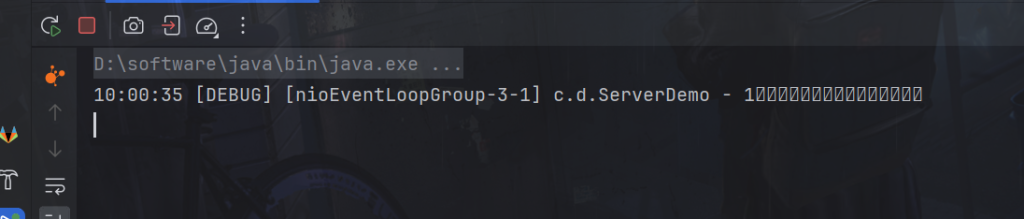
这样客户端就能够输出成功了,否则一直不会输出成功,因为写操作一直没有完成,就会被writeFuture.sync();阻塞住。
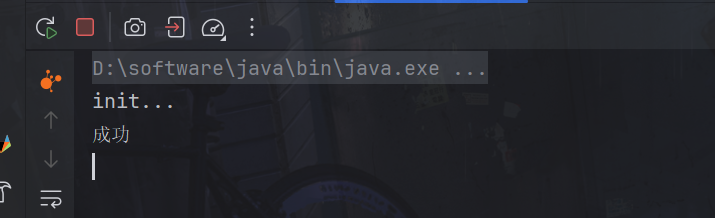
channel.closeFuture() 返回一个 ChannelFuture 对象,该对象代表了与当前 Channel 相关联的关闭操作的完成情况。调用 sync() 方法会阻塞当前线程,直到关闭操作完成。
package com.dreams;

import io.netty.bootstrap.Bootstrap;
import io.netty.channel.Channel;
import io.netty.channel.ChannelFuture;
import io.netty.channel.ChannelFutureListener;
import io.netty.channel.ChannelInitializer;
import io.netty.channel.nio.NioEventLoopGroup;
import io.netty.channel.socket.nio.NioSocketChannel;
import io.netty.handler.codec.string.StringEncoder;
import io.netty.handler.logging.LogLevel;
import io.netty.handler.logging.LoggingHandler;
import lombok.extern.slf4j.Slf4j;

import java.net.InetSocketAddress;
import java.util.Scanner;

@Slf4j
public class CloseFutureClient {
    public static void main(String[] args) throws InterruptedException {
        NioEventLoopGroup group = new NioEventLoopGroup();
        ChannelFuture channelFuture = new Bootstrap()
                .group(group)
                .channel(NioSocketChannel.class)
                .handler(new ChannelInitializer<NioSocketChannel>() {
                    @Override // 在连接建立后被调用
                    protected void initChannel(NioSocketChannel ch) throws Exception {
                        ch.pipeline().addLast(new LoggingHandler(LogLevel.DEBUG));
                        ch.pipeline().addLast(new StringEncoder());
                    }
                })
                .connect(new InetSocketAddress("localhost", 8080));
        System.out.println(channelFuture.getClass());
        Channel channel = channelFuture.sync().channel();
        log.debug("{}", channel);
        new Thread(()->{
            Scanner scanner = new Scanner(System.in);
            while (true) {
                String line = scanner.nextLine();
                if ("q".equals(line)) {
                    channel.close(); // close 异步操作 1s 之后
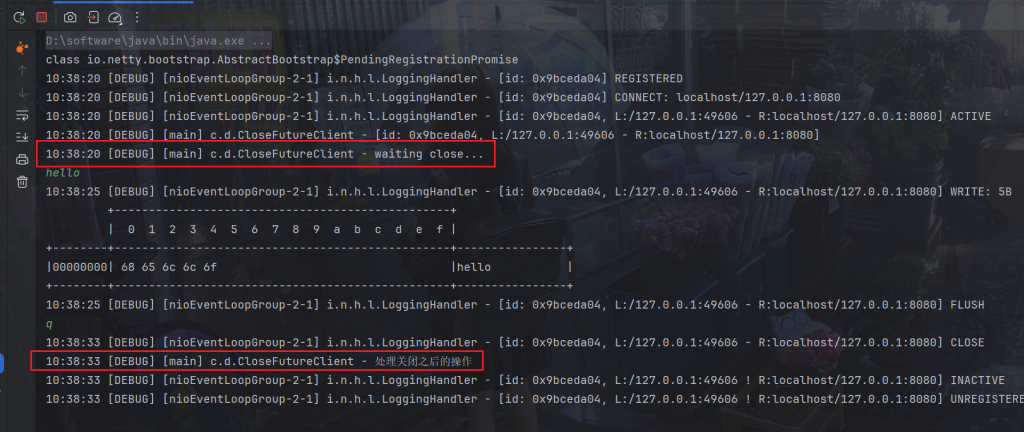
                    // log.debug("处理关闭之后的操作"); // 不能在这里善后,因为不同线程可能先后顺序问题
                    break;
                }
                channel.writeAndFlush(line);
            }
        }, "input").start();

        // 获取 CloseFuture 对象, 1) 同步处理关闭, 2) 异步处理关闭
        ChannelFuture closeFuture = channel.closeFuture();
        log.debug("waiting close...");
        //同步处理关闭
        closeFuture.sync();
        log.debug("处理关闭之后的操作");
    }
}
还有一种方法
package com.dreams;

import io.netty.bootstrap.Bootstrap;
import io.netty.channel.Channel;
import io.netty.channel.ChannelFuture;
import io.netty.channel.ChannelFutureListener;
import io.netty.channel.ChannelInitializer;
import io.netty.channel.nio.NioEventLoopGroup;
import io.netty.channel.socket.nio.NioSocketChannel;
import io.netty.handler.codec.string.StringEncoder;
import io.netty.handler.logging.LogLevel;
import io.netty.handler.logging.LoggingHandler;
import lombok.extern.slf4j.Slf4j;

import java.net.InetSocketAddress;
import java.util.Scanner;

@Slf4j
public class CloseFutureClient {
    public static void main(String[] args) throws InterruptedException {
        NioEventLoopGroup group = new NioEventLoopGroup();
        ChannelFuture channelFuture = new Bootstrap()
                .group(group)
                .channel(NioSocketChannel.class)
                .handler(new ChannelInitializer<NioSocketChannel>() {
                    @Override // 在连接建立后被调用
                    protected void initChannel(NioSocketChannel ch) throws Exception {
                        ch.pipeline().addLast(new LoggingHandler(LogLevel.DEBUG));
                        ch.pipeline().addLast(new StringEncoder());
                    }
                })
                .connect(new InetSocketAddress("localhost", 8080));
        System.out.println(channelFuture.getClass());
        Channel channel = channelFuture.sync().channel();
        log.debug("{}", channel);
        new Thread(()->{
            Scanner scanner = new Scanner(System.in);
            while (true) {
                String line = scanner.nextLine();
                if ("q".equals(line)) {
                    channel.close(); // close 异步操作 1s 之后
                    // log.debug("处理关闭之后的操作"); // 不能在这里善后,因为不同线程可能先后顺序问题
                    break;
                }
                channel.writeAndFlush(line);
            }
        }, "input").start();

        // 获取 CloseFuture 对象, 1) 同步处理关闭, 2) 异步处理关闭
        ChannelFuture closeFuture = channel.closeFuture();
        log.debug("waiting close...");
        System.out.println(closeFuture.getClass());
        closeFuture.addListener((ChannelFutureListener) future -> {
            log.debug("处理关闭之后的操作");
        });
    }
}
上面的代码使用Lomba表达式,原为
closeFuture.addListener(new ChannelFutureListener() {
    @Override
    public void operationComplete(ChannelFuture future) throws Exception {
        log.debug("处理关闭之后的操作");
    }
});
可以看到是nio线程了
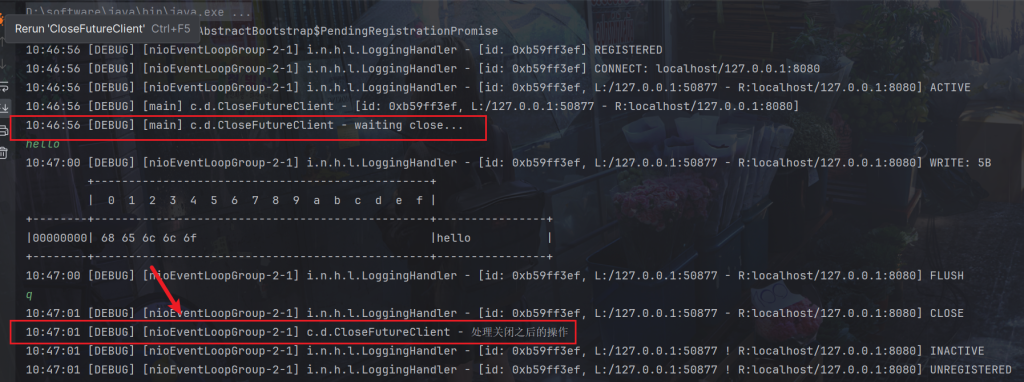
对于上面的代码,执行完成后,程序还没有退出,因为nio线程group里还存在线程,所以关闭后就可以退出了
group.shutdownGracefully() 是用于优雅地关闭 Netty 的 EventLoopGroup 的方法。在 Netty 中,EventLoopGroup 负责管理一个或多个 EventLoop,它们处理来自 Channel 的 I/O 操作。
调用 shutdownGracefully() 方法会启动关闭过程,该过程将等待未完成的任务执行完成,并停止接受新的任务。一旦关闭过程完成,EventLoopGroup 将完全终止。
通常,在程序退出时或者不再需要使用 Netty 时,应该调用 shutdownGracefully() 来确保资源得到正确释放和关闭。这可以避免资源泄漏和不必要的内存消耗。
closeFuture.addListener(new ChannelFutureListener() {
    @Override
    public void operationComplete(ChannelFuture future) throws Exception {
        log.debug("处理关闭之后的操作");
        group.shutdownGracefully();
    }
});
可以看到正常退出了
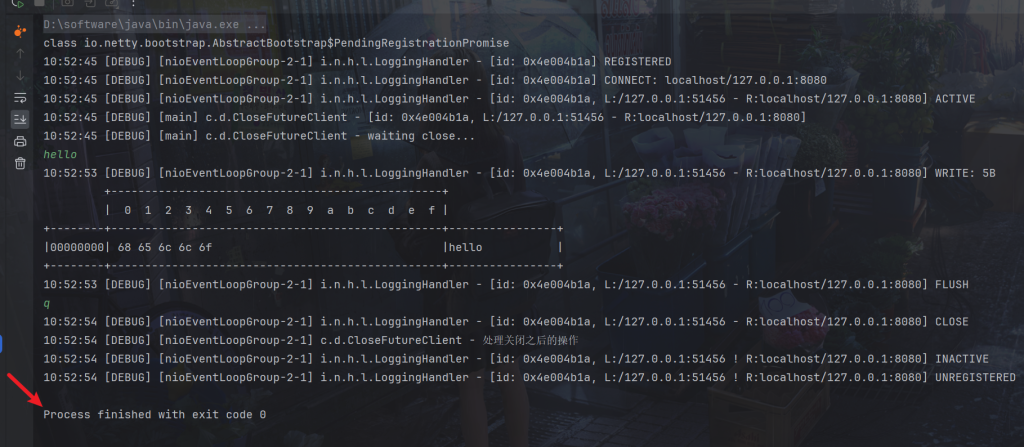
首先要说明 netty 中的 Future 与 jdk 中的 Future 同名,但是是两个接口,netty 的 Future 继承自 jdk 的 Future,而 Promise 又对 netty Future 进行了扩展
Future:
- Netty 的 Future 代表了一个异步操作的结果或状态,可以是已完成、正在进行中或尚未开始的状态。
- 与 JDK 的 Future 不同,Netty 的 Future 不仅可以进行同步等待任务结束获取结果,还可以使用异步方式获取结果,例如通过注册监听器,在任务结束时触发特定的动作。
- 但是和jdk Future 一样要等任务结束,被动。所以有了Promise,主动传递结果。
Promise:
- Netty 的 Promise 接口是对 Future 的扩展,它除了具有 Future 的功能外,还提供了设置结果或异常的方法,用于脱离任务独立存在,作为两个线程间传递结果的容器。
- Promise 可以在异步任务执行完成后,将结果或异常设置到其中,而关联的 Future 可以通过监听器或其他方法获取结果或处理异常。
- 在某些情况下,Promise 可以作为一个操作的结果的可写部分,用于向异步操作的调用方传递结果或异常。
常用方法
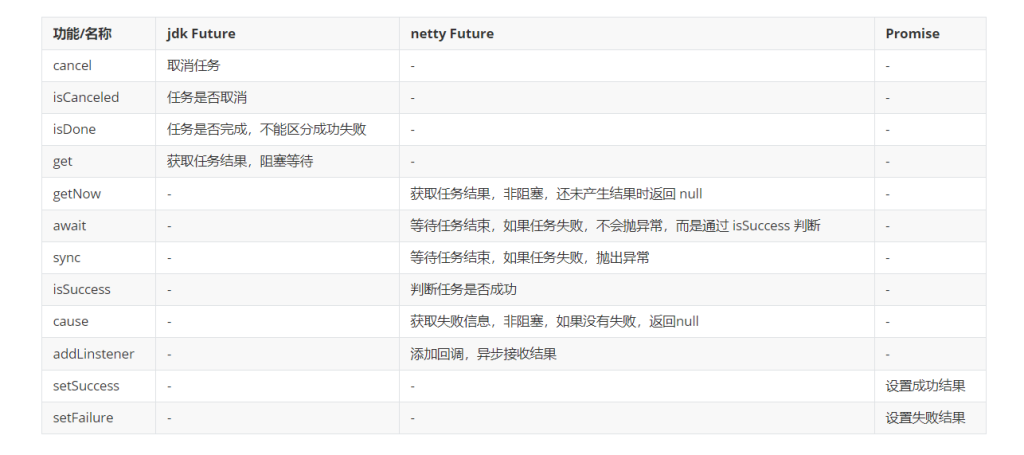
jdk的Future
举例
package com.dreams.netty;

import lombok.extern.slf4j.Slf4j;
import java.util.concurrent.*;

@Slf4j
public class JdkFutureDemo {
    public static void main(String[] args) throws ExecutionException, InterruptedException {
        // 1. 线程池
        ExecutorService service = Executors.newFixedThreadPool(2);
        // 2. 提交任务
        Future<Integer> future = service.submit(new Callable<Integer>() {
            @Override
            public Integer call() throws Exception {
                log.debug("执行计算");
                Thread.sleep(1000);
                return 50;
            }
        });
        // 3. 主线程通过 future 来获取结果
        log.debug("等待结果");
        log.debug("结果是 {}", future.get());
    }
}
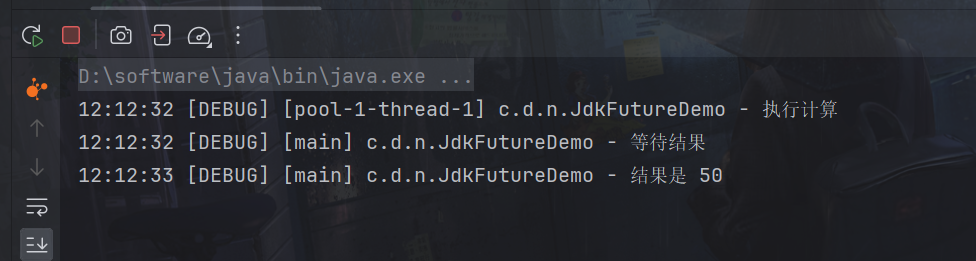
可以看到是阻塞等待结果
netty的Future
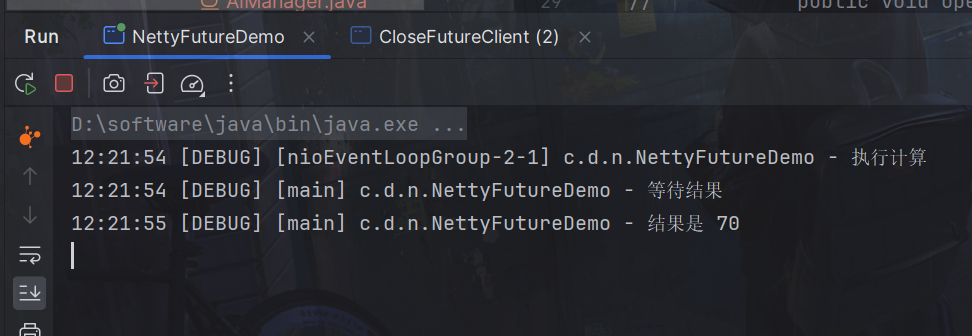
同步获取与JDK一致,只不过是从EventLoop中获取,同时注意Future对象与JDK不是同一个。
package com.dreams.netty;

import io.netty.channel.EventLoop;
import io.netty.channel.nio.NioEventLoopGroup;
import io.netty.util.concurrent.Future;
import io.netty.util.concurrent.GenericFutureListener;
import lombok.extern.slf4j.Slf4j;

import java.util.concurrent.Callable;
import java.util.concurrent.ExecutionException;

@Slf4j
public class NettyFutureDemo {
    public static void main(String[] args) throws ExecutionException, InterruptedException {
        NioEventLoopGroup group = new NioEventLoopGroup();
        EventLoop eventLoop = group.next();
        Future<Integer> future = eventLoop.submit(new Callable<Integer>() {
            @Override
            public Integer call() throws Exception {
                log.debug("执行计算");
                Thread.sleep(1000);
                return 70;
            }
        });
        log.debug("等待结果");
        log.debug("结果是 {}", future.get());
    }
}
异步获取
package com.dreams.netty;

import io.netty.channel.EventLoop;
import io.netty.channel.nio.NioEventLoopGroup;
import io.netty.util.concurrent.Future;
import io.netty.util.concurrent.GenericFutureListener;
import lombok.extern.slf4j.Slf4j;

import java.util.concurrent.Callable;
import java.util.concurrent.ExecutionException;

@Slf4j
public class NettyFutureDemo {
    public static void main(String[] args) throws ExecutionException, InterruptedException {
        NioEventLoopGroup group = new NioEventLoopGroup();
        EventLoop eventLoop = group.next();
        Future<Integer> future = eventLoop.submit(new Callable<Integer>() {
            @Override
            public Integer call() throws Exception {
                log.debug("执行计算");
                Thread.sleep(1000);
                return 70;
            }
        });

        future.addListener(new GenericFutureListener<Future<? super Integer>>(){
            @Override
            public void operationComplete(Future<? super Integer> future) throws Exception {
                log.debug("接收结果:{}", future.getNow());
            }
        });
    }
}
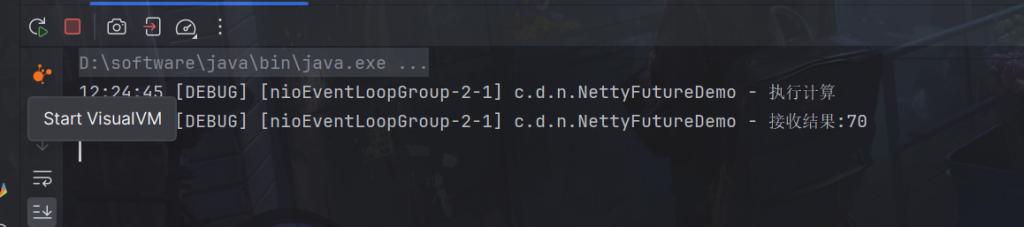
注意看拿到结果的线程是异步获取的结果。
netty的Promise
调用 promise.setSuccess(80) 的意思是将 Promise 的状态设置为成功,并将成功的结果设置为 80。这意味着与该 Promise 相关联的 Future 将会收到成功的通知,并且成功的结果将会是 80。
package com.dreams.netty;

import io.netty.channel.EventLoop;
import io.netty.channel.nio.NioEventLoopGroup;
import io.netty.util.concurrent.DefaultPromise;
import lombok.extern.slf4j.Slf4j;

import java.util.concurrent.ExecutionException;

@Slf4j
public class NettyPromiseDemo {
    public static void main(String[] args) throws ExecutionException, InterruptedException {
        // 1. 准备 EventLoop 对象
        EventLoop eventLoop = new NioEventLoopGroup().next();
        // 2. 可以主动创建 promise, 结果容器
        DefaultPromise<Integer> promise = new DefaultPromise<>(eventLoop);
        new Thread(() -> {
            // 3. 任意一个线程执行计算,计算完毕后向 promise 填充结果
            log.debug("开始计算...");
            promise.setSuccess(80);
            try {
                int i = 1 / 0;
                Thread.sleep(1000);
                promise.setSuccess(80);
            } catch (Exception e) {
                e.printStackTrace();
                promise.setFailure(e);
            }

        }).start();
        // 4. 接收结果的线程
        log.debug("等待结果...");
        log.debug("结果是: {}", promise.get());
    }

}
main线程阻塞到获取结果,调用 promise.get() 会阻塞当前线程,直到与该 Promise 相关联的异步操作完成并返回结果。如果异步操作成功完成,则返回成功的结果;如果异步操作失败,则抛出相应的异常。
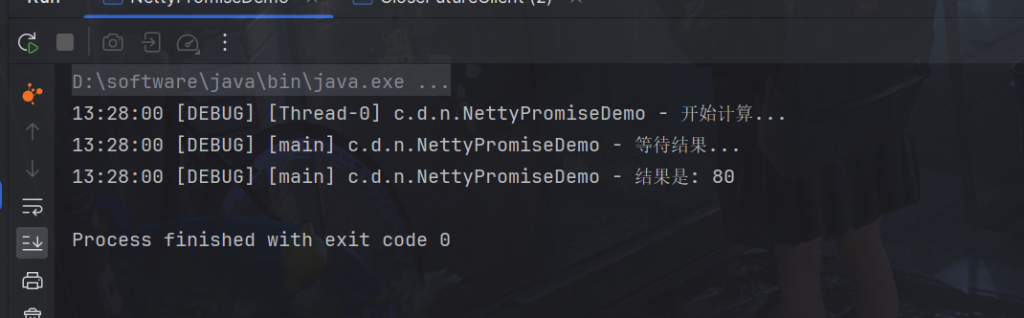
调用 promise.setFailure(e) 的意思是将 Promise 的状态设置为失败,并将失败的原因设置为异常 e。这意味着与该 Promise 相关联的 Future 将会收到失败的通知,并且失败的原因将会是异常 e。
这样的操作通常发生在一个异步任务执行完成后,但执行过程中出现了异常情况。通过调用 setFailure 方法,可以将异常作为失败的原因传递给关联的 Future,以便后续的操作可以获取到这个异常并进行相应的处理。
package com.dreams.netty;

import io.netty.channel.EventLoop;
import io.netty.channel.nio.NioEventLoopGroup;
import io.netty.util.concurrent.DefaultPromise;
import lombok.extern.slf4j.Slf4j;

import java.util.concurrent.ExecutionException;

@Slf4j
public class NettyPromiseDemo {
    public static void main(String[] args) throws ExecutionException, InterruptedException {
        // 1. 准备 EventLoop 对象
        EventLoop eventLoop = new NioEventLoopGroup().next();
        // 2. 可以主动创建 promise, 结果容器
        DefaultPromise<Integer> promise = new DefaultPromise<>(eventLoop);
        new Thread(() -> {
            // 3. 任意一个线程执行计算,计算完毕后向 promise 填充结果
            log.debug("开始计算...");
            try {
                int i = 1 / 0;
                Thread.sleep(1000);
                promise.setSuccess(80);
            } catch (Exception e) {
                e.printStackTrace();
                promise.setFailure(e);
            }

        }).start();
        // 4. 接收结果的线程
        log.debug("等待结果...");

        try{
            log.debug("结果是: {}", promise.get());
        }catch (Exception e){
            log.debug("出现错误: {}", e.toString());
        }
    }

}
ChannelHandler 用于处理入站(Inbound)或出站(Outbound)事件的组件。ChannelHandler 可以被添加到 ChannelPipeline 中,用于拦截和处理 Channel 发送或接收的事件。
Pipeline 是由一系列的 ChannelHandler 组成的,这些 ChannelHandler 负责处理 Channel 上的事件。当事件在 Channel 上触发时,它会在 Pipeline 中按顺序传播,直到有一个 ChannelHandler 处理了该事件或者它到达了 Pipeline 的末尾。
如果每个 Channel 是一个产品的加工车间,Pipeline 是车间中的流水线,ChannelHandler 就是流水线上的各道工序,而后面要讲的 ByteBuf 是原材料,经过很多工序的加工:先经过一道道入站工序,再经过一道道出站工序最终变成产品
Head 和 Tail 是两个特殊的 ChannelHandler,它们位于 Pipeline 的两端,分别代表了 ChannelPipeline 中事件流的起点和终点。
当一个事件在 ChannelPipeline 中传播时,会经历以下过程:
- 对于入站事件:从 ChannelPipeline 的头部(Head)开始向尾部(Tail)传播。
- 对于出站事件:从 ChannelPipeline 的尾部(Tail)开始向头部(Head)传播。
package com.dreams.netty;

import io.netty.bootstrap.ServerBootstrap;
import io.netty.channel.*;
import io.netty.channel.nio.NioEventLoopGroup;
import io.netty.channel.socket.nio.NioServerSocketChannel;
import io.netty.channel.socket.nio.NioSocketChannel;
import lombok.AllArgsConstructor;
import lombok.Data;
import lombok.extern.slf4j.Slf4j;

@Slf4j
public class PipelineDemo {
    public static void main(String[] args) {
        new ServerBootstrap()
                .group(new NioEventLoopGroup())
                .channel(NioServerSocketChannel.class)
                .childHandler(new ChannelInitializer<NioSocketChannel>() {
                    @Override
                    protected void initChannel(NioSocketChannel ch) throws Exception {
                        // 1. 通过 channel 拿到 pipeline
                        ChannelPipeline pipeline = ch.pipeline();
                        // 2. 添加处理器 head -> h1 -> h2 -> h3 -> tail
                        pipeline.addLast("h1", new ChannelInboundHandlerAdapter(){
                            @Override
                            public void channelRead(ChannelHandlerContext ctx, Object msg) throws Exception {
                                log.debug("1");
                                super.channelRead(ctx, msg);
                            }
                        });
                        pipeline.addLast("h2", new ChannelInboundHandlerAdapter(){
                            @Override
                            public void channelRead(ChannelHandlerContext ctx, Object name) throws Exception {
                                log.debug("2");
                                super.channelRead(ctx, name); // 将数据传递给下个 handler,如果不调用,调用链会断开 或者调用 ctx.fireChannelRead(student);
                            }
                        });

                        pipeline.addLast("h3", new ChannelInboundHandlerAdapter(){
                            @Override
                            public void channelRead(ChannelHandlerContext ctx, Object name) throws Exception {
                                log.debug("3");
                                super.channelRead(ctx, msg);
                            }
                        });
                    }
                })
               .bind(8080);
    }
}
客户端连接后,这时将按照顺序输出
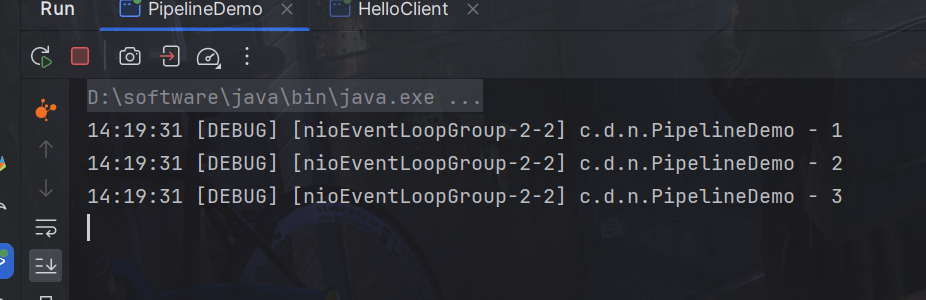
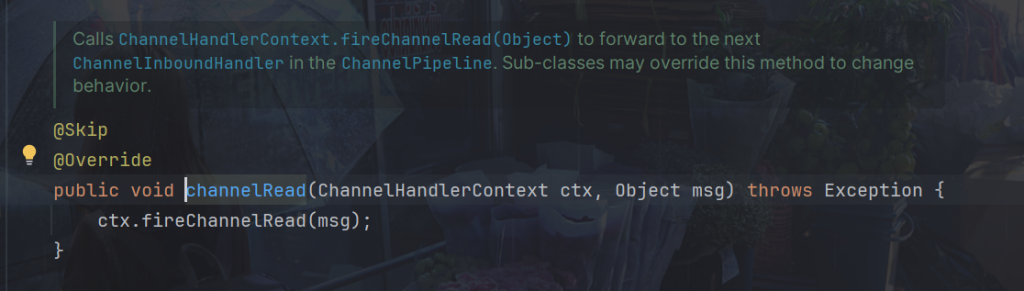
调用 super.channelRead(ctx, msg)确保消息能够继续传播到 ChannelPipeline 中的下一个 ChannelHandler 进行处理。底层调用的就是fireChannelRead(msg),入站处理器中,ctx.fireChannelRead(msg) 是 调用下一个入站处理器,fireChannelRead 方法会将当前事件(即接收到的消息)传播到 ChannelPipeline 中的下一个 ChannelHandler。这意味着它会触发下一个 ChannelHandler 的 channelRead 方法,并将消息传递给它。
package com.dreams.netty;

import io.netty.bootstrap.ServerBootstrap;
import io.netty.channel.*;
import io.netty.channel.nio.NioEventLoopGroup;
import io.netty.channel.socket.nio.NioServerSocketChannel;
import io.netty.channel.socket.nio.NioSocketChannel;
import lombok.AllArgsConstructor;
import lombok.Data;
import lombok.extern.slf4j.Slf4j;

@Slf4j
public class PipelineDemo {
    public static void main(String[] args) {
        new ServerBootstrap()
                .group(new NioEventLoopGroup())
                .channel(NioServerSocketChannel.class)
                .childHandler(new ChannelInitializer<NioSocketChannel>() {
                    @Override
                    protected void initChannel(NioSocketChannel ch) throws Exception {
                        // 1. 通过 channel 拿到 pipeline
                        ChannelPipeline pipeline = ch.pipeline();
                        // 2. 添加处理器 head -> h1 -> h2 -> h3 -> h4 -> h5 -> h6 -> tail
                        pipeline.addLast("h1", new ChannelInboundHandlerAdapter(){
                            @Override
                            public void channelRead(ChannelHandlerContext ctx, Object msg) throws Exception {
                                log.debug("1");
                                super.channelRead(ctx, msg);
                            }
                        });
                        pipeline.addLast("h2", new ChannelInboundHandlerAdapter(){
                            @Override
                            public void channelRead(ChannelHandlerContext ctx, Object name) throws Exception {
                                log.debug("2");
                                super.channelRead(ctx, name); // 将数据传递给下个 handler,如果不调用,调用链会断开 或者调用 ctx.fireChannelRead(student);
                            }
                        });
                        pipeline.addLast("h3", new ChannelInboundHandlerAdapter(){
                            @Override
                            public void channelRead(ChannelHandlerContext ctx, Object msg) throws Exception {
                                log.debug("3");
                                ch.writeAndFlush(ctx.alloc().buffer().writeBytes("server...".getBytes()));
                            }
                        });
                        pipeline.addLast("h4", new ChannelOutboundHandlerAdapter(){
                            @Override
                            public void write(ChannelHandlerContext ctx, Object msg, ChannelPromise promise) throws Exception {
                                log.debug("4");
                                super.write(ctx, msg, promise);
                            }
                        });
                        pipeline.addLast("h5", new ChannelOutboundHandlerAdapter(){
                            @Override
                            public void write(ChannelHandlerContext ctx, Object msg, ChannelPromise promise) throws Exception {
                                log.debug("5");
                                super.write(ctx, msg, promise);
                            }
                        });
                        pipeline.addLast("h6", new ChannelOutboundHandlerAdapter(){
                            @Override
                            public void write(ChannelHandlerContext ctx, Object msg, ChannelPromise promise) throws Exception {
                                log.debug("6");
                                super.write(ctx, msg, promise);
                            }
                        });
                    }
                })
               .bind(8080);
    }
}
客户端连接后,可以看到出站是从tail为头
处理器 head -> h1 -> h2 -> h3 -> h4 -> h5 -> h6 -> tail
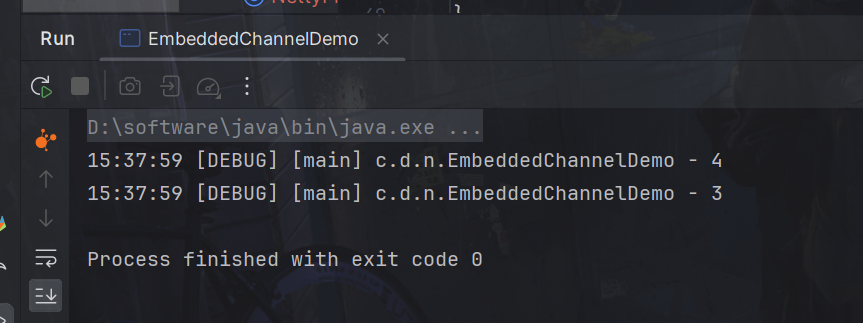
顺序为head -> h1 -> h2 -> h3 -> tail -> h6 -> h5 -> h4 ,因为写操作会从出站处理器处理,所以从tail开始往回走。
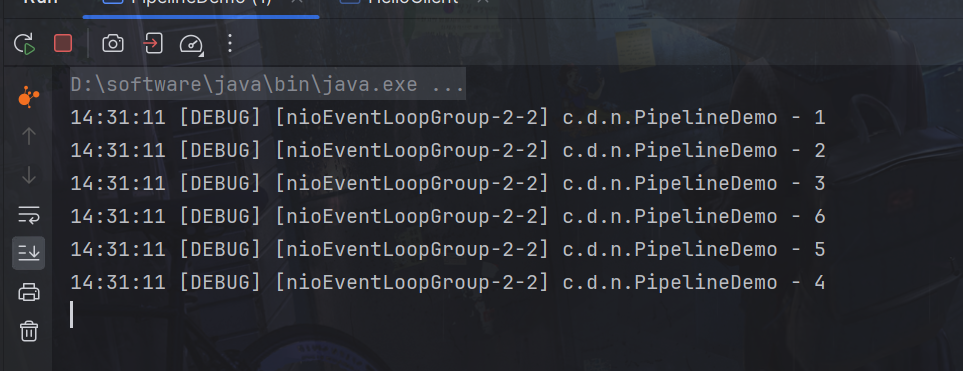
出站处理器主要对写回结果进行加工,所以需要触发,比如上述代码的h3触发
ch.writeAndFlush(ctx.alloc().buffer().writeBytes("server...".getBytes()));然后开始调用出站处理器,super.write(ctx, msg, promise)确保消息能够正确地被传递到下一个出站处理器,底层调用的是:
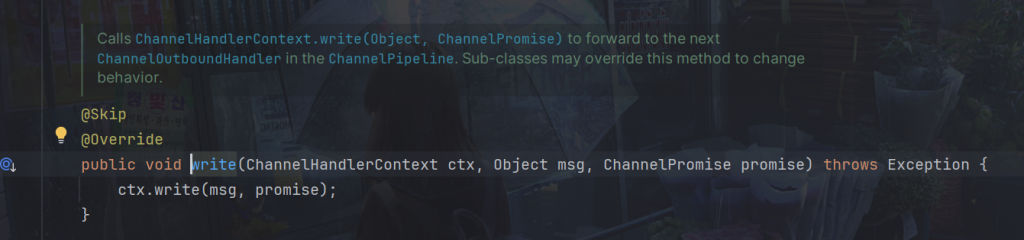
比如我们可以对信息进行处理,super.channelRead(ctx, name),name传递的就是我们处理过后的信息,如:
修改一下前三个
pipeline.addLast("h1", new ChannelInboundHandlerAdapter(){
    @Override
    public void channelRead(ChannelHandlerContext ctx, Object msg) throws Exception {
        log.debug("1");
        String name = "dreams";
        log.debug(name);
        super.channelRead(ctx, name);
    }
});
pipeline.addLast("h2", new ChannelInboundHandlerAdapter(){
    @Override
    public void channelRead(ChannelHandlerContext ctx, Object name) throws Exception {
        log.debug("2");
        String msg = (String)name + "study ---";
        Student student = new Student(msg);
        log.debug(msg);
        super.channelRead(ctx, student); // 将数据传递给下个 handler,如果不调用,调用链会断开 或者调用 ctx.fireChannelRead(student);
    }
});

pipeline.addLast("h3", new ChannelInboundHandlerAdapter(){
    @Override
    public void channelRead(ChannelHandlerContext ctx, Object msg) throws Exception {
        log.debug("3");
        log.debug(msg.toString());
        ch.writeAndFlush(ctx.alloc().buffer().writeBytes("server...".getBytes()));
    }
});
可以看到,对象也可以传递
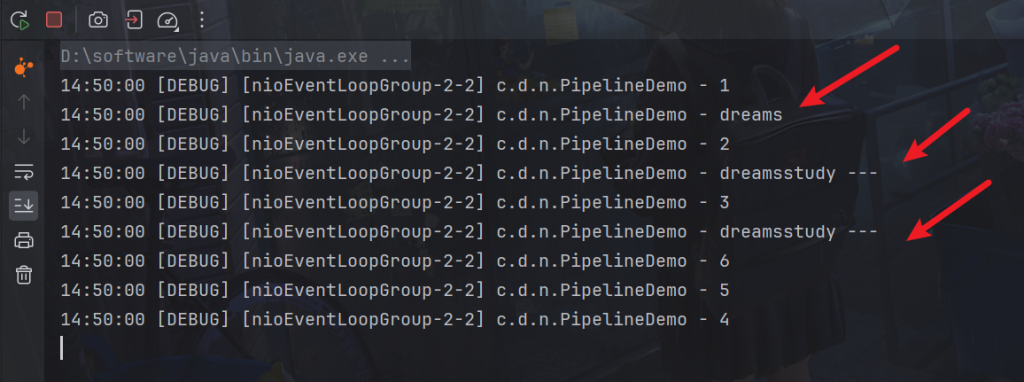
我们可以看到h3调用的
ch.writeAndFlush(ctx.alloc().buffer().writeBytes("server...".getBytes()));顺序为处理器 head -> h1 -> h2 -> h3 -> tail-> h6 -> h5 -> h4 ->
因为写操作会从出站处理器处理,所以从tail开始往回走。
如果h3改为
ctx.writeAndFlush(ctx.alloc().buffer().writeBytes("server...".getBytes()));传递的方向会不一样,会从当前链路往前找,所以找不到,就没有输出
head -> h1 -> h2 -> h3
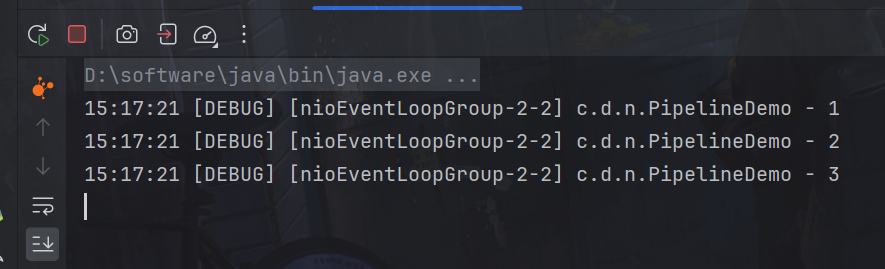
又或
pipeline.addLast("h1", new ChannelInboundHandlerAdapter(){
    @Override
    public void channelRead(ChannelHandlerContext ctx, Object msg) throws Exception {
        log.debug("1");
        super.channelRead(ctx, msg);
    }
});
pipeline.addLast("h2", new ChannelInboundHandlerAdapter(){
    @Override
    public void channelRead(ChannelHandlerContext ctx, Object name) throws Exception {
        log.debug("2");
        super.channelRead(ctx, name); // 将数据传递给下个 handler,如果不调用,调用链会断开 或者调用 ctx.fireChannelRead(student);
    }
});
pipeline.addLast("h4", new ChannelOutboundHandlerAdapter(){
    @Override
    public void write(ChannelHandlerContext ctx, Object msg, ChannelPromise promise) throws Exception {
        log.debug("4");
        super.write(ctx, msg, promise);
    }
});
pipeline.addLast("h3", new ChannelInboundHandlerAdapter(){
    @Override
    public void channelRead(ChannelHandlerContext ctx, Object msg) throws Exception {
        log.debug("3");
        ctx.writeAndFlush(ctx.alloc().buffer().writeBytes("server...".getBytes()));
    }
});
pipeline.addLast("h5", new ChannelOutboundHandlerAdapter(){
    @Override
    public void write(ChannelHandlerContext ctx, Object msg, ChannelPromise promise) throws Exception {
        log.debug("5");
        super.write(ctx, msg, promise);
    }
});
pipeline.addLast("h6", new ChannelOutboundHandlerAdapter(){
    @Override
    public void write(ChannelHandlerContext ctx, Object msg, ChannelPromise promise) throws Exception {
        log.debug("6");
        super.write(ctx, msg, promise);
    }
});
链路为head -> h1 -> h2 -> h4 -> h3 -> h5 -> h7 -> tail
但是因为h4不是入站处理器,所以先输出h3,然后,触发写,因为使用ctx,所以往回找出站处理器h4,输出h4
顺序为处理器 head -> h1 -> h2 -> h3 -> h4
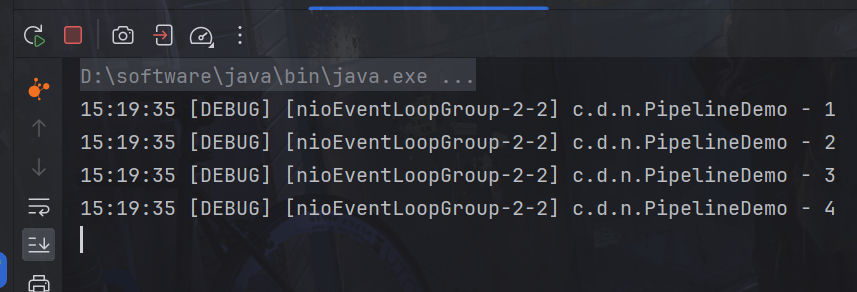
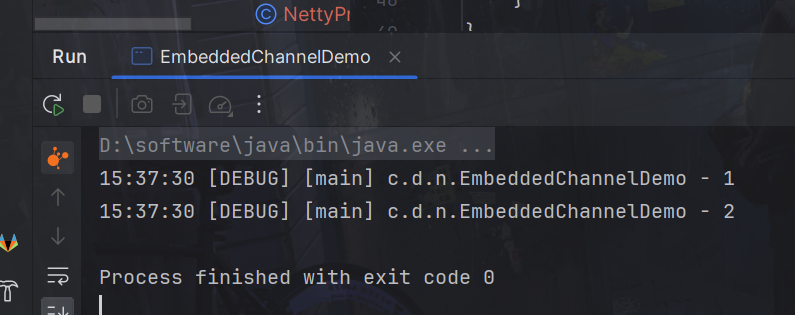
EmbeddedChannel 是 Netty 中的一个特殊类型的 Channel,用于在单元测试中模拟 Channel 的行为。它允许你在没有实际网络连接的情况下测试你的 ChannelHandler。
模拟入站
package com.dreams.netty;

import io.netty.buffer.ByteBufAllocator;
import io.netty.channel.ChannelHandlerContext;
import io.netty.channel.ChannelInboundHandlerAdapter;
import io.netty.channel.ChannelOutboundHandlerAdapter;
import io.netty.channel.ChannelPromise;
import io.netty.channel.embedded.EmbeddedChannel;
import lombok.extern.slf4j.Slf4j;

@Slf4j
public class EmbeddedChannelDemo {
    public static void main(String[] args) {
        ChannelInboundHandlerAdapter h1 = new ChannelInboundHandlerAdapter() {
            @Override
            public void channelRead(ChannelHandlerContext ctx, Object msg) throws Exception {
                log.debug("1");
                super.channelRead(ctx, msg);
            }
        };
        ChannelInboundHandlerAdapter h2 = new ChannelInboundHandlerAdapter() {
            @Override
            public void channelRead(ChannelHandlerContext ctx, Object msg) throws Exception {
                log.debug("2");
                super.channelRead(ctx, msg);
            }
        };
        ChannelOutboundHandlerAdapter h3 = new ChannelOutboundHandlerAdapter() {
            @Override
            public void write(ChannelHandlerContext ctx, Object msg, ChannelPromise promise) throws Exception {
                log.debug("3");
                super.write(ctx, msg, promise);
            }
        };
        ChannelOutboundHandlerAdapter h4 = new ChannelOutboundHandlerAdapter() {
            @Override
            public void write(ChannelHandlerContext ctx, Object msg, ChannelPromise promise) throws Exception {
                log.debug("4");
                super.write(ctx, msg, promise);
            }
        };

        EmbeddedChannel channel = new EmbeddedChannel(h1, h2, h3, h4);
        // 模拟入站操作
        channel.writeInbound(ByteBufAllocator.DEFAULT.buffer().writeBytes("hello".getBytes()));

    }
}
模拟出站
package com.dreams.netty;

import io.netty.buffer.ByteBufAllocator;
import io.netty.channel.ChannelHandlerContext;
import io.netty.channel.ChannelInboundHandlerAdapter;
import io.netty.channel.ChannelOutboundHandlerAdapter;
import io.netty.channel.ChannelPromise;
import io.netty.channel.embedded.EmbeddedChannel;
import lombok.extern.slf4j.Slf4j;

@Slf4j
public class EmbeddedChannelDemo {
    public static void main(String[] args) {
        ChannelInboundHandlerAdapter h1 = new ChannelInboundHandlerAdapter() {
            @Override
            public void channelRead(ChannelHandlerContext ctx, Object msg) throws Exception {
                log.debug("1");
                super.channelRead(ctx, msg);
            }
        };
        ChannelInboundHandlerAdapter h2 = new ChannelInboundHandlerAdapter() {
            @Override
            public void channelRead(ChannelHandlerContext ctx, Object msg) throws Exception {
                log.debug("2");
                super.channelRead(ctx, msg);
            }
        };
        ChannelOutboundHandlerAdapter h3 = new ChannelOutboundHandlerAdapter() {
            @Override
            public void write(ChannelHandlerContext ctx, Object msg, ChannelPromise promise) throws Exception {
                log.debug("3");
                super.write(ctx, msg, promise);
            }
        };
        ChannelOutboundHandlerAdapter h4 = new ChannelOutboundHandlerAdapter() {
            @Override
            public void write(ChannelHandlerContext ctx, Object msg, ChannelPromise promise) throws Exception {
                log.debug("4");
                super.write(ctx, msg, promise);
            }
        };

        EmbeddedChannel channel = new EmbeddedChannel(h1, h2, h3, h4);

        // 模拟出站操作
        channel.writeOutbound(ByteBufAllocator.DEFAULT.buffer().writeBytes("world".getBytes()));

    }
}
ByteBuf 是 Netty 中用于操作字节数据的强大工具。它是 Netty 对字节数据的抽象,提供了丰富的方法来处理字节数据,同时也解决了 Java 原生字节数组的一些限制和问题。
池化 – 可以重用池中 ByteBuf 实例,更节约内存,减少内存溢出的可能
读写指针分离,不需要像 ByteBuffer 一样切换读写模式
可以自动扩容
支持链式调用,使用更流畅
创建方法
ByteBufAllocator 是用于创建 ByteBuf 实例的工厂接口。在这里,我们使用了 DEFAULT 静态字段,这意味着我们使用了默认的 ByteBufAllocator。buffer() 方法用于创建一个新的 ByteBuf 实例。
ByteBuf buf = ByteBufAllocator.DEFAULT.buffer();
代码:
package com.dreams.ByteBuf;

import io.netty.buffer.ByteBuf;
import io.netty.buffer.ByteBufAllocator;

import static io.netty.buffer.ByteBufUtil.appendPrettyHexDump;
import static io.netty.util.internal.StringUtil.NEWLINE;

public class ByteBufDemo {
    public static void main(String[] args) {
        ByteBuf buf = ByteBufAllocator.DEFAULT.buffer();
        System.out.println(buf);
        System.out.println(buf.getClass());
        System.out.println(buf.maxCapacity());
    }
}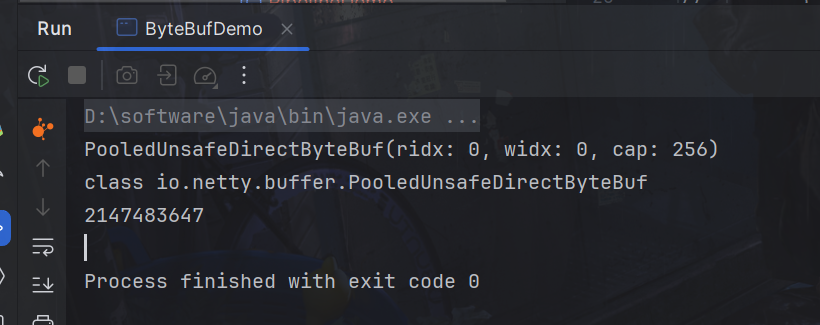
默认大小是256字节
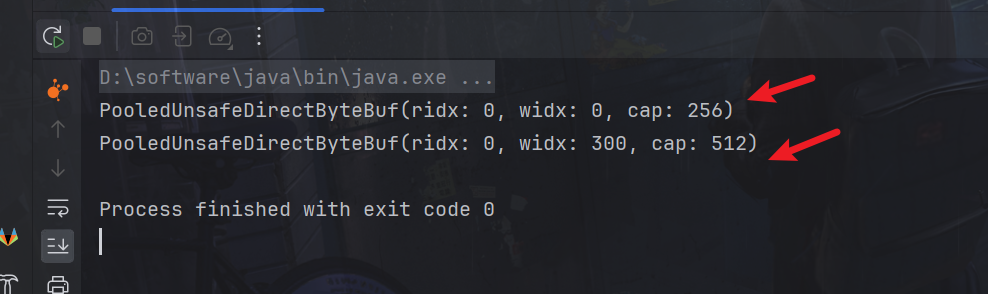
ByteBuf 可以自动扩展以容纳更多的数据,而不需要像普通的字节数组一样手动管理容量。这使得在写入和读取数据时更加方便和高效。
package com.dreams.ByteBuf;

import io.netty.buffer.ByteBuf;
import io.netty.buffer.ByteBufAllocator;

import static io.netty.buffer.ByteBufUtil.appendPrettyHexDump;
import static io.netty.util.internal.StringUtil.NEWLINE;

public class ByteBufDemo {
    public static void main(String[] args) {

        ByteBuf buf = ByteBufAllocator.DEFAULT.buffer();
        System.out.println(buf);
        StringBuilder sb = new StringBuilder();
        for (int i = 0; i < 300; i++) {
            sb.append("a");
        }
        buf.writeBytes(sb.toString().getBytes());
        System.out.println(buf);
    }
}
直接内存和堆内存
堆内存:
- 堆内存是指存储在 Java 堆上的内存,由 Java 虚拟机管理。
- ByteBuf 使用堆内存时,数据存储在 Java 堆上的字节数组中。这种方式的优点是可以通过垃圾回收来自动管理内存,不需要手动释放资源。
堆内存的缺点是它可能会受到 Java 堆的大小限制,并且在读写时需要进行额外的内存复制,可能会影响性能。
直接内存:
- 直接内存是指由操作系统管理的内存,不受 Java 堆大小的限制,通常表现为使用操作系统的虚拟内存机制。
- 当 ByteBuf 使用直接内存时,数据存储在操作系统的堆外内存中,ByteBuf 对象本身只是一个包含了指向堆外内存地址的引用。
- 直接内存的优点是可以减少内存复制的开销,因为数据可以直接在内存中进行传输,而无需经过 Java 堆。这在网络传输等高性能场景中非常有用。
- 直接内存的缺点是它的分配和释放成本较高,并且由于不受 Java 堆管理,可能导致一些性能方面的问题。
默认使用直接内存的 ByteBuf
ByteBuf buf = ByteBufAllocator.DEFAULT.buffer();
创建池化基于直接内存的 ByteBuf
ByteBuf buffer = ByteBufAllocator.DEFAULT.directBuffer(10);
创建池化基于堆的 ByteBuf
ByteBuf buffer = ByteBufAllocator.DEFAULT.heapBuffer(10);
代码:
package com.dreams.ByteBuf;

import io.netty.buffer.ByteBuf;
import io.netty.buffer.ByteBufAllocator;

import static io.netty.buffer.ByteBufUtil.appendPrettyHexDump;
import static io.netty.util.internal.StringUtil.NEWLINE;

public class ByteBufDemo {
    public static void main(String[] args) {
        ByteBuf buf = ByteBufAllocator.DEFAULT.buffer();
        System.out.println(buf);
        System.out.println(buf.getClass());
        System.out.println("---------");
        ByteBuf buffer = ByteBufAllocator.DEFAULT.heapBuffer(10);
        System.out.println(buffer);
        System.out.println(buffer.getClass());
    }
}
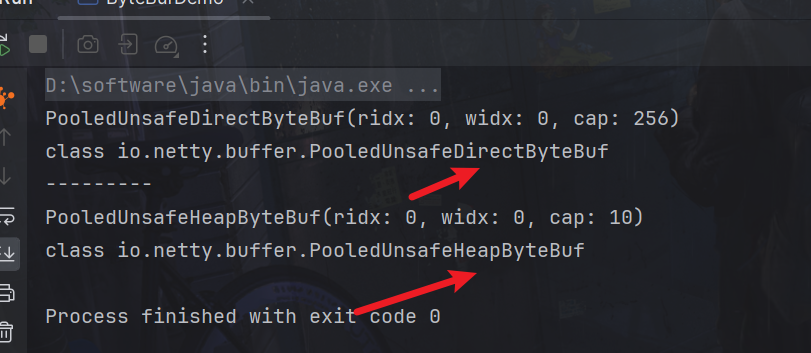
可以看到一个是直接,一个是堆。
池化的最大意义在于可以重用 ByteBuf,优点有
没有池化,则每次都得创建新的 ByteBuf 实例,这个操作对直接内存代价昂贵,就算是堆内存,也会增加 GC 压力
有了池化,则可以重用池中 ByteBuf 实例,并且采用了与 jemalloc 类似的内存分配算法提升分配效率
高并发时,池化功能更节约内存,减少内存溢出的可能
池化功能是否开启,可以通过下面的系统环境变量来设置,
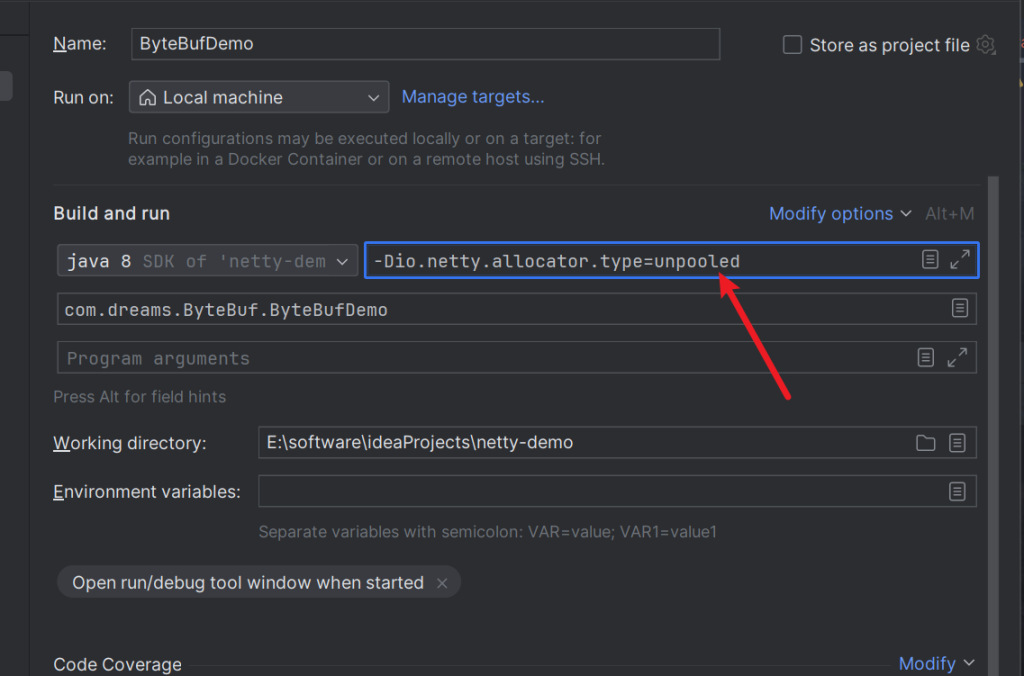
VM option参数:
-Dio.netty.allocator.type={unpooled|pooled}4.1 以后,非 Android 平台默认启用池化实现,Android 平台启用非池化实现
代码:
package com.dreams.ByteBuf;

import io.netty.buffer.ByteBuf;
import io.netty.buffer.ByteBufAllocator;

import static io.netty.buffer.ByteBufUtil.appendPrettyHexDump;
import static io.netty.util.internal.StringUtil.NEWLINE;

public class ByteBufDemo {
    public static void main(String[] args) {
        ByteBuf buf = ByteBufAllocator.DEFAULT.buffer();
        System.out.println(buf);
        System.out.println(buf.getClass());
    }
}
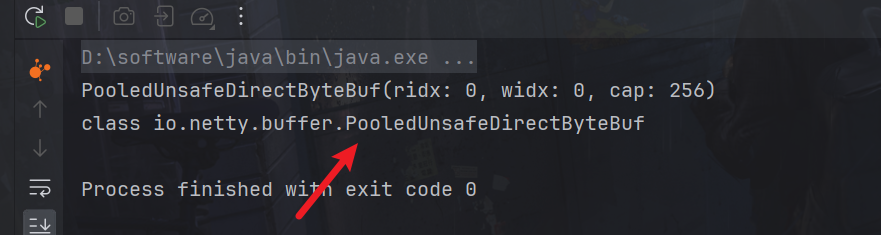
pool开头就是
添加VMoption
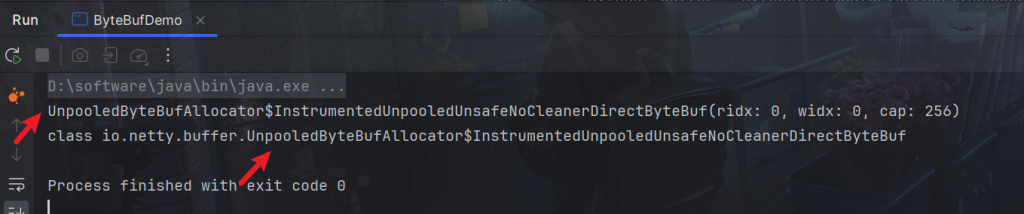
输出就是非池化了
ByteBuf结构
ByteBuf不同于nio的ByteBuffer读写共用一个指针,他有读指针和写指针,这样就不用来来回回切换读与写模式。
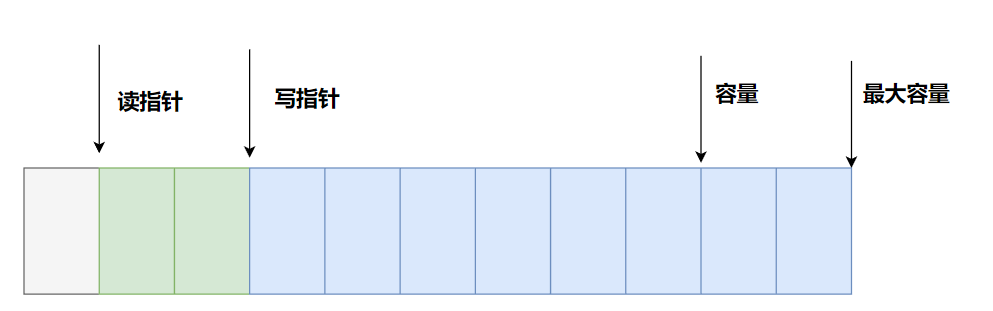
容量 (Capacity):
ByteBuf 的容量是指它所能容纳的最大字节数。当创建一个 ByteBuf 对象时,可以指定它的初始容量,当需要写入的数据大小超过当前容量时,ByteBuf 会进行扩容以容纳更多的数据。
最大容量 (Max Capacity):
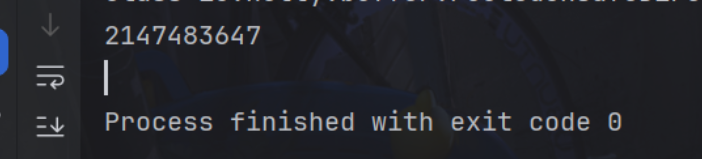
默认最大容量为2147483647,可以通过buf.maxCapacity()方法获取,只要不超过最大容量,最大容量都会动态扩容
读索引 (Reader Index):
读索引表示下一个被读取的字节的位置。当从 ByteBuf 中读取数据时,读索引会向前移动,指向下一个可读字节的位置。初始时,读索引通常为 0,表示从缓冲区的开头开始读取数据。
写索引 (Writer Index):
写索引表示下一个要写入的字节的位置。当向 ByteBuf 中写入数据时,写索引会向前移动,指向下一个可写入字节的位置。初始时,写索引通常与读索引重合,表示从缓冲区的开头开始写入数据。
ByteBuf常用方法
注意
这些方法的未指明返回值的,其返回值都是 ByteBuf,意味着可以链式调用
网络传输,默认习惯是 Big Endian
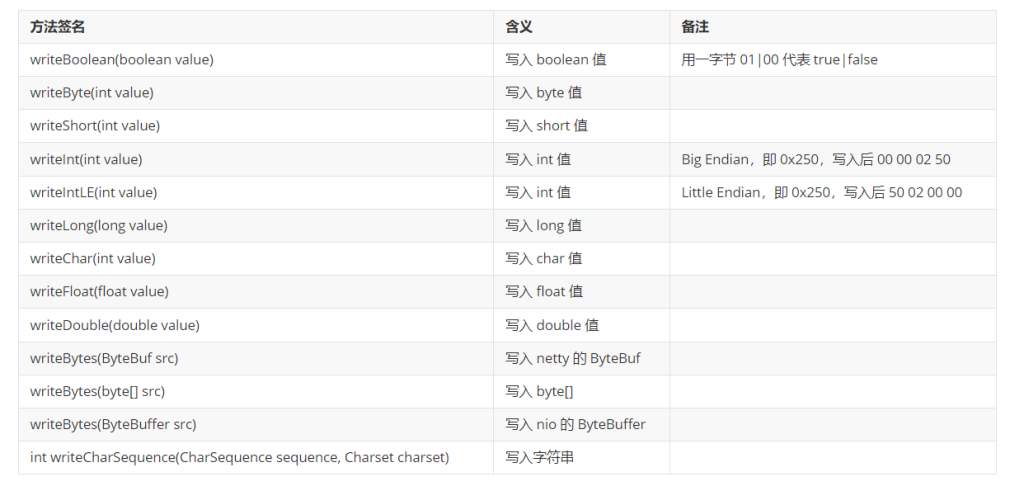
CharSequence是StringBuffer和StringBuilder的父类,既可以传入字符串
方法可以查看读写指针位置
public static void log(ByteBuf buffer) {
    int length = buffer.readableBytes();
    int rows = length / 16 + (length % 15 == 0 ? 0 : 1) + 4;
    StringBuilder buf = new StringBuilder(rows * 80 * 2)
        .append("read index:").append(buffer.readerIndex())
        .append(" write index:").append(buffer.writerIndex())
        .append(" capacity:").append(buffer.capacity())
        .append(NEWLINE);
    appendPrettyHexDump(buf, buffer);
    System.out.println(buf.toString());
}
注意要导入的类
import static io.netty.buffer.ByteBufUtil.appendPrettyHexDump;
import static io.netty.util.internal.StringUtil.NEWLINE;
代码举例
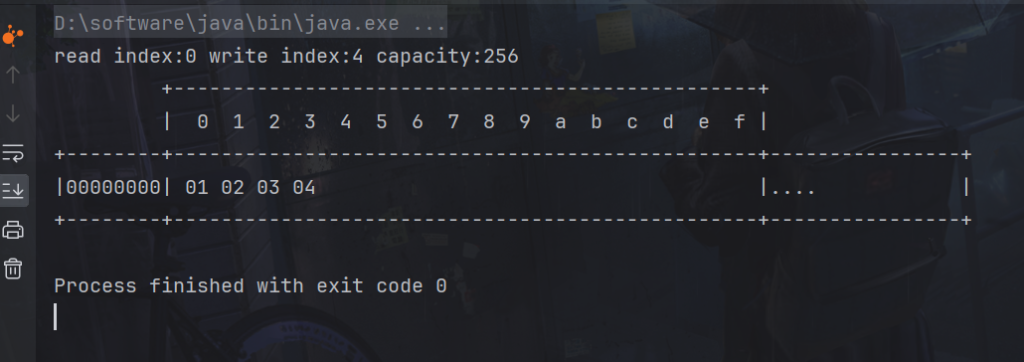
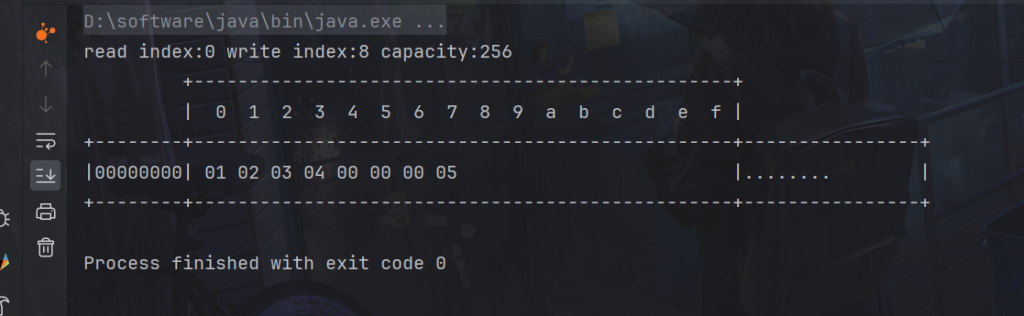
写入 4 个字节
ByteBuf buf = ByteBufAllocator.DEFAULT.buffer();
buf.writeBytes(new byte[]{1, 2, 3, 4});
log(buf);
读指针索引为0,写指针索引为4
再写入一个 int 整数,也是 4 个字节
buf.writeInt(5);
log(buf);
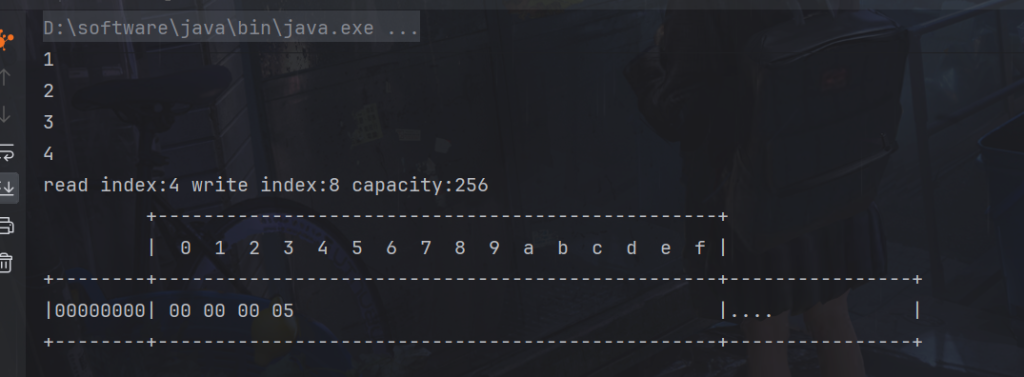
读取
System.out.println(buf.readByte());
System.out.println(buf.readByte());
System.out.println(buf.readByte());
System.out.println(buf.readByte());
log(buf);
读取过后的会被废弃
重复读
在 read 前先做个标记 mark,就可以重置到标记位置 reset
buf.writeBytes(new byte[]{1, 2, 3, 4});
//标记
buf.markReaderIndex();
System.out.println(buf.readByte());
log(buf);

//恢复
buf.resetReaderIndex();
log(buf);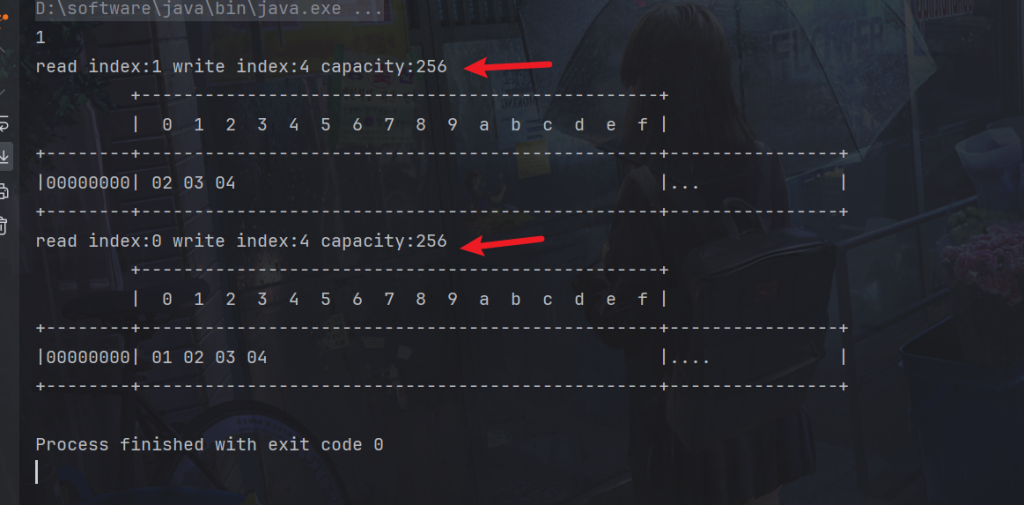
扩容规则
如果写入后数据大小超过 512,则选择下一个 2^n,例如写入后大小为 513,则扩容后 capacity 是 2^10=1024(2^9=512 已经不够了)
7.回收
UnpooledHeapByteBuf 使用的是 JVM 内存,只需等 GC 回收内存即可
UnpooledDirectByteBuf 使用的就是直接内存了,需要特殊的方法来回收内存
每个 ByteBuf 对象的初始计数为 1
调用 release 方法计数减 1,如果计数为 0,ByteBuf 内存被回收
调用 retain 方法计数加 1,表示调用者没用完之前,其它 handler 即使调用了 release 也不会造成回收
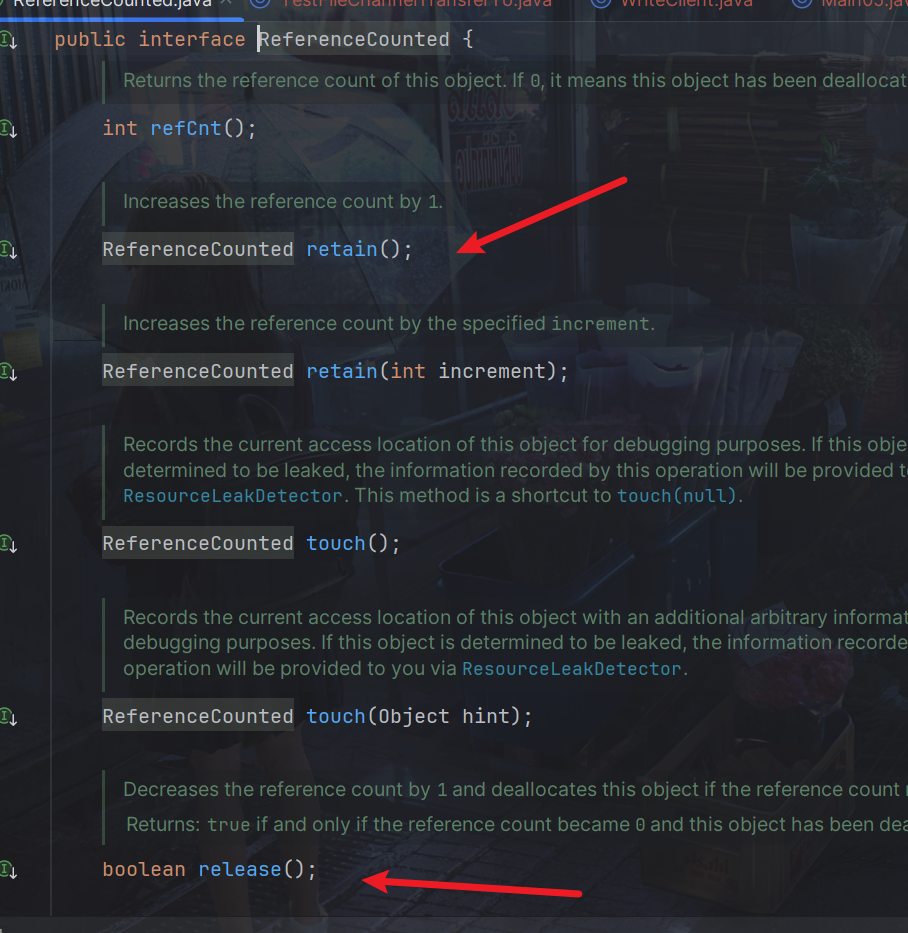
谁是最后使用者,谁负责 release。
起点,对于 NIO 实现来讲,在 io.netty.channel.nio.AbstractNioByteChannel.NioByteUnsafe#read 方法中首次创建 ByteBuf 放入 pipeline(line 163 pipeline.fireChannelRead(byteBuf))
入站 ByteBuf 处理原则
- 对原始 ByteBuf 不做处理,调用 ctx.fireChannelRead(msg) 向后传递,这时无须 release
- 将原始 ByteBuf 转换为其它类型的 Java 对象,这时 ByteBuf 就没用了,必须 release
- 如果不调用 ctx.fireChannelRead(msg) 向后传递,那么也必须 release
- 注意各种异常,如果 ByteBuf 没有成功传递到下一个 ChannelHandler,必须 release
- 假设消息一直向后传,那么最后 TailContext 会负责释放未处理消息(原始的 ByteBuf)
出站 ByteBuf 处理原则
- 出站消息最终都会转为 ByteBuf 输出,一直向前传,由 HeadContext flush 后 release
异常处理原则
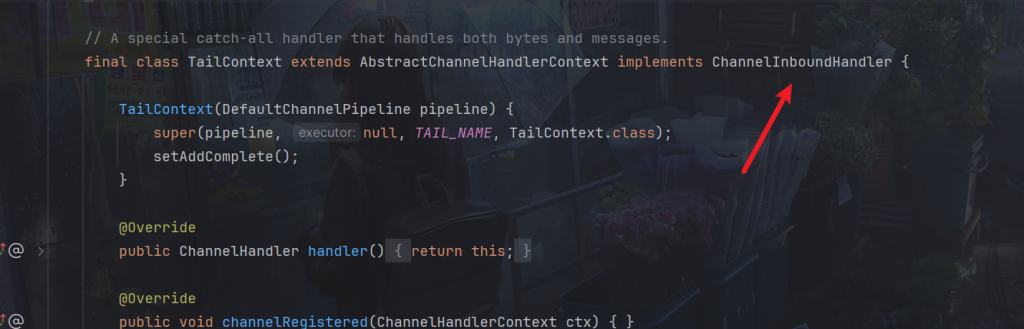
TailContext回收代码
可以看到其虽然是出站处理器,但是也继承了入站处理器
TailContext下有一个读的方法

再进去
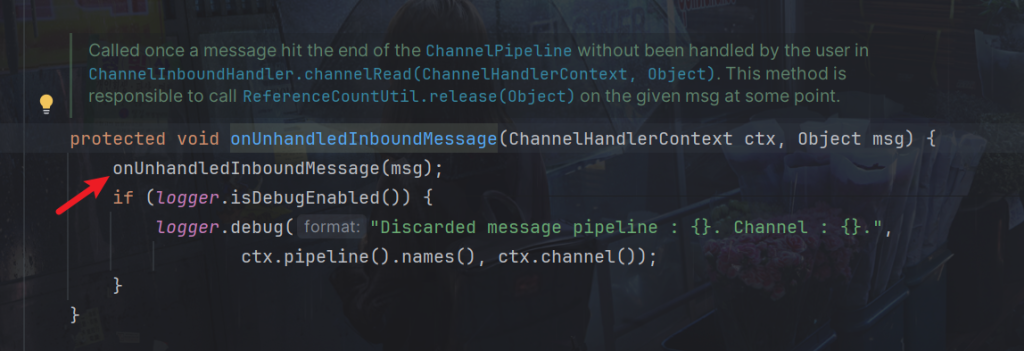
再进去,可以看到一个工具类调用了release方法
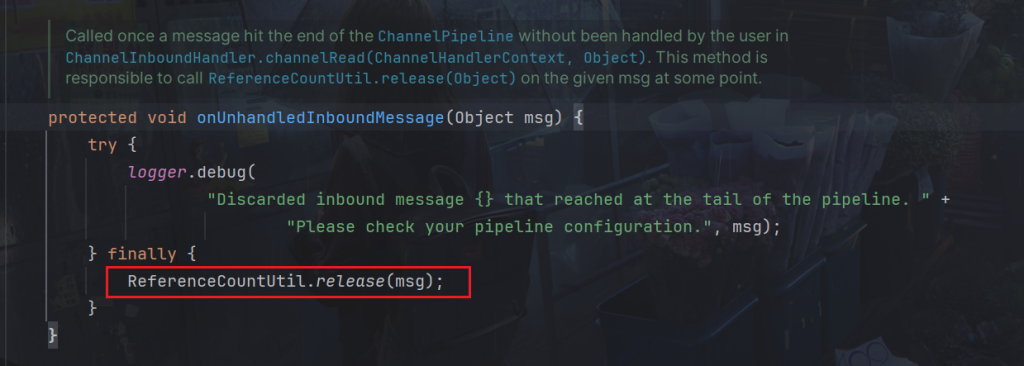
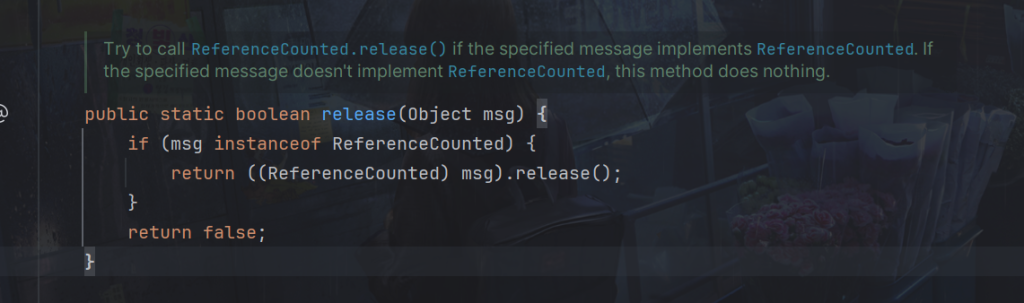
再进去,就可以看到,回收的逻辑,就是判断该对象是否是ReferenceCounted,是就将其回收掉。
HeadContext一样
HeadContext继承出站处理器
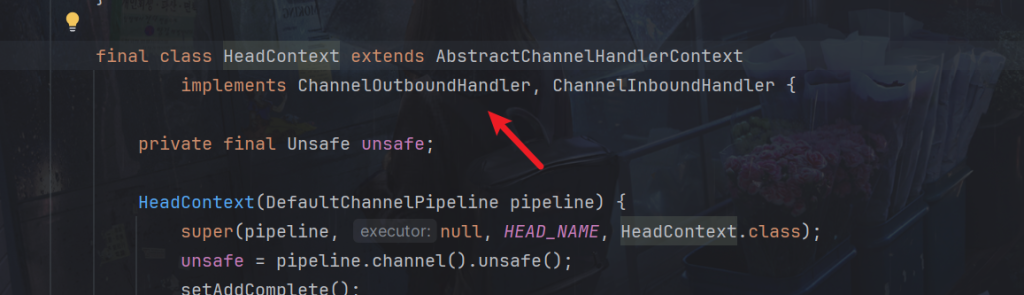
下面存在write

查看它的实现方法

可以看到同样有回收方法

8.零拷贝
这将创建一个新的 ByteBuf 实例 slicedBuf,其内容是 originalBuf 的一个切片。切片 slicedBuf 与原始的 originalBuf 共享同一块内存,因此对切片的操作会影响原始 ByteBuf。
ByteBuf buf = ByteBufAllocator.DEFAULT.buffer(10);
buf.writeBytes(new byte[]{'a','b','c','d','e','f','g','h','i','j'});
log(buf);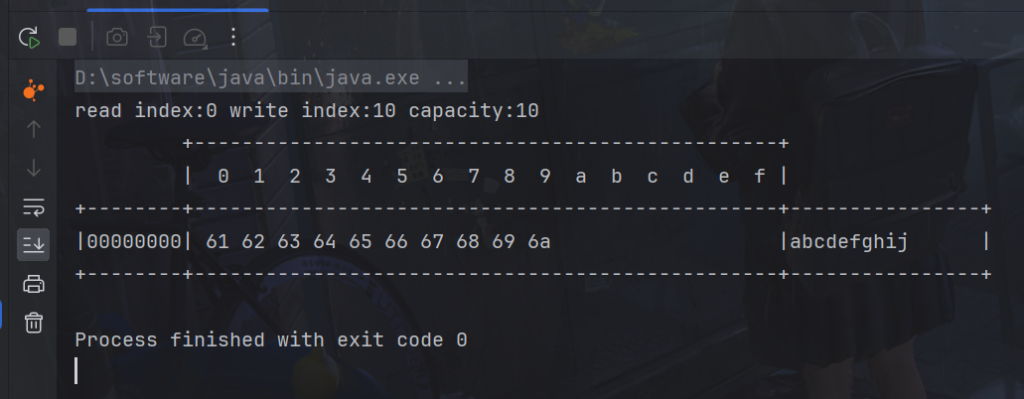
获取切片,创建一个新的 ByteBuf 实例 slicedBuf,其内容是 originalBuf 的一个切片。切片 slicedBuf 与原始的 originalBuf 共享同一块内存,因此对切片的操作会影响原始 ByteBuf。
// 在切片过程中,没有发生数据复制
ByteBuf f1 = buf.slice(0, 5);
ByteBuf f2 = buf.slice(5, 5);

log(f1);
log(f2);
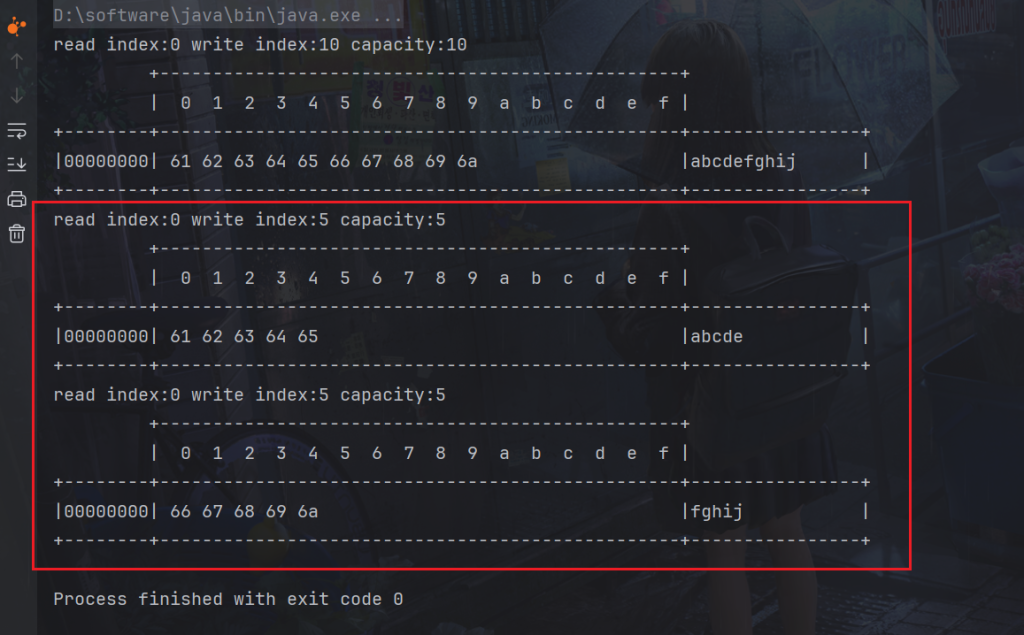
共享同一块内存,因此对切片的操作会影响原始 ByteBuf
f1.setByte(0, 'b');
log(f1);
log(buf);
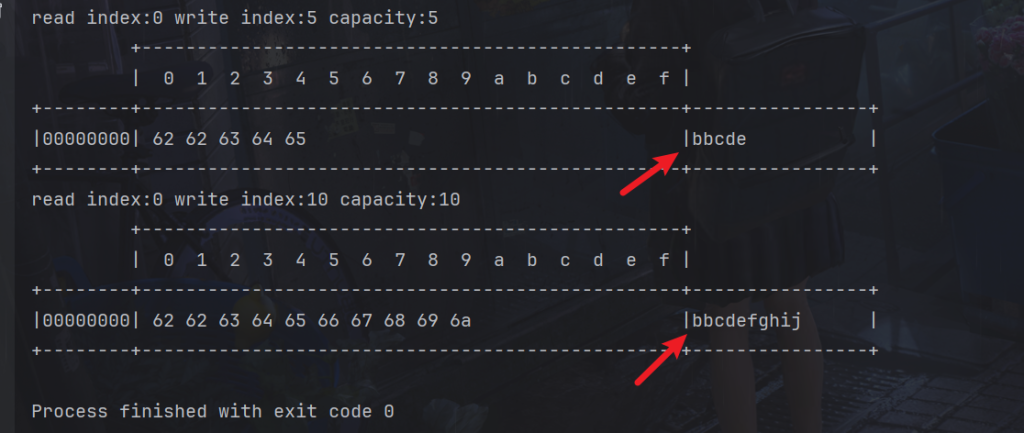
因为共享同一块内存,对切片的操作会影响原始 ByteBuf,所以切片的容量是不能扩大的,否则可能影响其他切片,切片后的 max capacity 被固定为这个区间的大小,因此不能追加 write
f1.writeBytes("a".getBytes());
同时如果原有的buf释放内存了,切片就不能使用了,当然可以调用f1.retain();给引用次数加一。
System.out.println("释放原有 byteBuf 内存");
buf.release();
log(f1);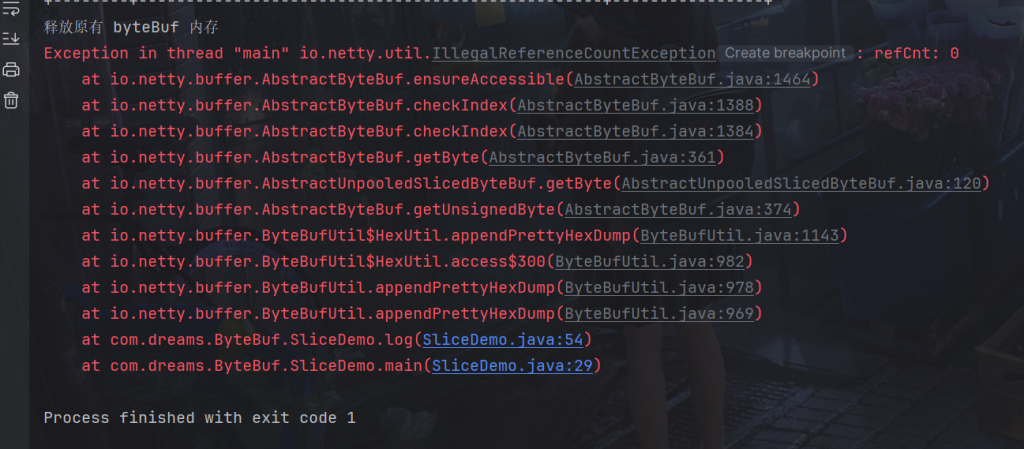
ByteBuf duplicatedBuf = buf.duplicate();
原生的如下:
package com.dreams.ByteBuf;

import io.netty.buffer.ByteBuf;
import io.netty.buffer.ByteBufAllocator;
import io.netty.buffer.CompositeByteBuf;

import static io.netty.buffer.ByteBufUtil.appendPrettyHexDump;
import static io.netty.util.internal.StringUtil.NEWLINE;

public class CompositeByteBufDemo {
    public static void main(String[] args) {
        ByteBuf buf1 = ByteBufAllocator.DEFAULT.buffer();
        buf1.writeBytes(new byte[]{1, 2, 3, 4, 5});

        ByteBuf buf2 = ByteBufAllocator.DEFAULT.buffer();
        buf2.writeBytes(new byte[]{6, 7, 8, 9, 10});

        ByteBuf buffer = ByteBufAllocator.DEFAULT.buffer();
        buffer.writeBytes(buf1).writeBytes(buf2);
        log(buffer);
    }
}
输出虽然成功,但是是使用了
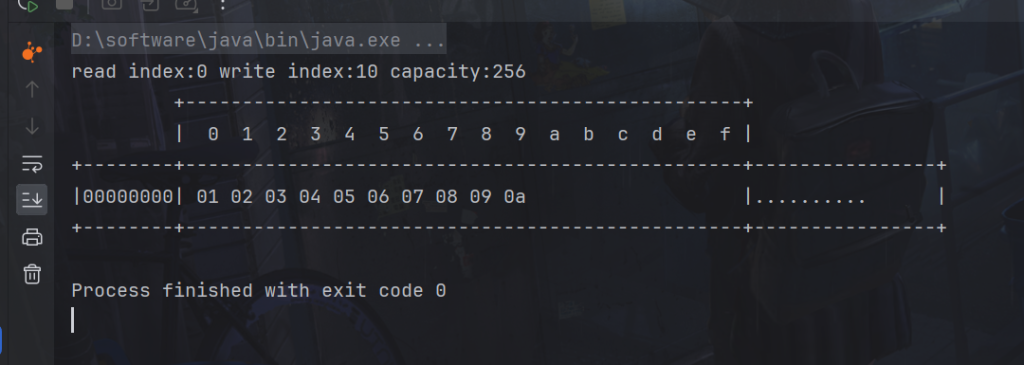
使用CompositeByteBuf,
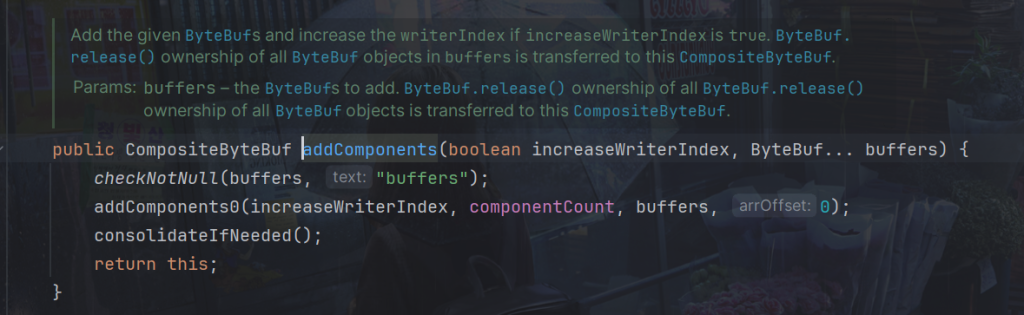
- increaseWriterIndex 参数是一个布尔值,表示是否要增加写入索引。如果设为 true,则添加 ByteBuf 后会增加写入索引,使得下次写入操作不会覆盖之前的数据;如果设为 false,则不会增加写入索引,新添加的数据会覆盖之前的数据。
- buf1, buf2, … 是要添加的 ByteBuf 对象。
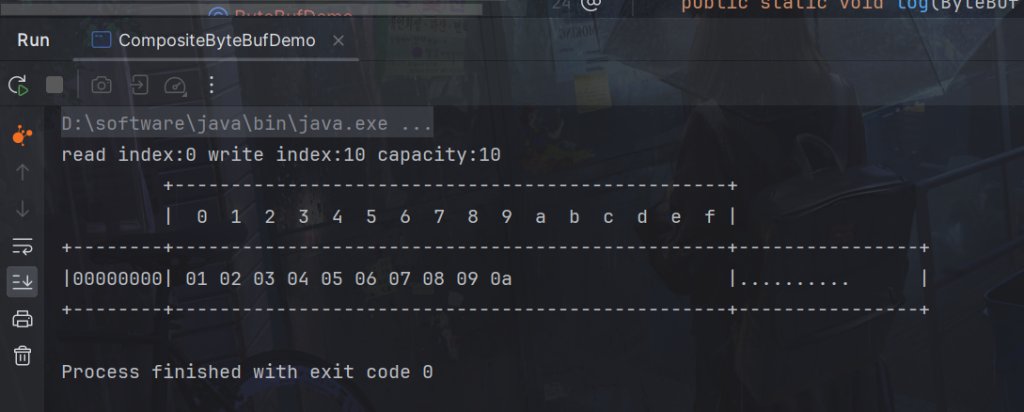
演示:
package com.dreams.ByteBuf;

import io.netty.buffer.ByteBuf;
import io.netty.buffer.ByteBufAllocator;
import io.netty.buffer.CompositeByteBuf;

import static io.netty.buffer.ByteBufUtil.appendPrettyHexDump;
import static io.netty.util.internal.StringUtil.NEWLINE;

public class CompositeByteBufDemo {
    public static void main(String[] args) {
        ByteBuf buf1 = ByteBufAllocator.DEFAULT.buffer();
        buf1.writeBytes(new byte[]{1, 2, 3, 4, 5});

        ByteBuf buf2 = ByteBufAllocator.DEFAULT.buffer();
        buf2.writeBytes(new byte[]{6, 7, 8, 9, 10});

        CompositeByteBuf buf = ByteBufAllocator.DEFAULT.compositeBuffer();
        buf.addComponents(true, buf1, buf2);
        log(buf);
    }
}
package com.dreams.ByteBuf;

import io.netty.buffer.ByteBuf;
import io.netty.buffer.ByteBufAllocator;
import io.netty.buffer.ByteBufUtil;
import io.netty.buffer.Unpooled;

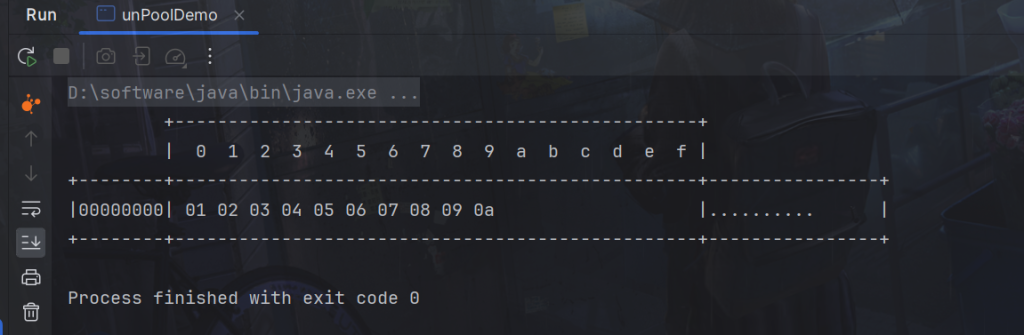
public class unPoolDemo {
    public static void main(String[] args) {
        ByteBuf buf1 = ByteBufAllocator.DEFAULT.buffer(5);
        buf1.writeBytes(new byte[]{1, 2, 3, 4, 5});
        ByteBuf buf2 = ByteBufAllocator.DEFAULT.buffer(5);
        buf2.writeBytes(new byte[]{6, 7, 8, 9, 10});

        // 当包装 ByteBuf 个数超过一个时, 底层使用了 CompositeByteBuf
        ByteBuf buf3 = Unpooled.wrappedBuffer(buf1, buf2);
        System.out.println(ByteBufUtil.prettyHexDump(buf3));
    }
}
也可以用来包装普通字节数组,底层也不会有拷贝操作
ByteBuf buf4 = Unpooled.wrappedBuffer(new byte[]{1, 2, 3}, new byte[]{4, 5, 6});
System.out.println(buf4.getClass());
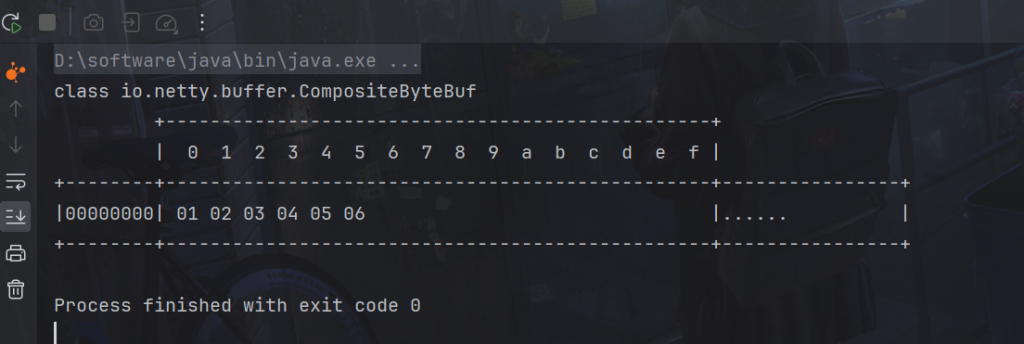
System.out.println(ByteBufUtil.prettyHexDump(buf4));