1.概述
logrus日志框架官网链接
GitHub – sirupsen/logrus: Structured, pluggable logging for Go.
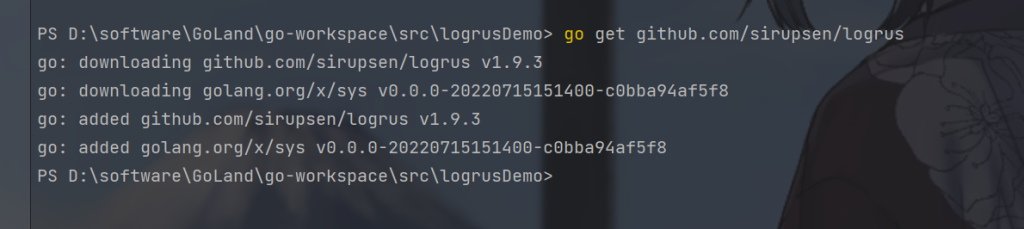
安装Logrus
go get github.com/sirupsen/logrus
2.日志级别
Logrus定义的级别有7个,从上往下等级越来越低。
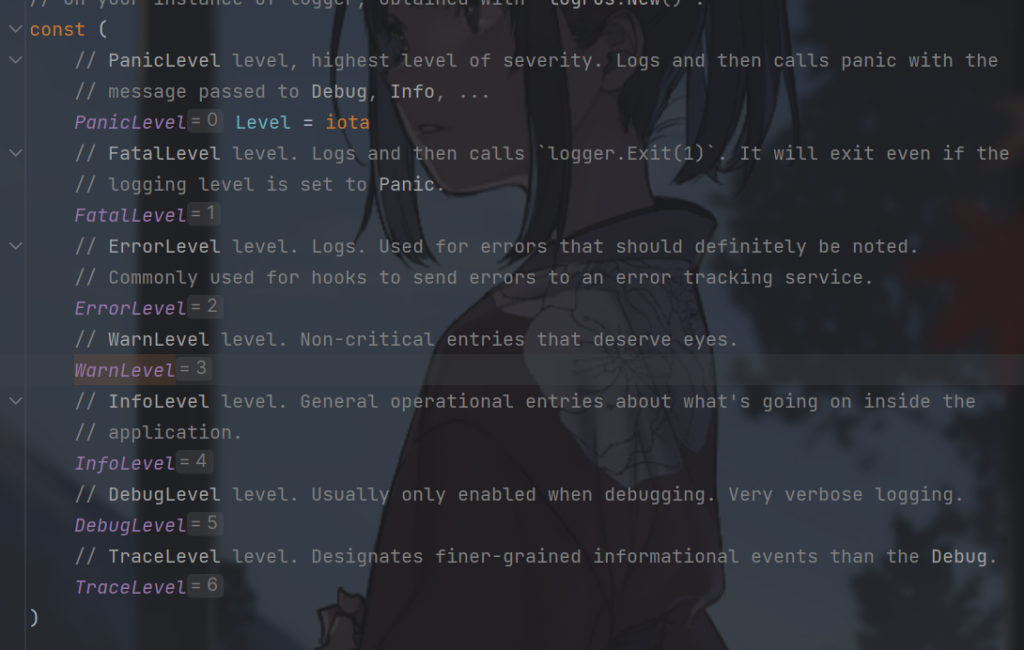
这里我们可以看到默认的日志级别
package main

import (
    "fmt"
    "github.com/sirupsen/logrus"
)

func main() {
    fmt.Println("默认日志级别 :", logrus.GetLevel())
}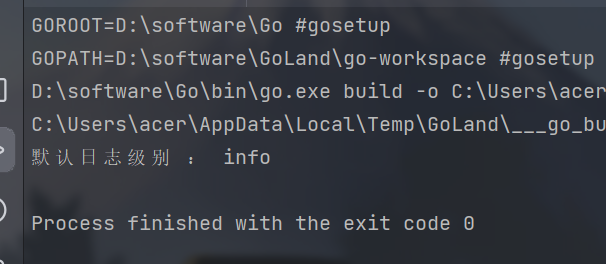
默认日志级别是info,在这住下的日志级别输出不会生效
Logrus 的存在不同日志级别函数,分别用于记录不同级别的日志消息:
- logrus.Error(“错误日志”):记录一个 Error 级别的日志消息,表示程序运行过程中出现了错误。
- logrus.Warnln(“警告日志”):记录一个 Warn 级别的日志消息,表示程序运行过程中出现了一些需要注意但不是错误的情况。
- logrus.Infof(“信息日志”):记录一个 Info 级别的日志消息,表示程序运行过程中的一些重要信息。
- logrus.Debugf(“debug日志”):记录一个 Debug 级别的日志消息,用于调试程序时输出详细信息。
- logrus.Println(“普通打印日志”):使用 Println 函数记录一个普通的日志消息,没有指定日志级别。
这里我们输出一下
package main

import (
   "fmt"
   "github.com/sirupsen/logrus"
)

func main() {
   fmt.Println("默认日志级别 :", logrus.GetLevel())
   logrus.Error("错误日志")
   logrus.Warnln("警告日志")
   logrus.Infof("信息日志")
   logrus.Debugf("debug日志")
   logrus.Println("普通打印日志")
}
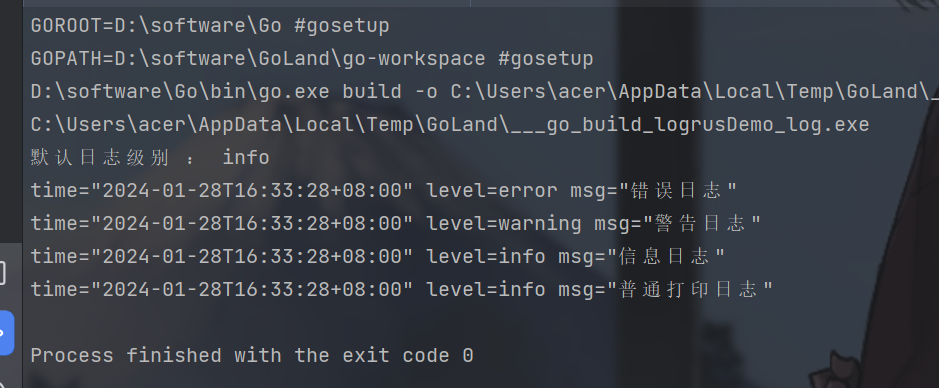
因为默认日志级别是info,在这住下的日志级别输出不会生效,所以debug日志不会输出
log.SetLevel() 是 Logrus 中的方法,用于设置日志记录器的日志级别。
logrus.SetLevel(logrus.DebugLevel)
这样就是debug级别的日志。
3.设置字段
logrus.WithField() 方法返回的类型是 *Entry,它是 Logrus 中用于记录日志的结构体。
*Entry 类型具有一组方法,用于对日志进行操作和记录。
package main

import (
    "fmt"
    "github.com/sirupsen/logrus"
)

func main() {
    //日志级别
    fmt.Println("默认日志级别 :", logrus.GetLevel())
    logrus.SetLevel(logrus.DebugLevel)
    fmt.Println("修改日志级别 :", logrus.GetLevel())

    //设置字段格式
    log := logrus.WithField("key-1", "value-1").WithField("key-2", "value-2")

    log.Error("错误日志")
    log.Warnln("警告日志")
    log.Infof("信息日志")
    log.Debugf("debug日志")
    log.Println("普通打印日志")

}
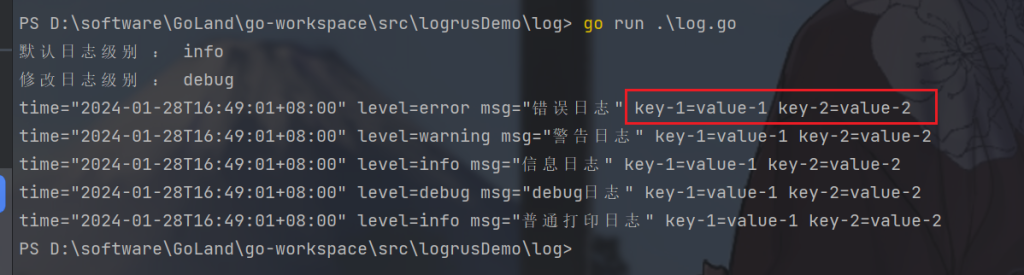
logrus.WithField() 是 Logrus 中的方法之一,用于在指定日志记录器上添加一个字段和相应的值。
可以看到输出的日志自动加上了键值对
如果想要设置多个字段,比如实际业务中标识
package main

import (
"github.com/sirupsen/logrus"
)

func main() {
    log := logrus.WithFields(logrus.Fields{
        "userId": "002",
        "name": "dreams",
    })

    log.Error("错误日志")
    log.Warnln("警告日志")
    log.Infof("信息日志")
    log.Debugf("debug日志")
    log.Println("普通打印日志")

}
可以看到

4.日志输出格式
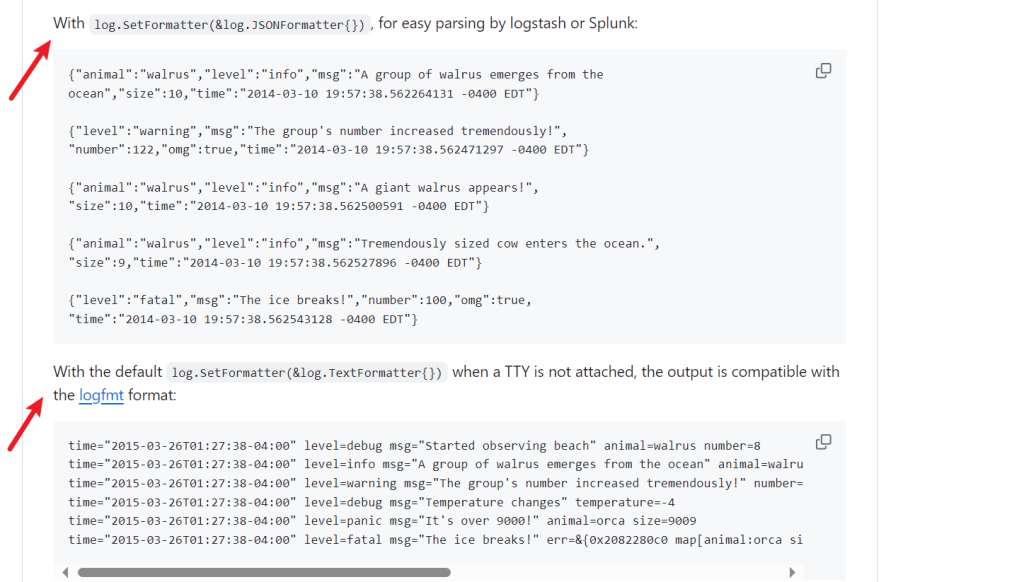
可以看到存在两种形式的日志
如果要对日志进行分析使用json形式日志更好,我们选择第一种
我们直接使用官网案例
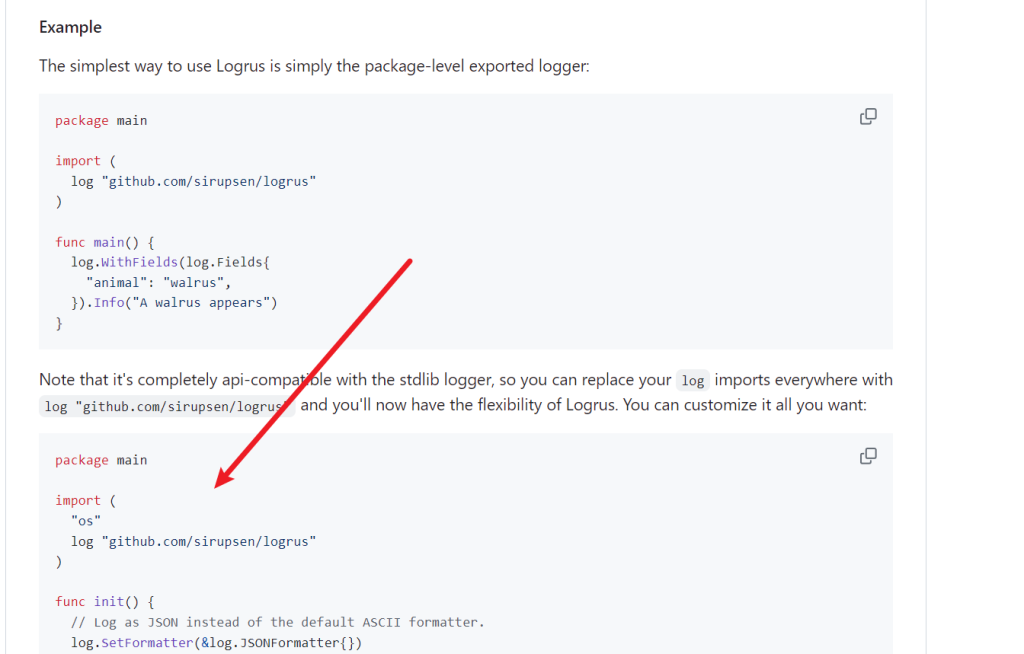
新建一个项目,复制进去
package main

import (
   log "github.com/sirupsen/logrus"
   "os"
)

func init() {
   // Log as JSON instead of the default ASCII formatter.
   log.SetFormatter(&log.JSONFormatter{})
   // Output to stdout instead of the default stderr
   // Can be any io.Writer, see below for File example
   log.SetOutput(os.Stdout)
   // Only log the warning severity or above.
   log.SetLevel(log.WarnLevel)
}

func main() {
   log.WithFields(log.Fields{
      "animal": "walrus",
      "size":   10,
   }).Info("A group of walrus emerges from the ocean")
   log.WithFields(log.Fields{
      "omg":    true,
      "number": 122,
   }).Warn("The group's number increased tremendously!")
   log.WithFields(log.Fields{
      "omg":    true,
      "number": 100,
   }).Fatal("The ice breaks!")
   // A common pattern is to re-use fields between logging statements by re-using
   // the logrus.Entry returned from WithFields()
   contextLogger := log.WithFields(log.Fields{
      "common": "this is a common field",
      "other":  "I also should be logged always",
   })
   contextLogger.Info("I'll be logged with common and other field")
   contextLogger.Info("Me too")
}
首先查看init函数
func init() {
    // Log as JSON instead of the default ASCII formatter.
    log.SetFormatter(&log.JSONFormatter{})

    // Output to stdout instead of the default stderr
    // Can be any io.Writer, see below for File example
    log.SetOutput(os.Stdout)

    // Only log the warning severity or above.
    log.SetLevel(log.WarnLevel)
}
log.SetFormatter(&logrus.JSONFormatter{}) 是使用 Logrus 记录日志时设置输出格式为 JSON 格式的代码。就是上图的效果。
默认使用的就是Test形式的,如下:
log.SetFormatter(&log.TextFormatter{})对于默认的Test形式可以设置颜色
package main

import (
    "github.com/sirupsen/logrus"
)

func main() {
    //日志级别
    logrus.SetLevel(logrus.DebugLevel)

    logrus.SetFormatter(&logrus.TextFormatter{
        //开启颜色
        ForceColors: true,
    })

    log := logrus.WithFields(logrus.Fields{
        "userId": "002",
        "name": "dreams",
    })

    log.Error("错误日志")
    log.Warnln("警告日志")
    log.Infof("信息日志")
    log.Debugf("debug日志")
    log.Println("普通打印日志")

}
还不错
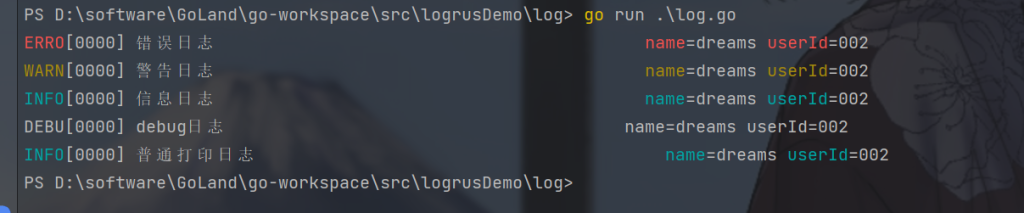
logrus.TextFormatter 是 Logrus 中的一种格式化器,用于将日志记录为文本格式。
logrus.TextFormatter 中的属性列表:
- DisableColors(bool):禁用彩色日志输出(默认为 false)。
- DisableTimestamp(bool):禁用时间戳(默认为 false)。如果设置为 true,则不会在日志中包含时间戳。
- FullTimestamp(bool):使用完整的时间戳,而不仅仅是时间部分(默认为 false)。
- TimestampFormat(string):自定义时间戳格式的布局字符串。可以使用 Go 的时间格式化字符串来指定格式。
- DisableSorting(bool):禁用字段排序(默认为 false)。如果设置为 true,则不会按字母顺序对字段进行排序。
- QuoteEmptyFields(bool):引用空字段值(默认为 false)。如果设置为 true,则空字段值将被引用。
- ForceColors(bool):强制启用彩色日志输出(默认为 false)。即使不是在终端中运行,也会强制使用颜色。
- EnvironmentOverrideColors(bool):根据环境变量覆盖颜色设置(默认为 true)。通过环境变量 CLICOLOR_FORCE 和 CLICOLOR 来决定是否启用颜色输出。
- DisableLevelTruncation(bool):禁用对日志级别进行截断(默认为 false)。如果设置为 true,则不会将日志级别截断为 4 个字符。
- PadLevelText(bool):对日志级别文本进行填充(默认为 false)。如果设置为 true,则会在日志级别文本后添加空格以对齐。
- QuoteCharacter(string):自定义字段值引用字符的字符串(默认为 “)。可以使用单引号 ‘ 或其他字符来代替
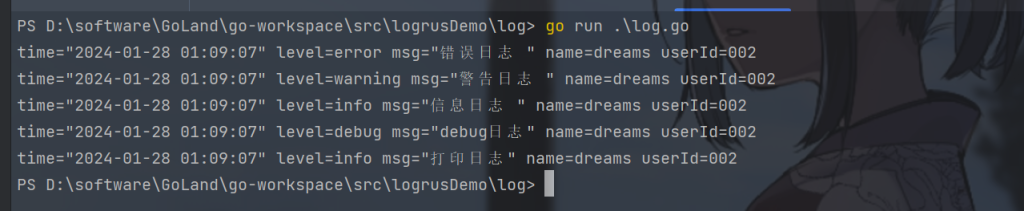
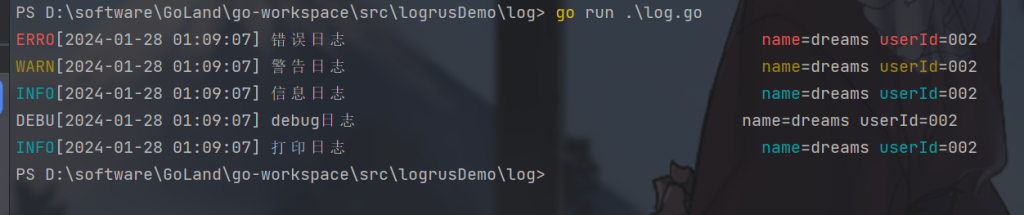
比如
package main

import "github.com/sirupsen/logrus"

func main() {
   //日志级别
   logrus.SetLevel(logrus.DebugLevel)
   logrus.SetFormatter(&logrus.TextFormatter{
      ForceColors:     true,
      FullTimestamp:   true,
      TimestampFormat: "2006-01-02 01:09:07",
   })
   log := logrus.WithFields(logrus.Fields{
      "userId": "002",
      "name":   "dreams",
   })
   log.Error("错误日志 ")
   log.Warnln("警告日志 ")
   log.Infof("信息日志 ")
   log.Debugf("debug日志")
   log.Println("打印日志")
}
5.logrus输出到文件
log.SetOutput() 是 Logrus 中的一个方法,用于设置日志记录器的输出目标。通过调用该方法,你可以将日志输出到控制台、文件或其他自定义的输出目标。
log.SetOutput(os.Stdout) 这行代码的作用是将 Logrus 的日志输出目标设置为标准输出,也就是控制台。这意味着所有通过 Logrus 记录的日志消息都将被输出到控制台上。
所以我们要输出文件只要改为文件即可
//输出到文件
file, _ := os.OpenFile("log/log.log", os.O_CREATE|os.O_WRONLY|os.O_APPEND, 0666)
logrus.SetOutput(file)
os.O_CREATE|os.O_WRONLY|os.O_APPEND: 这部分是打开文件的模式。
- os.O_CREATE 表示如果文件不存在则创建文件,
- os.O_WRONLY 表示以只写模式打开文件,
- os.O_APPEND 表示在写入数据时追加到文件末尾而不是覆盖文件内容。
0666: 这是文件的权限设置,表示允许所有用户读写该文件。
如果想要同时输出控制台和文件,使用io.MultiWriter ,用于创建一个多重写入器。它接收多个参数,每个参数都是一个实现了 io.Writer 接口的对象,表示将数据同时写入到这些对象中。
file, _ := os.OpenFile("log/log.log", os.O_CREATE|os.O_WRONLY|os.O_APPEND, 0666)
logrus.SetOutput(io.MultiWriter(file, os.Stdout))
举例:
package main

import (
   "github.com/sirupsen/logrus"
   "io"
   "os"
)

func main() {
   //输出到文件
   file, _ := os.OpenFile("log/log.log", os.O_CREATE|os.O_WRONLY|os.O_APPEND, 0666)
   //logrus.SetOutput(file)
   logrus.SetOutput(io.MultiWriter(file, os.Stdout))
   //日志级别
   logrus.SetLevel(logrus.DebugLevel)
   logrus.SetFormatter(&logrus.TextFormatter{
      FullTimestamp:   true,
      TimestampFormat: "2006-01-02 01:09:07",
   })
   log := logrus.WithFields(logrus.Fields{
      "userId": "002",
      "name":   "dreams",
   })
   log.Error("错误日志 ")
   log.Warnln("警告日志 ")
   log.Infof("信息日志 ")
   log.Debugf("debug日志")
   log.Println("打印日志")
}