1.概述
NIO,即New Input/Output(或non-blocking io 非阻塞 IO),是Java中用于非阻塞I/O操作的一组API。它提供了一种更为高效的IO操作方式,适用于需要处理大量连接的服务器应用。
NIO(New I/O)在Java中有三个核心组件,它们是通道(Channel)、缓冲区(Buffer)和选择器(Selector)。这些组件共同构成了NIO的基本框架,实现了高效的非阻塞I/O操作。
- 通道(Channel): 通道是NIO中用于数据传输的双向连接。它类似于传统IO中的流,但通道可以同时支持读和写操作,而且可以通过通道直接与缓冲区交互,提供更高效的数据传输。常见的通道类型包括FileChannel、DatagramChannel、SocketChannel、ServerSocketChannel等,分别用于文件操作、网络Socket连接等。
- 缓冲区(Buffer): 缓冲区是NIO中用于暂时存储数据的区域,所有数据的读写操作都是通过缓冲区进行的。缓冲区提供了对数据的结构化访问,并可以追踪读写位置、限制等信息,以便有效地管理数据。常见的缓冲区类型包括ByteBuffer(DirectByteBuffer、)、CharBuffer、IntBuffer等,根据数据类型不同选择不同的缓冲区类型。
- 选择器(Selector): 选择器是NIO中用于多路复用的关键组件,它可以监听多个通道上的事件,例如读、写、连接等。通过选择器,一个线程可以监听多个通道上的事件,实现了单线程处理多个连接,提高了系统的并发性能。选择器主要用于实现非阻塞I/O,避免了传统阻塞I/O中线程阻塞等待的情况。
selector图示
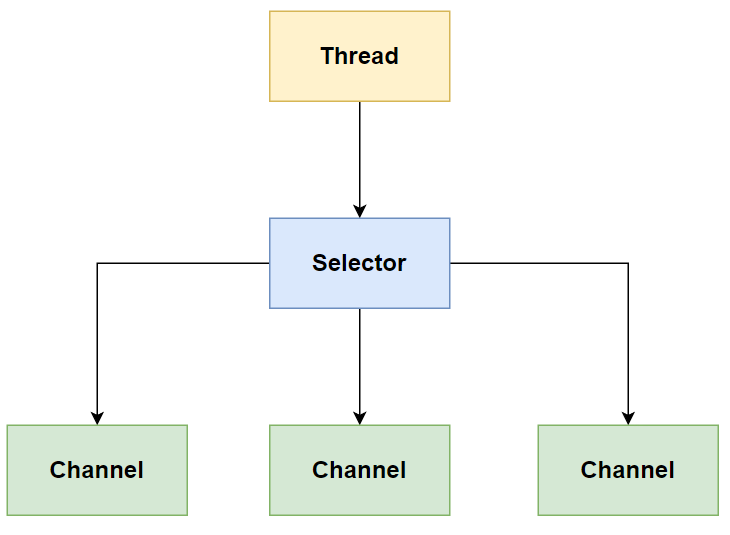
这三个组件相互协作,构成了NIO模型的基础。通道负责数据的传输,缓冲区负责数据的存储和管理,选择器负责监听通道上的事件。通过合理地使用这些组件,可以实现高效的非阻塞I/O操作,适用于需要处理大量连接的网络应用场景。
调用selector的select()会阻塞直到channel发生了读写就绪事件,这些事件发生, select方法就会返回这些事件交给 thread 来处理
2.Buffer使用
基本使用
新建项目,加入依赖
<!--netty依赖-->
<dependency>
    <groupId>io.netty</groupId>
    <artifactId>netty-all</artifactId>
    <version>4.1.39.Final</version>
</dependency>
<dependency>
    <groupId>org.projectlombok</groupId>
    <artifactId>lombok</artifactId>
    <version>1.16.18</version>
</dependency>
<!--做json转换的-->
<dependency>
    <groupId>com.google.code.gson</groupId>
    <artifactId>gson</artifactId>
    <version>2.8.5</version>
</dependency>
<!--谷歌工具类合集-->
<dependency>
    <groupId>com.google.guava</groupId>
    <artifactId>guava</artifactId>
    <version>19.0</version>
</dependency>
准备个文件Hello.txt做读取测试,放在项目目录下
Hello World !
一个简单的程序
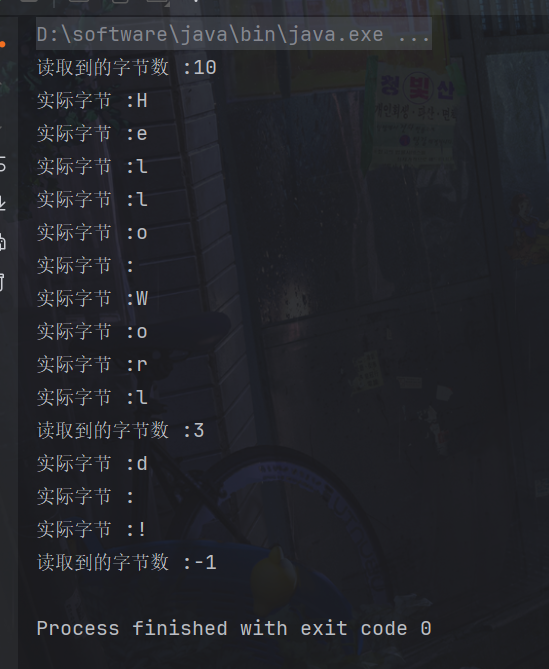
通过FileInputStream获取了文件的FileChannel,然后准备了一个ByteBuffer作为缓冲区来存储读取的数据。接着进入了一个循环,在循环中不断从FileChannel读取数据到ByteBuffer中,并逐个字节输出到控制台,直到文件结束。
在每次从FileChannel读取数据后,需要调用flip()方法将ByteBuffer切换至读模式,然后使用get()方法逐个字节读取数据。读取完毕后,再调用clear()方法切换为写模式,准备下一次读取。
package com.dreams;

import java.io.FileInputStream;
import java.io.IOException;
import java.nio.ByteBuffer;
import java.nio.channels.FileChannel;
public class Main {

    public static void main(String[] args) {
        // FileChannel
        // 1. 输入输出流, 2. RandomAccessFile
        try (FileChannel channel = new FileInputStream("Hello.txt").getChannel()) {
            // 准备缓冲区
            ByteBuffer buffer = ByteBuffer.allocate(10);
            while (true) {
                // 从 channel 读取数据,向 buffer 写入
                int len = channel.read(buffer);
                System.out.println("读取到的字节数 :" + len);
                if (len == -1) { // 没有内容了
                    break;
                }
                // 打印 buffer 的内容
                buffer.flip(); // 切换至读模式
                while (buffer.hasRemaining()) { // 是否还有剩余未读数据
                    byte b = buffer.get();
                    System.out.println("实际字节 :" + (char) b);
                }
                buffer.clear(); // 切换为写模式
            }
        } catch (IOException e) {
            e.printStackTrace();
        }
    }
}
输出如下
ByteBuffer 是 Java NIO 中的一个缓冲区对象,用于读取和写入字节数据。它是一个抽象类,继承于Buffer。
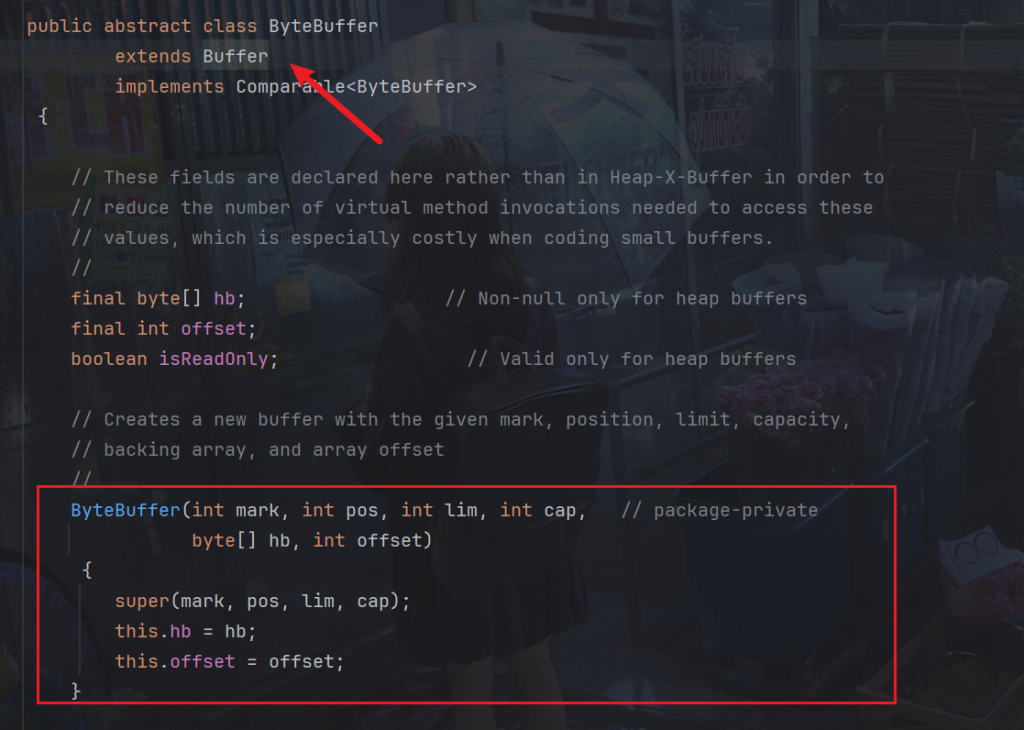
继承4个重要属性
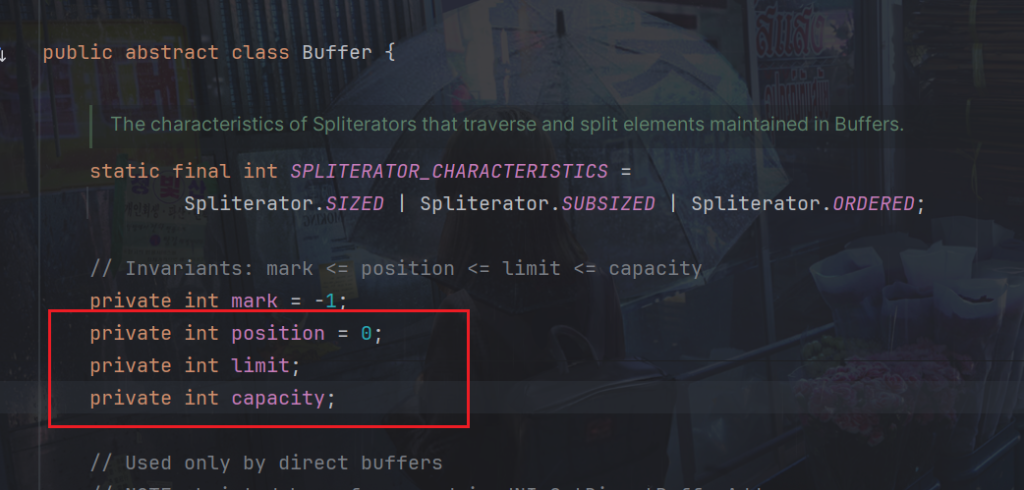
- Capacity(容量):表示缓冲区的总容量,即可以容纳的最大字节数。一旦创建,容量不可更改。
- Position(位置):表示当前的位置,即下一个要读取或写入的字节的索引位置。初始位置为 0,读取或写入后会自动移动。
- Limit(限制):表示缓冲区的限制位置,即不能读取或写入超过此位置的字节。初始限制位置等于容量,可以通过flip()、limit(n)等方法设置新的限制位置。
通过调整 position 和 limit 的值,可以在缓冲区中实现读取和写入操作。读取操作会将 position重新向前移动到开始位置然后向后移动,写入操作会将 position 向后移动。limit 限制了读取或写入的范围,不能超过该位置。
使用 clear() 方法可以将缓冲区切换为写模式,此时 position 被设置为 0,limit 被设置为容量。这样可以方便地写入新的数据。写入操作会将 position 向后移动
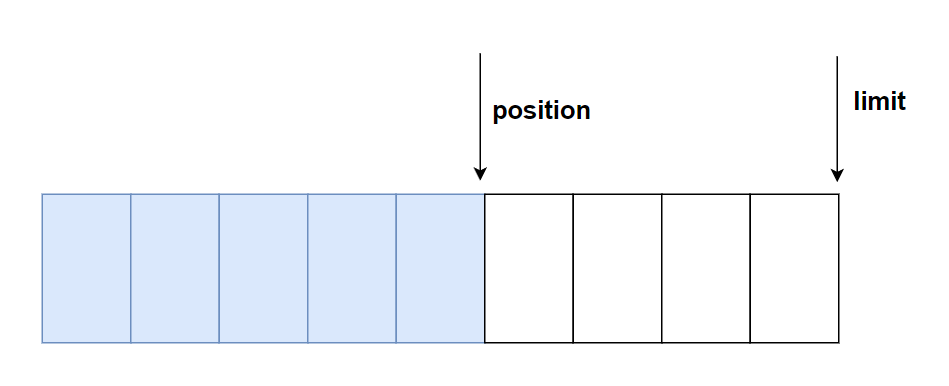
使用 flip() 方法可以将缓冲区切换为读模式,此时 position 被设置为 0,limit 被设置为读取的 position 值位置。这样可以方便地读取之前写入的数据。读取操作会将 position 重新向前移动到开始位置然后向后移动,limit 限制了读取或写入的范围。

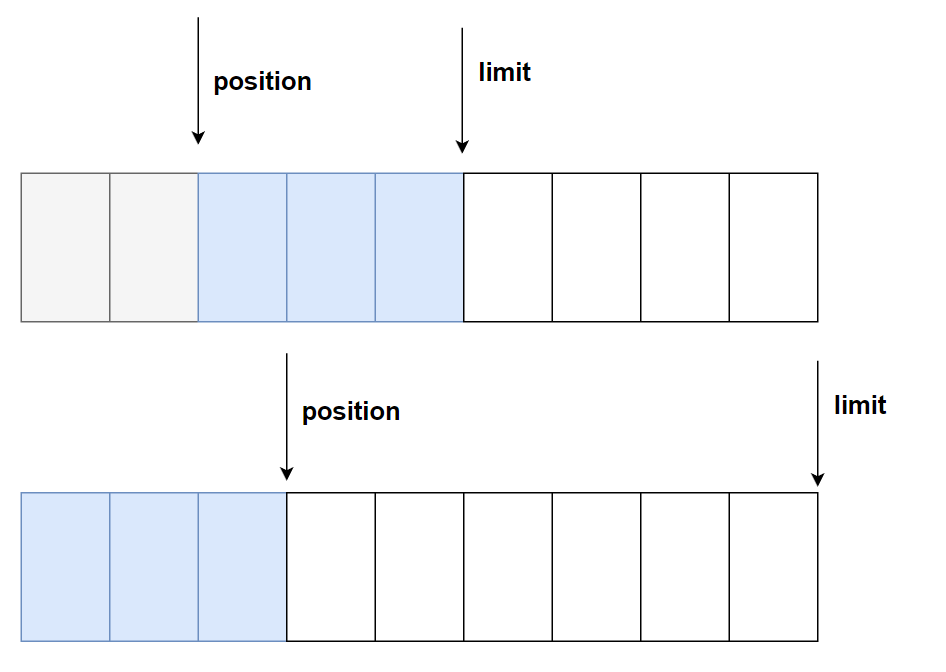
compact() 同样可以将缓冲区切换为写模式,主要用于压缩缓冲区,将未读取的数据移动到缓冲区的起始位置,同时更新 position 和 limit,以便继续向缓冲区写入新的数据。
在调用 compact() 方法之前,通常是在读取完部分数据后需要继续写入数据,但是缓冲区可能还有未读取完的数据。通过调用 compact() 方法,可以将未读取的数据移动到缓冲区的起始位置, 而position 被设置为未读取的数据之后,保留未读取数据,同时为新的数据留出空间。
常用方法
创建ByteBuffer:可以使用ByteBuffer.allocate()方法来创建一个指定大小的ByteBuffer,或者使用ByteBuffer.allocateDirect()方法创建一个直接缓冲区,适用于需要直接与底层操作系统交互的场景。
ByteBuffer buffer = ByteBuffer.allocate(10);
ByteBuffer buffer = ByteBuffer.allocateDirect(1024); // 在本地内存中分配 1024 字节的缓冲区
ByteBuffer.allocate() 方法
- 用于在 Java 虚拟机的堆内存中创建一个字节缓冲区。数据存储在 Java 虚拟机的堆内存中。
- 由于数据存储在堆内存中,因此受到 Java 垃圾回收机制的管理。
- 适合处理小量数据或者临时数据,因为堆内存的分配和释放相对容易,但可能会受到垃圾回收的影响。
ByteBuffer.allocateDirect() 方法
- 用于在操作系统的本地内存(直接内存)中创建一个字节缓冲区。数据存储在操作系统的本地内存中,而不受 Java 垃圾回收机制管理。
- 由于数据存储在本地内存中,因此可以避免在 Java 堆和本地堆之间复制数据,适合处理大量数据或者需要频繁进行 I/O 操作的场景。
- 但是分配效率低,且可能会造成内存泄漏。
切换读写模式:在写入完数据后,需要将ByteBuffer切换至读模式,以便读取数据。使用flip()方法来切换读写模式。
buffer.flip(); // 切换至读模式
获取当前limit索引
buffer.limit()
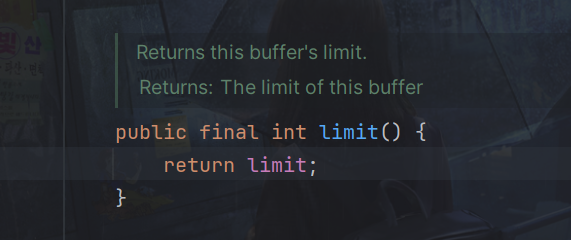
读取数据:使用get()系列方法从ByteBuffer中读取数据。
byte b = buffer.get();
判断是否还有剩余数据:可以使用hasRemaining()方法判断是否还有未读取的数据。
buffer.hasRemaining()
清空缓冲区:在读取完数据后,可以使用clear()方法来清空缓冲区,以便再次写入数据。
buffer.clear(); // 切换为写模式
写入数据到ByteBuffer:使用put()系列方法将数据写入到ByteBuffer中。
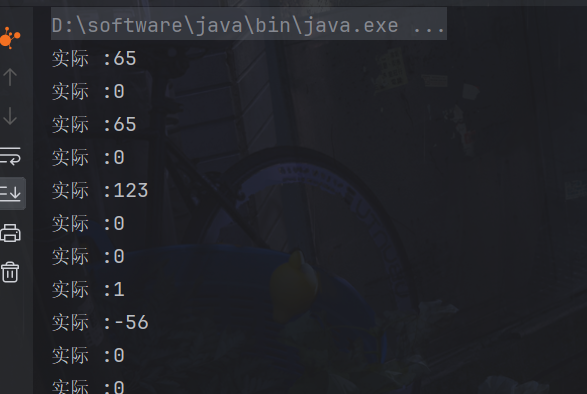
public static void main(String[] args) {
    // 准备缓冲区
    ByteBuffer buffer = ByteBuffer.allocate(100);

    // 向 buffer 写入
    buffer.put((byte) 65); // 写入一个字节数据
    buffer.putChar('A'); // 写入一个字符数据
    buffer.putShort((short) 123); // 写入一个短整型数据
    buffer.putInt(456); // 写入一个整型数据
    buffer.putLong(789L); // 写入一个长整型数据
    buffer.putFloat(3.14f); // 写入一个浮点型数据
    buffer.putDouble(2.71828); // 写入一个双精度浮点型数据

    // 打印 buffer 的内容
    buffer.flip(); // 切换至读模式
    while (buffer.hasRemaining()) { // 是否还有剩余未读数据
        byte b = buffer.get();
        System.out.println("实际 :" + b);
    }
}
还有channel.read(buffer) 是使用 FileChannel 的 read() 方法来从通道读取数据到 ByteBuffer 中。这个方法会尝试读取数据到给定的 ByteBuffer,并返回实际读取的字节数量。
int len = channel.read(buffer);
channel.write 是 Java NIO 中的一个方法,通常用于将数据写入到通道(Channel)中。
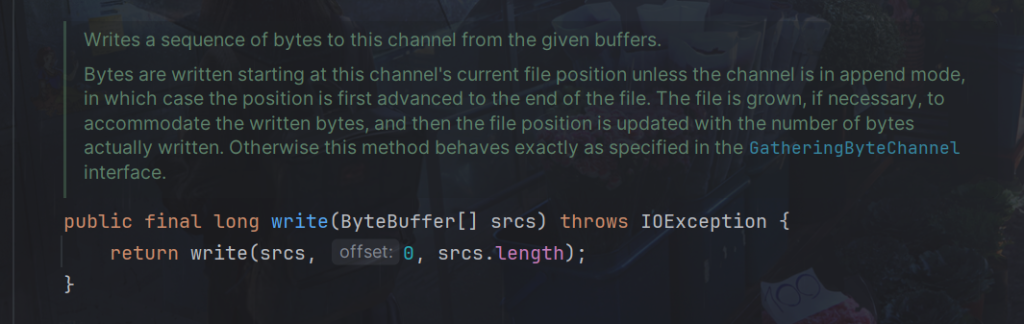
// 将数据写入通道
int bytesWritten = channel.write(buffer);
System.out.println("Bytes written: " + bytesWritten);
如果想重复读取数据
使用 rewind() 方法将 position 设置为 0。rewind() 方法不会修改 limit 的值,因此可以继续使用原始的 limit 值进行读取操作。
package com.dreams;

import java.nio.ByteBuffer;

public class Main03 {
    public static void main(String[] args) {
        ByteBuffer buffer = ByteBuffer.allocate(10);
        buffer.put(new byte[]{'a', 'b', 'c', 'd'});
        buffer.flip();

        System.out.println((char)buffer.get());
        System.out.println((char)buffer.get());

        // rewind 从头开始读
        System.out.println("--从头开始读--");
        buffer.rewind();
        System.out.println((char)buffer.get());
    }
}
运行
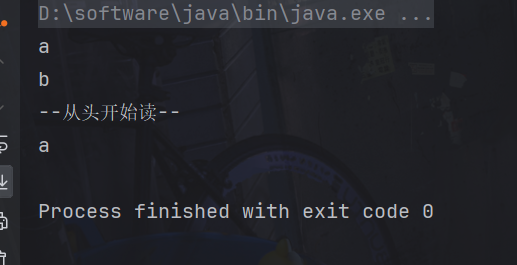
rewind() 方法的源码就是将 position 设置为 0
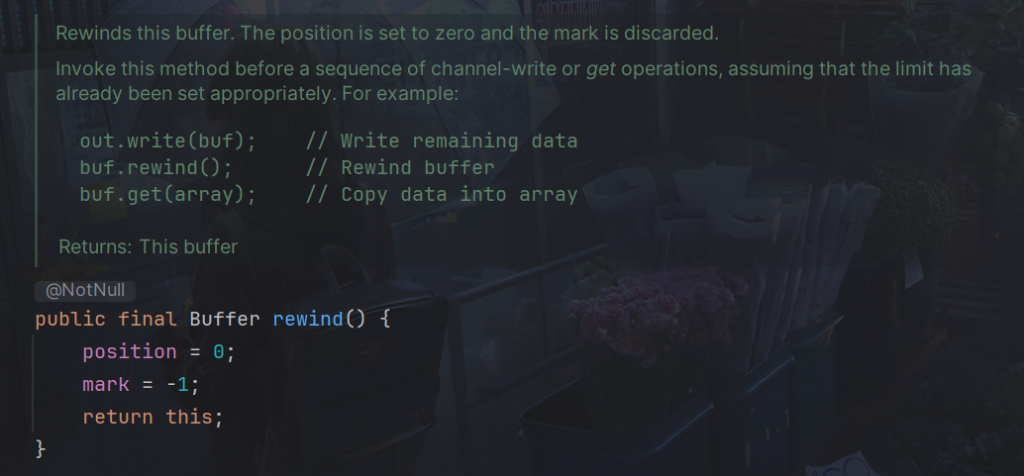
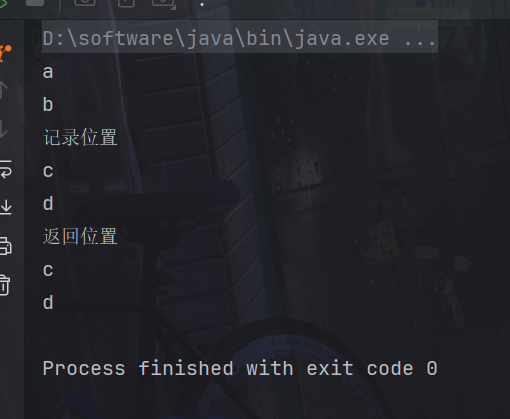
mark() 方法用于在当前位置设置一个标记,以便稍后可以通过 reset() 方法返回到这个标记处。reset() 方法用于将位置(position)设置为之前通过 mark() 方法设置的标记的位置。
public static void main(String[] args) {
    ByteBuffer buffer = ByteBuffer.allocate(10);
    buffer.put(new byte[]{'a', 'b', 'c', 'd'});
    buffer.flip();

    System.out.println((char)buffer.get());
    System.out.println((char) buffer.get());

    System.out.println("记录位置");
    buffer.mark(); //加标记,索引2 的位置

    System.out.println((char) buffer.get());
    System.out.println((char) buffer.get());

    System.out.println("返回位置");
    buffer.reset(); // 将 position 重置到索引 2
    System.out.println((char) buffer.get());
    System.out.println((char) buffer.get());
}
运行
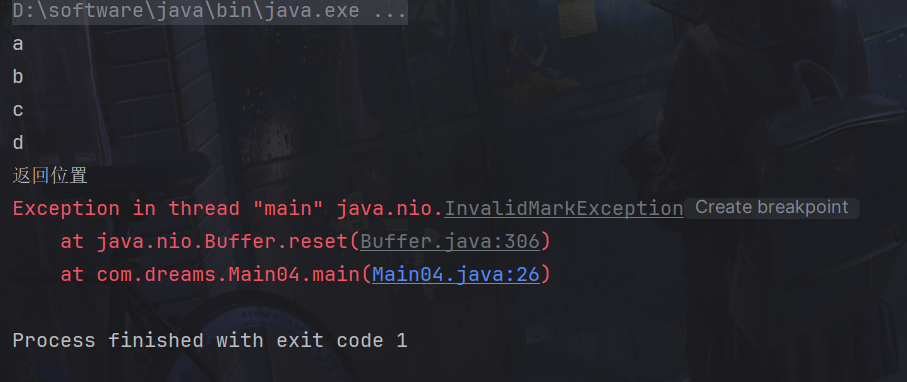
如果没有调用过 mark() 方法,或者在调用 reset() 方法之后已经写入了新的数据使得标记无效,那么会抛出 InvalidMarkException 异常。
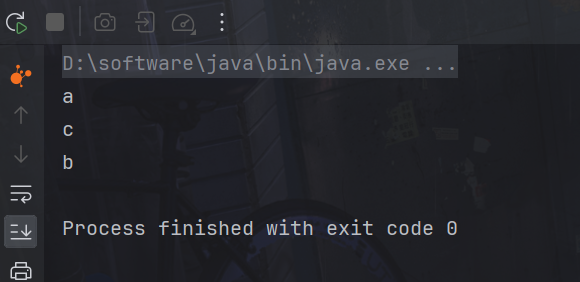
get(i) 不会改变读索引的位置
public static void main(String[] args) {
    ByteBuffer buffer = ByteBuffer.allocate(10);
    buffer.put(new byte[]{'a', 'b', 'c', 'd'});
    buffer.flip();

    System.out.println((char)buffer.get());

    // get(i) 不会改变读索引的位置
    System.out.println((char) buffer.get(2));

    System.out.println((char)buffer.get());
}
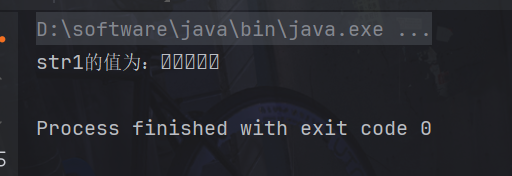
字符串转换为 ByteBuffer,使用put方法会还没有切换读模式
public static void main(String[] args) {
    // 1. 字符串转为 ByteBuffer
    ByteBuffer buffer1 = ByteBuffer.allocate(10);
    //但是还没有切换读模式
    buffer1.put("hello".getBytes());
    String str1 = StandardCharsets.UTF_8.decode(buffer1).toString();
    System.out.println("str1的值为:" + str1);
}
输出
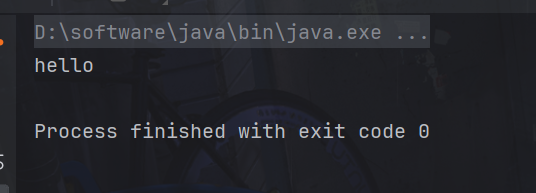
StandardCharsets.UTF_8.encode和 wrap() 方法默认已经切换成读模式
public static void main(String[] args) {
    //字符串转为 ByteBuffer
    ByteBuffer buffer = StandardCharsets.UTF_8.encode("hello");

    // 4. 转为字符串
    String str = StandardCharsets.UTF_8.decode(buffer).toString();
    System.out.println(str);
}
wrap() 方法
public static void main(String[] args) {
    //字符串转为 ByteBuffer
    ByteBuffer buffer = ByteBuffer.wrap("hello".getBytes());

    //转为字符串
    String str = StandardCharsets.UTF_8.decode(buffer).toString();
    System.out.println(str);
}
Scattering Reads
“Netty Scattering Reads” 是指 Netty 框架中的一种数据读取方式。在网络编程中,数据通常以字节流的形式进行传输,而在接收数据时需要将这些字节流解析成有意义的数据。Netty 中的 “Scattering Reads” 是一种数据读取操作,它允许从一个 Channel 中读取数据到多个 ByteBuffer 中,实现了数据的分散读取。用于从 Channel 中读取数据并分散到多个 ByteBuffer 中的机制,用于提高网络数据处理的效率和性能。
具体来说,当网络数据包到达时,Netty 可以将数据块按照一定规则分散到多个 ByteBuffer 中,这样可以更高效地处理大量数据,提高性能。通过使用 “Scattering Reads”,可以减少数据拷贝的次数,提高数据处理的效率。
import java.io.IOException;
import java.io.RandomAccessFile;
import java.nio.ByteBuffer;
import java.nio.channels.FileChannel;

public class TestScatteringReads {
    public static void main(String[] args) {
        try (FileChannel channel = new RandomAccessFile("words.txt", "r").getChannel()) {
            ByteBuffer a = ByteBuffer.allocate(3);
            ByteBuffer b = ByteBuffer.allocate(3);
            ByteBuffer c = ByteBuffer.allocate(5);
            channel.read(new ByteBuffer[]{a, b, c});
            a.flip();
            b.flip();
            c.flip();
            //a业务
            //b业务
            //c业务
        } catch (IOException e) {
        }
    }
}
Gathering Writes
“Gathering Writes” 是指一种数据写入的操作方式,通常用于将多个缓冲区中的数据聚集到一个通道中进行传输。能够将多个缓冲区中的数据聚集到一个通道中进行传输。这种方式有利于提高数据传输的效率和性能。
具体来说,”Gathering Writes” 允许将多个 ByteBuffer 中的数据聚集到一个通道中进行连续的写入操作。这样可以避免将数据合并成一个单独的缓冲区再进行写入,从而提高了数据传输的效率。在网络编程中,这种方式可以用于同时发送多个数据块,而无需额外的数据拷贝操作。
import java.io.IOException;
import java.io.RandomAccessFile;
import java.nio.ByteBuffer;
import java.nio.channels.FileChannel;
import java.nio.charset.StandardCharsets;

public class GatheringWrites {
    public static void main(String[] args) {
        ByteBuffer a = StandardCharsets.UTF_8.encode("hello");
        ByteBuffer b = StandardCharsets.UTF_8.encode("world");
        ByteBuffer c = StandardCharsets.UTF_8.encode("你好");

        try (FileChannel channel = new RandomAccessFile("words.txt", "rw").getChannel()) {
            channel.write(new ByteBuffer[]{a, b, c});
        } catch (IOException e) {
        }
    }
}
黏包和半包问题
“黏包”和”半包”是指由于数据传输的特性而导致的两种常见问题。
黏包(Packet Picking):
- 黏包是指发送方发送的数据包被接收方“黏”在一起,接收方无法正确区分出每个数据包的边界,从而导致接收到的数据混在一起。
- 例如,发送方按照一定的规则将多个数据包发送到接收方,但由于网络传输的不确定性,这些数据包有可能会被接收方合并成一个或多个更大的数据块,导致接收方无法正确解析每个数据包。
半包(Half Packet):
- 半包是指接收方接收到的数据包不完整,即只收到了部分数据包的内容,无法构成一个完整的数据包。
- 这可能发生在网络传输过程中,数据包被分割成多个部分进行发送,而接收方在某个时间点上只接收到了部分数据,导致数据包不完整。
其实就是一种思想,只要加上逻辑处理即可
import java.nio.ByteBuffer;

public class ByteBufferExam {
    public static void main(String[] args) {
        /*
        网络上有多条数据发送给服务端,数据之间使用 \n 进行分隔
        但由于某种原因这些数据在接收时,被进行了重新组合,例如原始数据有3条为
        Hello,world\n
        I'm Dreams\n
        How are you?\n
        变成了下面的两个 byteBuffer (黏包,半包)
        Hello,world\nI'm Dreams\nHo
        w are you?\n
        现在要求你编写程序,将错乱的数据恢复成原始的按 \n 分隔的数据
        */
        ByteBuffer source = ByteBuffer.allocate(32);
        //收到不完整消息
        source.put("Hello,world\nI'm zhangsan\nHo".getBytes());
        //处理逻辑
        split(source);
        source.put("w are you?\n".getBytes());
        split(source);
    }

    private static void split(ByteBuffer source) {
        source.flip();
        for (int i = 0; i < source.limit(); i++) {
            // 找到一条完整消息
            if (source.get(i) == '\n') {
                int length = i + 1 - source.position();
                // 把这条完整消息存入新的 ByteBuffer
                ByteBuffer target = ByteBuffer.allocate(length);
                // 从 source 读,向 target 写
                for (int j = 0; j < length; j++) {
                    target.put(source.get());
                }
            }
        }
        source.compact();
    }
}
3.Channel使用
FileChannel是Java NIO中用于对文件进行读写操作的通道。通过FileChannel,可以实现文件的读取和写入,以及文件位置的定位等操作。FileChannel提供了比传统的I/O流更为灵活和高效的文件操作方式。
使用方法
获取FileChannel对象的方法通常是通过以下几种方式:
- 通过文件输入流(FileInputStream)获取FileChannel:
FileInputStream fis = new FileInputStream("file.txt");
FileChannel channel = fis.getChannel();
FileInputStream获取的channel只能读
- 通过文件输出流(FileOutputStream)获取FileChannel:
FileOutputStream fos = new FileOutputStream("file.txt");
FileChannel channel = fos.getChannel();
FileOutputStream获取的channel只能写
- 通过随机访问文件(RandomAccessFile)获取FileChannel:
RandomAccessFile raf = new RandomAccessFile("file.txt", "rw");
FileChannel channel = raf.getChannel();
- 通过文件对象(File)和文件路径(Path)获取FileChannel:
File file = new File("file.txt");
FileChannel channel = FileChannel.open(file.toPath(), StandardOpenOption.READ, StandardOpenOption.WRITE);
- 通过文件路径(Path)和标准打开选项(StandardOpenOption)获取FileChannel:
Path path = Paths.get("file.txt");
FileChannel channel = FileChannel.open(path, StandardOpenOption.READ, StandardOpenOption.WRITE);
读取数据到buffer
int bytesRead = channel.read(buffer);
读取数据应该注意判断是否存在数据
buffer.flip(); // 切换至读模式

while (buffer.hasRemaining()) {
    System.out.print((char) buffer.get());
}
一个资源应该关闭,channel也一样
channel.close();
传输数据
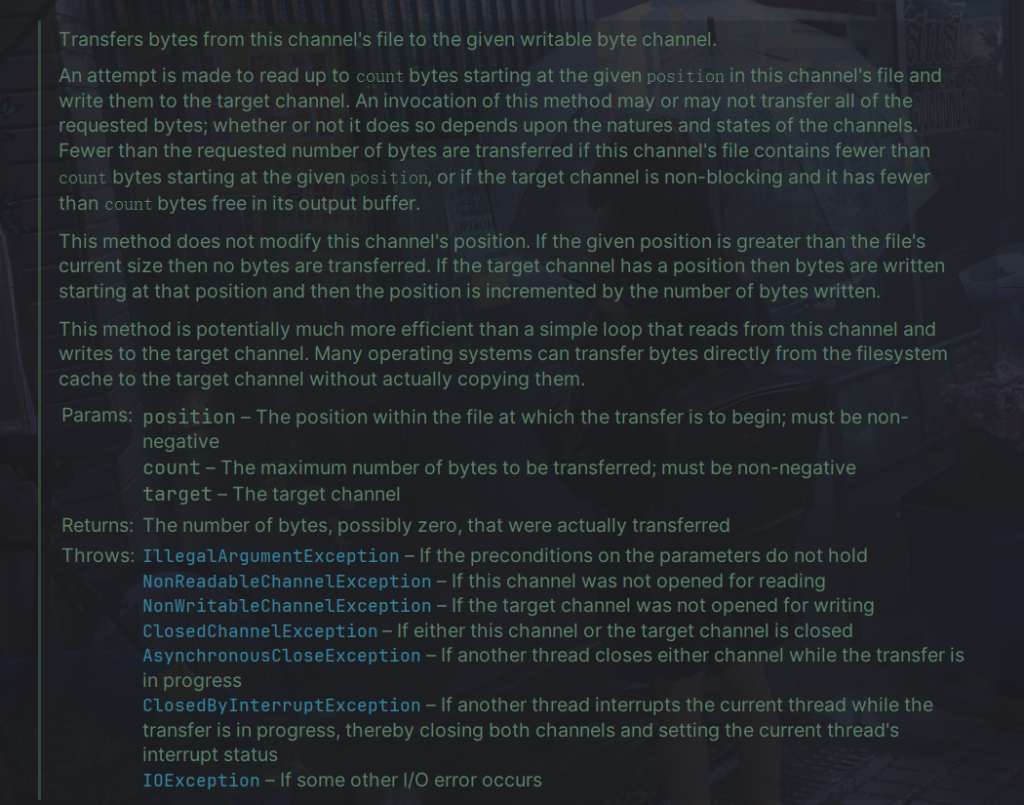
transferTo方法用于将数据从当前FileChannel传输到另一个可写的字节通道,
接收参数如下:
- position: 表示从当前FileChannel的哪个位置开始传输数据。
- count: 表示要传输的最大字节数。
- target: 表示要传输到的目标通道,通常是另一个FileChannel或者其他实现了WritableByteChannel接口的通道。
该方法会将从当前FileChannel的position位置开始的count个字节数据传输到目标通道中。如果成功传输了一部分数据,它可能会返回传输的字节数。如果在传输期间发生I/O错误,将会抛出IOException异常。

import java.io.FileInputStream;
import java.io.FileOutputStream;
import java.io.IOException;
import java.nio.channels.FileChannel;

public class TestFileChannelTransferTo {
    public static void main(String[] args) {
        try (
            FileChannel from = new FileInputStream("data.txt").getChannel();
            FileChannel to = new FileOutputStream("to.txt").getChannel();
        ) {
            // 效率高,底层会利用操作系统的零拷贝进行优化, 限制大小2g 数据
            long size = from.size();
            // left 变量代表还剩余多少字节
            for (long left = size; left > 0; ) {
                System.out.println("position:" + (size - left) + " left:" + left);
                left -= from.transferTo((size - left), left, to);
            }
        } catch (IOException e) {
            e.printStackTrace();
        }
    }
}
处理文件路径
Path 用来表示文件路径
Path source = Paths.get("1.txt"); // 相对路径 使用 user.dir 环境变量来定位 1.txt

Path source = Paths.get("d:\\1.txt"); // 绝对路径 代表了 d:\1.txt

Path source = Paths.get("d:/1.txt"); // 绝对路径 同样代表了 d:\1.txt

Path projects = Paths.get("d:\\data", "projects"); // 代表了 d:\data\projects代表了当前路径
normalize() 方法是 Path 类的一个方法,用于标准化路径,去除路径中的冗余部分。这些冗余部分可能包括当前目录 .、父目录 ..,以及多余的斜杠符号等。
Path path = Paths.get("/home/user/.././documents");调用 normalize() 方法后,将会得到标准化的路径,冗余的部分 user 和 .. 已经被去除,路径变得更加简洁。:
Path normalizedPath = path.normalize();
System.out.println(normalizedPath);
会输出
/home/documents
Files类
Files类是 Java NIO(New I/O)包中提供的一个实用工具类,用于对文件系统进行各种操作。它提供了一系列静态方法,用于文件的读取、写入、复制、移动、删除等操作,以及与文件属性相关的操作。
读取文件内容:
Path filePath = Paths.get("path/to/your/file.txt");
try {
    byte[] fileBytes = Files.readAllBytes(filePath);
    // 处理文件字节数据
} catch (IOException e) {
    // 处理异常
    e.printStackTrace();
}
写入文件内容:
Path filePath = Paths.get("path/to/your/file.txt");
byte[] data = "Hello, world!".getBytes();
try {
    Files.write(filePath, data);
} catch (IOException e) {
    // 处理异常
    e.printStackTrace();
}复制文件:
Path sourcePath = Paths.get("path/to/your/source.txt");
Path targetPath = Paths.get("path/to/your/target.txt");
try {
    Files.copy(sourcePath, targetPath);
} catch (IOException e) {
    // 处理异常
    e.printStackTrace();
}
如果希望用 source 覆盖掉 target,需要用 StandardCopyOption 来控制
Files.copy(source, target, StandardCopyOption.REPLACE_EXISTING);
移动文件:
Path sourcePath = Paths.get("path/to/your/source.txt");
Path targetPath = Paths.get("path/to/your/target.txt");
try {
    Files.move(sourcePath, targetPath);
} catch (IOException e) {
    // 处理异常
    e.printStackTrace();
}
StandardCopyOption.ATOMIC_MOVE 保证文件移动的原子性
Files.move(source, target, StandardCopyOption.ATOMIC_MOVE);
检查文件属性:
Path filePath = Paths.get("path/to/your/file.txt");
try {
    boolean exists = Files.exists(filePath);
    boolean isReadable = Files.isReadable(filePath);
    boolean isWritable = Files.isWritable(filePath);
    // 处理文件属性
} catch (IOException e) {
    // 处理异常
    e.printStackTrace();
}创建目录:
Path dirPath = Paths.get("path/to/your/directory");
try {
    Files.createDirectories(dirPath);
} catch (IOException e) {
    // 处理异常
    e.printStackTrace();
}
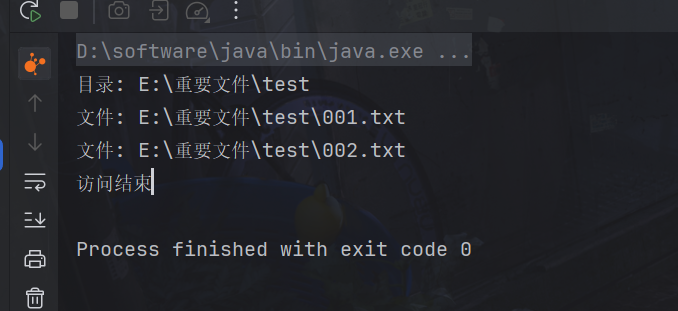
遍历文件使用Files.walkFileTree,它允许你对文件树中的每个文件和目录执行自定义操作。
package com.dreams;

import java.io.IOException;
import java.nio.file.FileVisitResult;
import java.nio.file.Files;
import java.nio.file.Path;
import java.nio.file.Paths;
import java.nio.file.SimpleFileVisitor;
import java.nio.file.attribute.BasicFileAttributes;

public class FileTreeWalker {
    public static void main(String[] args) {
        // 定义要遍历的根目录路径
        Path rootPath = Paths.get("E:\\重要文件\\test");

        try {
            // 调用 walkFileTree() 方法遍历文件树
            Files.walkFileTree(rootPath, new SimpleFileVisitor<Path>() {
                //访问文件夹前
                @Override
                public FileVisitResult preVisitDirectory(Path dir, BasicFileAttributes attrs) throws IOException {
                    System.out.println("目录: " + dir);
                    return FileVisitResult.CONTINUE;
                }

                //访问文件夹后
                @Override
                public FileVisitResult postVisitDirectory(Path dir, IOException exc) throws IOException {
                    System.out.println("访问结束");
                    return super.postVisitDirectory(dir, exc);
                }

                //访问文件成功执行
                @Override
                public FileVisitResult visitFile(Path file, BasicFileAttributes attrs) throws IOException {
                    System.out.println("文件: " + file);
                    return FileVisitResult.CONTINUE;
                }

                //访问文件失败执行
                @Override
                public FileVisitResult visitFileFailed(Path file, IOException exc) throws IOException {
                    System.err.println("访问文件失败: " + file);
                    return FileVisitResult.CONTINUE;
                }
            });
        } catch (IOException e) {
            e.printStackTrace();
        }
    }
}
SimpleFileVisitor<Path>()是匿名内部类,所以使用外部变量,需要传递,但是参数必须是final修饰的,
或者使用
AtomicInteger jarCount = new AtomicInteger();
删除文件就方便一点
public static void main(String[] args) throws IOException {
    Files.walkFileTree(Paths.get("E:\\重要文件\\test"), new SimpleFileVisitor<Path>() {
        @Override
        public FileVisitResult visitFile(Path file, BasicFileAttributes attrs) throws IOException {
            Files.delete(file);
            return super.visitFile(file, attrs);
        }
        @Override
        public FileVisitResult postVisitDirectory(Path dir, IOException exc) throws IOException {
            Files.delete(dir);
            return super.postVisitDirectory(dir, exc);
        }
    });
}
遍历文件还可以使用Files.walk,比如遍历复制文件
package com.dreams;

import java.io.IOException;
import java.nio.file.Files;
import java.nio.file.Paths;

public class FilesCopy {

    public static void main(String[] args) throws IOException {
        long start = System.currentTimeMillis();
        String source = "E:\\重要文件\\test\\source";
        String target = "E:\\重要文件\\test\\target";

        Files.walk(Paths.get(source)).forEach(path -> {
            try {
                String targetName = path.toString().replace(source, target);
                // 是目录
                if (Files.isDirectory(path)) {
                    Files.createDirectory(Paths.get(targetName));
                }
                // 是普通文件
                else if (Files.isRegularFile(path)) {
                    Files.copy(path, Paths.get(targetName));
                }
            } catch (IOException e) {
                e.printStackTrace();
            }
        });
        long end = System.currentTimeMillis();
        System.out.println(end - start);
    }
}
4.Selector使用
阻塞使用
服务端代码
package com.dreams;

import java.io.IOException;
import java.net.InetSocketAddress;
import java.nio.ByteBuffer;
import java.nio.channels.ServerSocketChannel;
import java.nio.channels.SocketChannel;
import java.util.ArrayList;
import java.util.List;

/**
* @author PoemsAndDreams
* @date 2024-03-30 21:28
* @description //TODO
*/
public class ServerNon {
    public static void main(String[] args) throws IOException {
        // 使用 nio 来理解阻塞模式, 单线程
        // 0. ByteBuffer
        ByteBuffer buffer = ByteBuffer.allocate(16);
        // 1. 创建了服务器
        ServerSocketChannel ssc = ServerSocketChannel.open();

        // 2. 绑定监听端口
        ssc.bind(new InetSocketAddress(8080));

        // 3. 连接集合
        List<SocketChannel> channels = new ArrayList<>();
        while (true) {
            // 4. accept 建立与客户端连接, SocketChannel 用来与客户端之间通信
            System.out.println();
            System.out.println("connecting...");
            SocketChannel sc = ssc.accept(); // 阻塞方法,线程停止运行
            System.out.println("connected :" + sc);
            channels.add(sc);
            for (SocketChannel channel : channels) {
                // 5. 接收客户端发送的数据
                System.out.println("before read : " + channel);
                channel.read(buffer); // 阻塞方法,线程停止运行
                buffer.flip();
                System.out.println(buffer);
                buffer.clear();
                System.out.println("after read :" + channel);
            }
        }
    }
}
代码解释:
- ByteBuffer buffer = ByteBuffer.allocate(16);:创建了一个容量为 16 字节的 ByteBuffer 对象,用于读取客户端发送的数据。
- ServerSocketChannel ssc = ServerSocketChannel.open();:创建了一个 ServerSocketChannel 实例,表示服务器套接字通道。
- ssc.bind(new InetSocketAddress(8080));:将服务器套接字通道绑定到指定的端口号(这里是 8080)上。
- SocketChannel sc = ssc.accept();:通过调用 accept() 方法来接受客户端的连接请求。该方法是一个阻塞方法,直到有客户端连接到服务器时才会返回对应的 SocketChannel 对象。
- channel.read(buffer);:通过调用 read() 方法来读取客户端发送的数据,并将数据写入到 ByteBuffer 中。这也是一个阻塞方法,在没有数据可读取时会一直等待。
其中,这是阻塞方法,会一直阻塞到有客户端连接
SocketChannel sc = ssc.accept(); // 阻塞方法,线程停止运行
这也是阻塞方法,会一直阻塞到客户端发送消息
channel.read(buffer); // 阻塞方法,线程停止运行
客户端代码
package com.dreams;

import java.io.IOException;
import java.net.InetSocketAddress;
import java.net.SocketAddress;
import java.nio.channels.SocketChannel;
import java.nio.charset.Charset;

public class Client {
    public static void main(String[] args) throws IOException, InterruptedException {
        Thread.sleep(5000);
        SocketChannel sc = SocketChannel.open();
        sc.connect(new InetSocketAddress("localhost", 8080));
        SocketAddress address = sc.getLocalAddress();
        Thread.sleep(5000);
        sc.write(Charset.defaultCharset().encode("hello!"));
        // sc.close();
    }
}
运行后,查看服务端输出
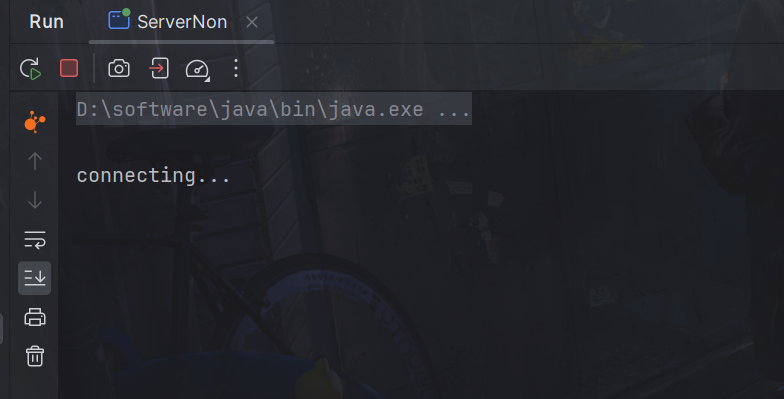
服务端阻塞,阻塞到有客户端连接
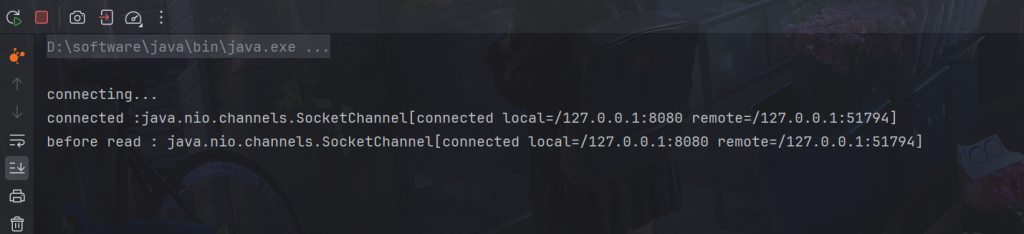
连接后,服务端输出,然后
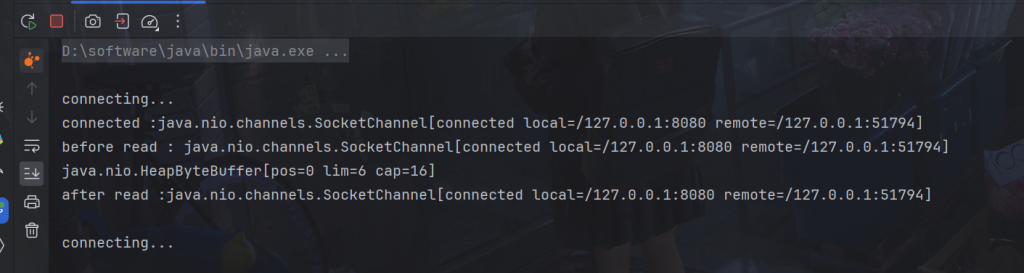
阻塞到客户端发送消息
输出
非阻塞使用
服务端
package com.dreams;

import java.io.IOException;
import java.net.InetSocketAddress;
import java.nio.ByteBuffer;
import java.nio.channels.*;
import java.util.ArrayList;
import java.util.List;

public class ServerFalse {

    public static void main(String[] args) throws IOException {
        // 使用 nio 来理解非阻塞模式, 单线程
        // 0. ByteBuffer
        ByteBuffer buffer = ByteBuffer.allocate(16);
        // 1. 创建了服务器
        ServerSocketChannel ssc = ServerSocketChannel.open();
        // 设置ssc.accept()为非阻塞模式
        ssc.configureBlocking(false);
        // 2. 绑定监听端口
        ssc.bind(new InetSocketAddress(8080));
        // 3. 连接集合
        List<SocketChannel> channels = new ArrayList<>();
        while (true) {
            // 4. accept 建立与客户端连接, SocketChannel 用来与客户端之间通信
            SocketChannel sc = ssc.accept(); // 非阻塞,线程还会继续运行,如果没有连接建立,但sc是null
            if (sc != null) {
                System.out.println("connected : " + sc);
                // 设置channel.read(buffer)为非阻塞模式
                sc.configureBlocking(false);
                channels.add(sc);
            }
            for (SocketChannel channel : channels) {
                // 5. 接收客户端发送的数据
               int read = channel.read(buffer);// 非阻塞,线程仍然会继续运行,如果没有读到数据,read 返回 0
               if (read > 0) {
                   buffer.flip();
                   buffer.clear();
                   System.out.println("after read : " + StandardCharsets.UTF_8.decode(buffer).toString());
                }
            }
        }
    }
}
因为不阻塞连接,所以客户端需要主动断开连接,否则会报错
客户端加上代码
sc.close();
客户端连接后

Selector使用
Selector是NIO中用于多路复用的关键组件,它可以监听多个通道上的事件,例如读、写、连接等。通过选择器,一个线程可以监听多个通道上的事件,实现了单线程处理多个连接,提高了系统的并发性能。选择器主要用于实现非阻塞I/O,避免了传统阻塞I/O中线程阻塞等待的情况。
selector图示
示例代码
package com.dreams;

import java.io.IOException;
import java.net.InetSocketAddress;
import java.nio.ByteBuffer;
import java.nio.channels.SelectionKey;
import java.nio.channels.Selector;
import java.nio.channels.ServerSocketChannel;
import java.nio.channels.SocketChannel;
import java.nio.charset.Charset;
import java.util.Iterator;

public class Server {

    public static void main(String[] args) throws IOException {
        // 1. 创建 selector, 管理多个 channel
        Selector selector = Selector.open();
        ServerSocketChannel ssc = ServerSocketChannel.open();
        ssc.configureBlocking(false);
        // 2. 建立 selector 和 channel 的联系(注册)
        // SelectionKey 就是将来事件发生后,通过它可以知道事件和哪个channel的事件
        SelectionKey sscKey = ssc.register(selector, 0, null);
        // key 只关注 accept 事件
        sscKey.interestOps(SelectionKey.OP_ACCEPT);
        System.out.println("sscKey: " + sscKey);
        ssc.bind(new InetSocketAddress(8080));
        while (true) {
            // 3. select 方法, 没有事件发生,线程阻塞,有事件,线程才会恢复运行
            // select 在事件未处理时,它不会阻塞, 事件发生后要么处理,要么取消,不能置之不理
            selector.select();
            // 4. 处理事件, selectedKeys 内部包含了所有发生的事件
            Iterator<SelectionKey> iter = selector.selectedKeys().iterator(); // accept, read
            while (iter.hasNext()) {
                SelectionKey key = iter.next();
                // 处理key 时,要从 selectedKeys 集合中删除,否则下次处理就会有问题
                iter.remove();
                System.out.println("key: " + key);
                // 5. 区分事件类型
                // 如果是 accept
                if (key.isAcceptable()) {
                    ServerSocketChannel channel = (ServerSocketChannel) key.channel();
                    SocketChannel sc = channel.accept();
                    sc.configureBlocking(false);

                    SelectionKey scKey = sc.register(selector, 0, null);
                    scKey.interestOps(SelectionKey.OP_READ);
                    System.out.println("sc : " + sc);
                    System.out.println("scKey: " + scKey);
                } else if (key.isReadable()) { // 如果是 read
                    try {
                        // 拿到触发事件的channel
                        SocketChannel channel = (SocketChannel) key.channel();
                        ByteBuffer buffer = ByteBuffer.allocate(4);
                        // 如果是正常断开,read 的方法的返回值是 -1
                        int read = channel.read(buffer);
                        if(read == -1) {
                            //同样因为客户端正常断开,所以需要将 key 取消
                            key.cancel();
                        } else {
                            buffer.flip();
                            System.out.println(Charset.defaultCharset().decode(buffer));
                        }
                    } catch (IOException e) {
                        //如果客户端断开会报异常,需要捕获
                        e.printStackTrace();
                        // 因为客户端断开了,因此需要将 key 取消(从 selector 的 keys 集合中真正删除 key)
                        key.cancel();
                    }
                }
            }
        }
    }
}
代码解释
创建 selector
Selector selector = Selector.open();
建立 selector 和 channel 的联系(注册)
SelectionKey sscKey = ssc.register(selector, 0, null);
register() 方法是用来将通道注册到选择器上的,其参数包括:
- selector:要注册到的选择器对象。
- interestOps:感兴趣的事件类型,可以使用 SelectionKey.OP_XXX 常量来指定,如 SelectionKey.OP_READ 表示对读取事件感兴趣,SelectionKey.OP_WRITE 表示对写入事件感兴趣,也可以使用位运算来指定多个事件类型的组合,如 SelectionKey.OP_READ | SelectionKey.OP_WRITE。如果对所有事件都不感兴趣,可以传入 0。
- attachment:可选参数,是一个附加的对象,可以在后续事件处理中使用。通常情况下,可以传入 null。
将一个 byteBuffer 作为附件关联到 selectionKey 上
SelectionKey scKey = sc.register(selector, 0, buffer);
获取可以
SocketChannel channel = (SocketChannel) key.channel(); // 拿到触发事件的channel
// 获取 selectionKey 上关联的附件
ByteBuffer buffer = (ByteBuffer) key.attachment();
在Java NIO中,通过Selector可以监听多个通道的事件,常见的事件包括:
- Accept(接受):当ServerSocketChannel接受客户端连接时触发。
- Connect(连接):当SocketChannel连接到远程服务器时触发。
- Read(读取):当有数据可读时触发,即通道内部有数据可读取。
- Write(写入):当通道可写入数据时触发,即通道内部有空间可用于写入数据。
要监听这些事件,需要首先将通道注册到Selector上,并指定感兴趣的事件类型。然后通过Selector的select()方法来阻塞等待就绪事件,一旦有就绪事件发生,select()方法将返回,并返回就绪事件的数量。接着可以通过selectedKeys()方法获取到就绪事件的SelectionKey集合,进而获取到具体的就绪通道和事件类型。
事件定义在SelectionKey类里,为常量
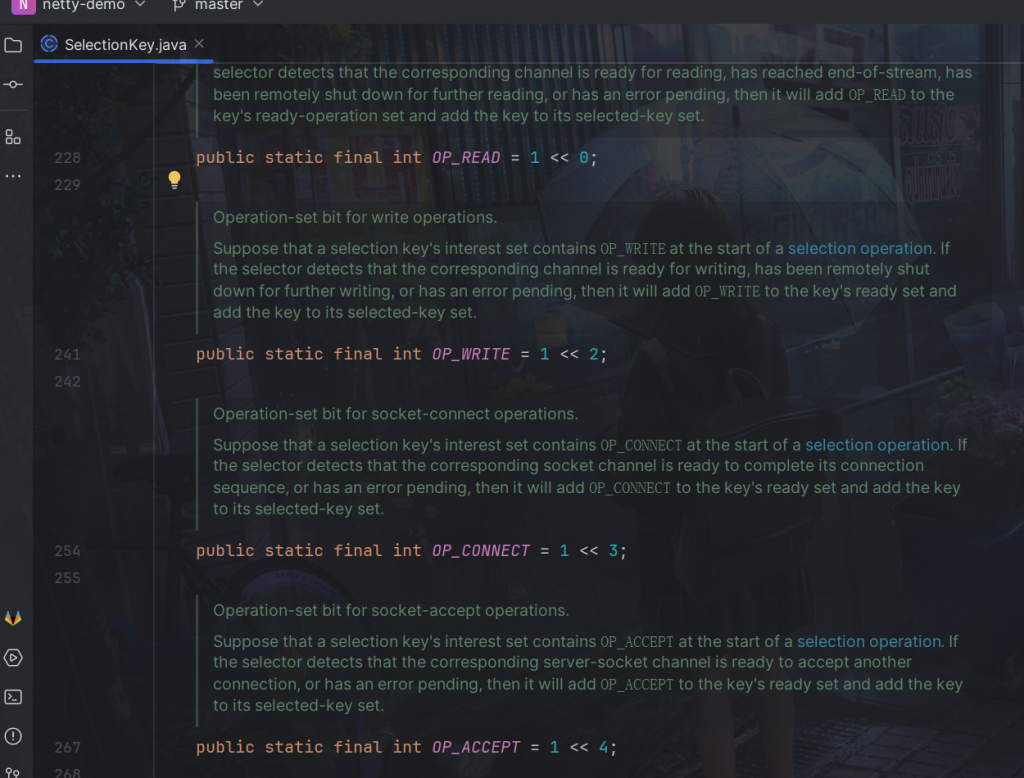
比如设置key 只关注 accept 事件
sscKey.interestOps(SelectionKey.OP_ACCEPT);
等同于
Selector selector = Selector.open();
ssc.register(selector, SelectionKey.OP_ACCEPT);
selector.select() 是一个阻塞方法,用于等待就绪事件的发生。当调用这个方法时,程序会阻塞在这里,直到至少有一个通道已经准备好了某个事件或者等待超时。一旦有就绪事件发生,select() 方法会返回就绪事件的数量,并且程序可以继续执行后续的处理逻辑。
selector.select();
int count = selector.select();
阻塞直到绑定事件发生,或是超时(时间单位为 ms)
int count = selector.select(long timeout);
不会阻塞,也就是不管有没有事件,立刻返回,自己根据返回值检查是否有事件
int count = selector.selectNow();
使selector不再阻塞方法
调用 selector.close()
selector.selectedKeys() 返回包含了所有已经就绪通道的集合。这些键代表了一组已经准备就绪的 I/O 通道的事件。每个键都是一个 SelectionKey 对象,它包含了相关的通道、事件类型和一些附加信息。使用迭代器来遍历这个集合来处理,在处理完一个键之后,要调用 remove() 方法将其从集合中移除,以确保不会重复处理。所以不能所以增强for。
Iterator<SelectionKey> iter = selector.selectedKeys().iterator();
SelectionKey key = iter.next();
拿到事件后可以对其进行类型判断
key.isAcceptable()
然后就可以向下转型
ServerSocketChannel channel = (ServerSocketChannel) key.channel();
SocketChannel sc = channel.accept();
channel.accept()就是对事件处理,每一个事件都必须处理,否则未标记为未处理事件,还会加入集合中,下一次循环还会进入循环,就不会阻塞在selector.select(),所以必须处理,当然也可以丢弃该事件,丢弃该事件就不会加入集合。select 在事件未处理时,它不会阻塞, 事件发生后要么处理,要么取消,不能置之不理
key.cancel();
处理key 时,要从 selectedKeys 集合中删除,否则下次处理就会有问题,因为如果已经处理了该事件,会被标记为已处理,但是如果没有删除,那下一次同样会遍历到该事件,因为已经处理所以会报空指针异常。
iter.remove();
如果客户端断开会报异常,需要捕获,否则只要一个客户端断开,整个服务器都会异常
try {
    //...
} catch (IOException e) {
    //如果客户端断开会报异常,需要捕获
    e.printStackTrace();
    // 因为客户端断开了,因此需要将 key 取消(从 selector 的 keys 集合中真正删除 key)
    key.cancel();
}
正常断开,同样要处理,否则会一直处理该事件
int read = channel.read(buffer);
if(read == -1) {
    //同样因为客户端正常断开,所以需要将 key 取消
    key.cancel();
}
优化:绑定buffer 。提供扩容方法即key.attach(newBuffer) 方法用于将一个新的缓冲区(Buffer)关联到一个选择键(SelectionKey)。
package com.dreams;

import java.io.IOException;
import java.net.InetSocketAddress;
import java.nio.ByteBuffer;
import java.nio.channels.SelectionKey;
import java.nio.channels.Selector;
import java.nio.channels.ServerSocketChannel;
import java.nio.channels.SocketChannel;
import java.nio.charset.Charset;
import java.util.Iterator;

public class Server {

    public static void main(String[] args) throws IOException {
        // 1. 创建 selector, 管理多个 channel
        Selector selector = Selector.open();
        ServerSocketChannel ssc = ServerSocketChannel.open();
        ssc.configureBlocking(false);
        // 2. 建立 selector 和 channel 的联系(注册)
        // SelectionKey 就是将来事件发生后,通过它可以知道事件和哪个channel的事件
        SelectionKey sscKey = ssc.register(selector, 0, null);
        // key 只关注 accept 事件
        sscKey.interestOps(SelectionKey.OP_ACCEPT);
        System.out.println("sscKey: " + sscKey);
        ssc.bind(new InetSocketAddress(8080));
        while (true) {
            // 3. select 方法, 没有事件发生,线程阻塞,有事件,线程才会恢复运行
            // select 在事件未处理时,它不会阻塞, 事件发生后要么处理,要么取消,不能置之不理
            selector.select();
            // 4. 处理事件, selectedKeys 内部包含了所有发生的事件
            Iterator<SelectionKey> iter = selector.selectedKeys().iterator(); // accept, read
            while (iter.hasNext()) {
                SelectionKey key = iter.next();
                // 处理key 时,要从 selectedKeys 集合中删除,否则下次处理就会有问题
                iter.remove();
                System.out.println("key: " + key);
                // 5. 区分事件类型
                // 如果是 accept
                if (key.isAcceptable()) {
                    ServerSocketChannel channel = (ServerSocketChannel) key.channel();
                    SocketChannel sc = channel.accept();
                    sc.configureBlocking(false);
                    ByteBuffer buffer = ByteBuffer.allocate(16); // attachment
                    // 将一个 byteBuffer 作为附件关联到 selectionKey 上
                    SelectionKey scKey = sc.register(selector, 0, buffer);
                    scKey.interestOps(SelectionKey.OP_READ);
                    System.out.println("sc : " + sc);
                    System.out.println("scKey: " + scKey);
                } else if (key.isReadable()) { // 如果是 read
                    try {
                        // 拿到触发事件的channel
                        SocketChannel channel = (SocketChannel) key.channel();
                        // 获取 selectionKey 上关联的附件
                        ByteBuffer buffer = (ByteBuffer) key.attachment();
                        // 如果是正常断开,read 的方法的返回值是 -1
                        int read = channel.read(buffer);
                        if(read == -1) {
                            //同样因为客户端正常断开,所以需要将 key 取消
                            key.cancel();
                        } else {
                            //处理边界
                            split(buffer);
                            // 需要扩容
                            if (buffer.position() == buffer.limit()) {
                                ByteBuffer newBuffer = ByteBuffer.allocate(buffer.capacity() * 2);
                                buffer.flip();
                                newBuffer.put(buffer); // 0123456789abcdef3333\n
                                //使用新的buffer替换
                                key.attach(newBuffer);
                            }
                        }
                    } catch (IOException e) {
                        //如果客户端断开会报异常,需要捕获
                        e.printStackTrace();
                        // 因为客户端断开了,因此需要将 key 取消(从 selector 的 keys 集合中真正删除 key)
                        key.cancel();
                    }
                }
            }
        }
    }
}
写入事件
服务端
package com.dreams;

import java.io.IOException;
import java.net.InetSocketAddress;
import java.nio.ByteBuffer;
import java.nio.channels.SelectionKey;
import java.nio.channels.Selector;
import java.nio.channels.ServerSocketChannel;
import java.nio.channels.SocketChannel;
import java.nio.charset.Charset;
import java.util.Iterator;

public class WriteServer {
    public static void main(String[] args) throws IOException {
        ServerSocketChannel ssc = ServerSocketChannel.open();
        ssc.configureBlocking(false);
        Selector selector = Selector.open();
        ssc.register(selector, SelectionKey.OP_ACCEPT);
        ssc.bind(new InetSocketAddress(8080));
        while (true) {
            selector.select();
            Iterator<SelectionKey> iter = selector.selectedKeys().iterator();
            while (iter.hasNext()) {
                SelectionKey key = iter.next();
                iter.remove();
                if (key.isAcceptable()) {
                    SocketChannel sc = ssc.accept();
                    sc.configureBlocking(false);
                    SelectionKey sckey = sc.register(selector, 0, null);
                    sckey.interestOps(SelectionKey.OP_READ);
                    // 1. 向客户端发送大量数据
                    StringBuilder sb = new StringBuilder();
                    for (int i = 0; i < 5000000; i++) {
                        sb.append("a");
                    }
                    ByteBuffer buffer = Charset.defaultCharset().encode(sb.toString());

                    // 2. 返回值代表实际写入的字节数
                    int write = sc.write(buffer);
                    System.out.println(write);

                    // 3. 判断是否有剩余内容
                    if (buffer.hasRemaining()) {
                        // 4. 关注可写事件 1 4
                        sckey.interestOps(sckey.interestOps() + SelectionKey.OP_WRITE);
                        // sckey.interestOps(sckey.interestOps() | SelectionKey.OP_WRITE);
                        // 5. 把未写完的数据挂到 sckey 上
                        sckey.attach(buffer);
                    }
                } else if (key.isWritable()) {
                    ByteBuffer buffer = (ByteBuffer) key.attachment();
                    SocketChannel sc = (SocketChannel) key.channel();
                    int write = sc.write(buffer);
                    System.out.println(write);
                    // 6. 清理操作
                    if (!buffer.hasRemaining()) {
                        key.attach(null); // 需要清除buffer
                        key.interestOps(key.interestOps() - SelectionKey.OP_WRITE);//不需关注可写事件
                    }
                }
            }
        }
    }
}
客户端
package com.dreams;

import java.io.IOException;
import java.net.InetSocketAddress;
import java.nio.ByteBuffer;
import java.nio.channels.SocketChannel;

public class WriteClient {
    public static void main(String[] args) throws IOException {
        SocketChannel sc = SocketChannel.open();
        sc.connect(new InetSocketAddress("localhost", 8080));

        // 3. 接收数据
        int count = 0;
        while (true) {
            ByteBuffer buffer = ByteBuffer.allocate(1024 * 1024);
            count += sc.read(buffer);
            System.out.println(count);
            buffer.clear();
        }
    }
}
服务器输出
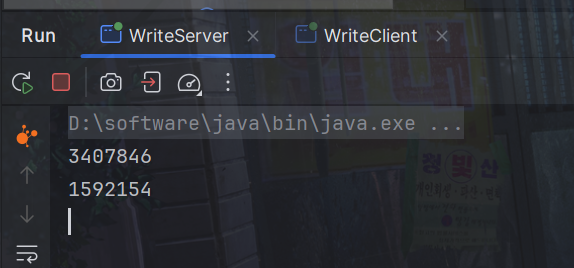
客户端输出
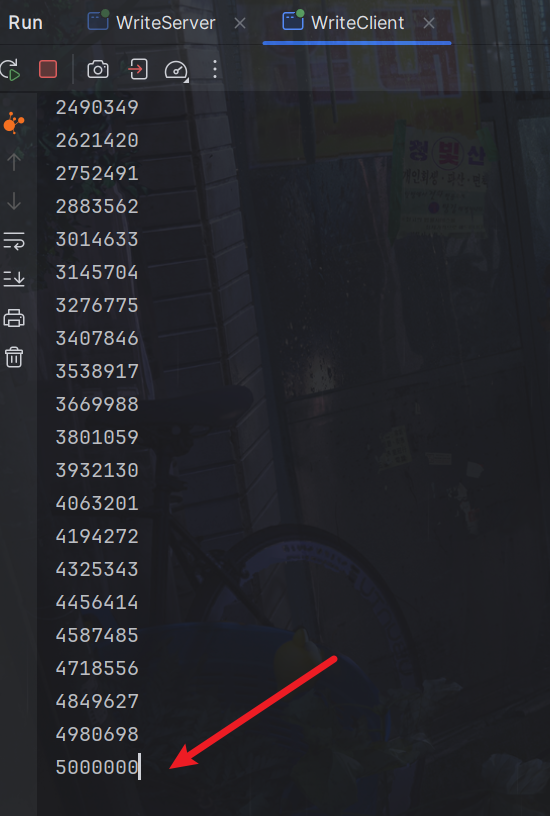
多线程优化
Runtime.getRuntime().availableProcessors()用于获取当前系统可用处理器数量的方法。它返回一个整数,表示当前系统可用的处理器核心数量。
Runtime.getRuntime().availableProcessors() 如果工作在 docker 容器下,因为容器不是物理隔离的,会拿到物理 cpu 个数,而不是容器申请时的个数
这个问题直到 jdk 10 才修复,使用 jvm 参数 UseContainerSupport 配置, 默认开启
package com.dreams;

import java.io.IOException;
import java.net.InetSocketAddress;
import java.nio.ByteBuffer;
import java.nio.channels.*;
import java.util.Iterator;
import java.util.concurrent.ConcurrentLinkedQueue;
import java.util.concurrent.atomic.AtomicInteger;

public class MultiThreadServer {
    public static void main(String[] args) throws IOException {
        Thread.currentThread().setName("boss");
        ServerSocketChannel ssc = ServerSocketChannel.open();
        ssc.configureBlocking(false);
        Selector boss = Selector.open();
        SelectionKey bossKey = ssc.register(boss, 0, null);
        bossKey.interestOps(SelectionKey.OP_ACCEPT);
        ssc.bind(new InetSocketAddress(8080));
        // 1. 创建固定数量的 worker 并初始化
        Worker[] workers = new Worker[Runtime.getRuntime().availableProcessors()];
        for (int i = 0; i < workers.length; i++) {
            workers[i] = new Worker("worker-" + i);
        }
        AtomicInteger index = new AtomicInteger();
        while(true) {
            boss.select();
            Iterator<SelectionKey> iter = boss.selectedKeys().iterator();
            while (iter.hasNext()) {
                SelectionKey key = iter.next();
                iter.remove();
                if (key.isAcceptable()) {
                    SocketChannel sc = ssc.accept();
                    sc.configureBlocking(false);
                    System.out.println("connected... : " + sc.getRemoteAddress());
                    // 2. 关联 selector
                    System.out.println("before register... : " + sc.getRemoteAddress());
                    // round robin 轮询
                    workers[index.getAndIncrement() % workers.length].register(sc); // boss 调用 初始化 selector , 启动 worker-0
                    System.out.println("after register... : "+sc.getRemoteAddress());
                }
            }
        }
    }
    static class Worker implements Runnable{
        private Thread thread;
        private Selector selector;
        private String name;
        private volatile boolean start = false; // 还未初始化
        private ConcurrentLinkedQueue<Runnable> queue = new ConcurrentLinkedQueue<>();
        public Worker(String name) {
            this.name = name;
        }

        // 初始化线程,和 selector
        public void register(SocketChannel sc) throws IOException {
            if(!start) {
                selector = Selector.open();
                thread = new Thread(this, name);
                thread.start();
                start = true;
            }
            selector.wakeup(); // 唤醒 select 方法 boss
            sc.register(selector, SelectionKey.OP_READ, null); // boss
        }

        @Override
        public void run() {
            while(true) {
                try {
                    selector.select(); // worker-0 阻塞
                    Iterator<SelectionKey> iter = selector.selectedKeys().iterator();
                    while (iter.hasNext()) {
                        SelectionKey key = iter.next();
                        iter.remove();
                        if (key.isReadable()) {
                            ByteBuffer buffer = ByteBuffer.allocate(16);
                            SocketChannel channel = (SocketChannel) key.channel();
                            System.out.println("read... : " + channel.getRemoteAddress());
                            channel.read(buffer);
                            buffer.flip();
                        }
                    }
                } catch (IOException e) {
                    e.printStackTrace();
                }
            }
        }
    }
}
主要的逻辑是:
- 主线程负责监听客户端的连接,当有客户端连接请求时,会将对应的 SocketChannel 注册到一个 Worker 线程中处理。
- Worker 线程通过 Selector 来监听注册的 SocketChannel,当有可读事件发生时,会从通道中读取数据并进行处理。
这里使用了固定数量的 Worker 线程来处理客户端连接,每个 Worker 线程都有一个单独的 Selector 对象来监听其负责的客户端连接。这样可以提高并发处理能力。
在 MultiThreadServer类中,主要的操作是:
- 在main方法中,创建了一个 ServerSocketChannel,并将其注册到 Selector 中,监听 OP_ACCEPT 事件。
- 在循环中,通过 boss.select()阻塞等待事件发生,然后遍历处理已经就绪的事件。
- 当有连接事件发生时,会通过轮询的方式选择一个 Worker 线程来处理该连接,并将对应的 SocketChannel 注册到该 Worker 线程的 Selector 中。
在 Worker 内部类中,每个 Worker 线程会:
- 初始化一个 Selector 对象,并在一个单独的线程中运行。
- 在 register方法中,将新连接的 SocketChannel 注册到自己的 Selector 中,并唤醒 Selector 的阻塞状态,以便及时处理事件。
- 在run方法中,使用 selector.select()方法阻塞等待事件发生,然后处理就绪的事件。
多线程队列优化
package com.dreams;

import java.io.IOException;
import java.net.InetSocketAddress;
import java.nio.ByteBuffer;
import java.nio.channels.*;
import java.util.Iterator;
import java.util.concurrent.ConcurrentLinkedQueue;
import java.util.concurrent.atomic.AtomicInteger;

public class MultiThreadServer {
    public static void main(String[] args) throws IOException {
        Thread.currentThread().setName("boss");
        ServerSocketChannel ssc = ServerSocketChannel.open();
        ssc.configureBlocking(false);
        Selector boss = Selector.open();
        SelectionKey bossKey = ssc.register(boss, 0, null);
        bossKey.interestOps(SelectionKey.OP_ACCEPT);
        ssc.bind(new InetSocketAddress(8080));
        // 1. 创建固定数量的 worker 并初始化
        Worker[] workers = new Worker[Runtime.getRuntime().availableProcessors()];
        for (int i = 0; i < workers.length; i++) {
            workers[i] = new Worker("worker-" + i);
        }
        AtomicInteger index = new AtomicInteger();
        while(true) {
            boss.select();
            Iterator<SelectionKey> iter = boss.selectedKeys().iterator();
            while (iter.hasNext()) {
                SelectionKey key = iter.next();
                iter.remove();
                if (key.isAcceptable()) {
                    SocketChannel sc = ssc.accept();
                    sc.configureBlocking(false);
                    System.out.println("connected... : " + sc.getRemoteAddress());
                    // 2. 关联 selector
                    System.out.println("before register... : " + sc.getRemoteAddress());
                    // round robin 轮询
                    workers[index.getAndIncrement() % workers.length].register(sc); // boss 调用 初始化 selector , 启动 worker-0
                    System.out.println("after register... : "+sc.getRemoteAddress());
                }
            }
        }
    }
    static class Worker implements Runnable{
        private Thread thread;
        private Selector selector;
        private String name;
        private volatile boolean start = false; // 还未初始化
        private ConcurrentLinkedQueue<Runnable> queue = new ConcurrentLinkedQueue<>();
        public Worker(String name) {
            this.name = name;
        }

        // 初始化线程,和 selector
        public void register(SocketChannel sc) throws IOException {
            if(!start) {
                selector = Selector.open();
                thread = new Thread(this, name);
                thread.start();
                start = true;
            }
            queue.add(() -> {
                try {
                    SelectionKey sckey = sc.register(selector, 0, null);
                    sckey.interestOps(SelectionKey.OP_READ);
                } catch (IOException e) {
                    e.printStackTrace();
                }
            });
            selector.wakeup(); // 唤醒 select 方法 boss
        }

        @Override
        public void run() {
            while(true) {
                try {
                    selector.select(); // worker-0 阻塞
                    Runnable task = queue.poll();
                    if (task != null) {
                        task.run();
                    }
                    Iterator<SelectionKey> iter = selector.selectedKeys().iterator();
                    while (iter.hasNext()) {
                        SelectionKey key = iter.next();
                        iter.remove();
                        if (key.isReadable()) {
                            ByteBuffer buffer = ByteBuffer.allocate(16);
                            SocketChannel channel = (SocketChannel) key.channel();
                            System.out.println("read... : " + channel.getRemoteAddress());
                            channel.read(buffer);
                            buffer.flip();
                        }
                    }
                } catch (IOException e) {
                    e.printStackTrace();
                }
            }
        }
    }
}
向队列添加任务然后再唤醒 Selector 的目的是为了确保新添加的任务能够尽快被 Worker 线程处理。
具体来说,主线程在处理连接事件时,会选择一个 Worker 线程来处理该连接,然后将对应的任务(一个 Runnable 对象)放入选定的 Worker 线程的任务队列中。接着,主线程会调用 selector.wakeup() 方法唤醒 Worker 线程的 Selector,以确保 Worker 线程能够及时地处理新添加的任务。
唤醒 Selector 的目的是让 Worker 线程尽快从阻塞状态中退出,以便处理新添加的任务。如果不唤醒 Selector,Worker 线程可能会一直阻塞在 selector.select() 方法中,无法及时响应新任务的到来,从而导致任务积压或延迟处理。
- 缓冲:Stream不会自动缓冲数据,而Channel会利用系统提供的发送缓冲区和接收缓冲区,这使得Channel更为底层,可以更加灵活地控制数据的传输。
- 阻塞与非阻塞:Stream仅支持阻塞API,而Channel则同时支持阻塞和非阻塞API。特别是网络Channel,可以结合Selector实现多路复用,提高了I/O操作的效率和灵活性。
- 全双工:两者均为全双工,即可以同时进行读写操作,这使得它们在处理双向数据流时非常方便和高效。
阻塞 IO(Blocking IO)
在阻塞IO中,当应用程序发起一个I/O操作时,它会一直等待直到操作完成并返回结果。这意味着应用程序在等待I/O操作完成期间会被阻塞,无法执行其他任务。
非阻塞 IO(Non-blocking IO)
与阻塞IO不同,非阻塞IO在发起一个I/O操作后会立即返回,不会等待操作完成。应用程序可以继续执行其他任务,而不必等待I/O操作完成。需要通过轮询或其他机制来检查操作是否完成。但是可能会导致一定程度的CPU资源消耗和延迟。
多路复用(Multiplexing)
多路复用是一种通过监视多个I/O通道的状态来实现同时处理多个I/O操作的技术。典型的多路复用模型是通过一个专门的系统调用(如Unix/Linux的select()、poll()或epoll())来监视多个文件描述符,当其中任何一个描述符准备好执行I/O操作时,就会通知应用程序。
信号驱动 IO(Signal-driven IO)
信号驱动IO是一种通过信号通知来告知应用程序I/O操作已完成的技术。当一个I/O操作完成时,操作系统会发送一个信号给应用程序,应用程序通过信号处理函数来处理这个信号并完成相应的操作。
异步 IO(Asynchronous IO)
异步IO是一种在发起一个I/O操作后不需要等待操作完成即可继续执行其他任务的技术。应用程序可以通过回调函数或事件通知来处理I/O操作完成的情况。
阻塞 IO vs 多路复用
阻塞IO和多路复用是两种不同的I/O处理模型。在阻塞IO中,应用程序在进行I/O操作时会被阻塞,直到操作完成。而在多路复用模型中,应用程序可以同时监视多个I/O通道的状态,当任何一个通道准备好执行I/O操作时就可以立即处理,而不会被阻塞。
异步IO举例
Windows 系统通过 IOCP 实现了真正的异步 IO
异步读取文件
package com.dreams;

import java.io.IOException;
import java.nio.ByteBuffer;
import java.nio.channels.AsynchronousFileChannel;
import java.nio.channels.CompletionHandler;
import java.nio.file.Paths;
import java.nio.file.StandardOpenOption;

public class AioFileChannel {
    public static void main(String[] args) throws IOException {
        try (AsynchronousFileChannel channel = AsynchronousFileChannel.open(Paths.get("data.txt"), StandardOpenOption.READ)) {
            // 参数1 ByteBuffer
            // 参数2 读取的起始位置
            // 参数3 附件,一次读不完,还会需要一个buffer接着读
            // 参数4 回调对象 CompletionHandler
            ByteBuffer buffer = ByteBuffer.allocate(16);
            ByteBuffer newBuffer = ByteBuffer.allocate(16);
            System.out.println("read begin...");
            channel.read(buffer, 0, newBuffer, new CompletionHandler<Integer, ByteBuffer>() {
                @Override // read 成功
                public void completed(Integer result, ByteBuffer attachment) {
                    System.out.println("read completed result : " + result);
                    //处理
                    attachment.flip();
                }
                @Override // read 失败
                public void failed(Throwable exc, ByteBuffer attachment) {
                    exc.printStackTrace();
                }
            });
            System.out.println("read end...");
        } catch (IOException e) {
            e.printStackTrace();
        }
        //默认文件 AIO 使用的线程都是守护线程
        //暂时阻塞,否则main线程结束,程序就结束了
        System.in.read();
    }
}
异步网络IO
服务端代码
package com.dreams;

import java.io.IOException;
import java.net.InetSocketAddress;
import java.nio.ByteBuffer;
import java.nio.channels.AsynchronousServerSocketChannel;
import java.nio.channels.AsynchronousSocketChannel;
import java.nio.channels.CompletionHandler;

public class AIOServer {

    public static void main(String[] args) throws IOException {
        final int port = 8080;

        // 创建异步服务器套接字通道
        AsynchronousServerSocketChannel serverChannel = AsynchronousServerSocketChannel.open();
        InetSocketAddress address = new InetSocketAddress("localhost", port);
        serverChannel.bind(address);

        System.out.println("Server is listening on port " + port);

        // 接受客户端连接
        serverChannel.accept(null, new CompletionHandler<AsynchronousSocketChannel, Void>() {
            @Override
            public void completed(AsynchronousSocketChannel clientChannel, Void attachment) {
                // 接受下一个连接
                serverChannel.accept(null, this);

                // 处理客户端连接
                handleClient(clientChannel);
            }

            @Override
            public void failed(Throwable exc, Void attachment) {
                exc.printStackTrace();
            }
        });

        // 阻塞主线程
        try {
            Thread.sleep(Long.MAX_VALUE);
        } catch (InterruptedException ex) {
            ex.printStackTrace();
        }
    }

    public static void handleClient(AsynchronousSocketChannel clientChannel) {
        ByteBuffer buffer = ByteBuffer.allocate(1024);

        // 读取客户端数据
        clientChannel.read(buffer, null, new CompletionHandler<Integer, Void>() {
            @Override
            public void completed(Integer bytesRead, Void attachment) {
                if (bytesRead == -1) {
                    // 客户端关闭连接
                    try {
                        clientChannel.close();
                    } catch (IOException e) {
                        e.printStackTrace();
                    }
                } else {
                    // 处理读取的数据
                    buffer.flip();
                    byte[] data = new byte[buffer.remaining()];
                    buffer.get(data);
                    String message = new String(data).trim();
                    System.out.println("Received message from client: " + message);

                    // 继续等待下一次数据读取
                    buffer.clear();
                    clientChannel.read(buffer, null, this);
                }
            }

            @Override
            public void failed(Throwable exc, Void attachment) {
                exc.printStackTrace();
            }
        });
    }
}
客户端
package com.dreams;

import java.io.IOException;
import java.net.InetSocketAddress;
import java.nio.ByteBuffer;
import java.nio.channels.AsynchronousSocketChannel;
import java.nio.channels.CompletionHandler;
import java.util.Scanner;

public class AIOClient {

    public static void main(String[] args) {
        final String host = "localhost";
        final int port = 8080;

        try {
            // 创建异步套接字通道
            AsynchronousSocketChannel clientChannel = AsynchronousSocketChannel.open();

            // 连接到服务器
            clientChannel.connect(new InetSocketAddress(host, port), null, new CompletionHandler<Void, Void>() {
                @Override
                public void completed(Void result, Void attachment) {
                    System.out.println("Connected to server.");

                    // 开始向服务器发送消息
                    sendMessages(clientChannel);
                }

                @Override
                public void failed(Throwable exc, Void attachment) {
                    exc.printStackTrace();
                }
            });

            // 阻塞主线程
            Thread.sleep(Long.MAX_VALUE);
        } catch (IOException | InterruptedException e) {
            e.printStackTrace();
        }
    }

    private static void sendMessages(AsynchronousSocketChannel clientChannel) {
        Scanner scanner = new Scanner(System.in);

        while (true) {
            // 从控制台读取消息
            try {
                Thread.sleep(1000);
            } catch (InterruptedException e) {
                throw new RuntimeException(e);
            }
            System.out.println("Enter message: ");
            String message = scanner.nextLine();

            // 将消息写入缓冲区并发送到服务器
            ByteBuffer buffer = ByteBuffer.wrap(message.getBytes());
            clientChannel.write(buffer, null, new CompletionHandler<Integer, Void>() {
                @Override
                public void completed(Integer result, Void attachment) {
                    // 消息发送成功
                    System.out.println("Message sent to server success.");
                }

                @Override
                public void failed(Throwable exc, Void attachment) {
                    exc.printStackTrace();
                }
            });
        }
    }
}
客户端输入
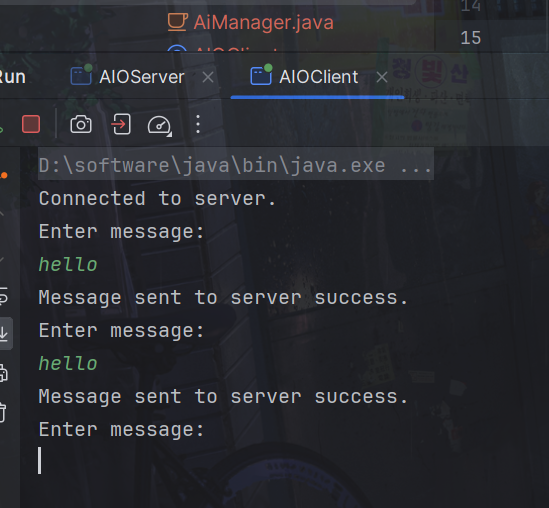
服务端接收成功
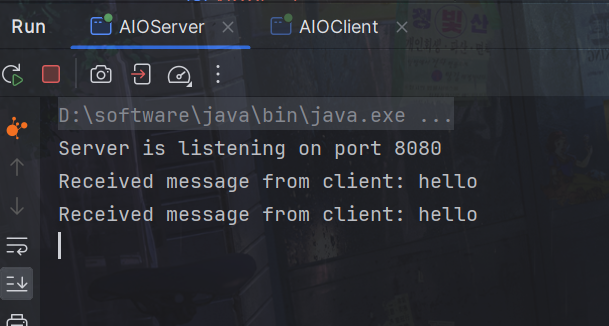
6.零拷贝问题
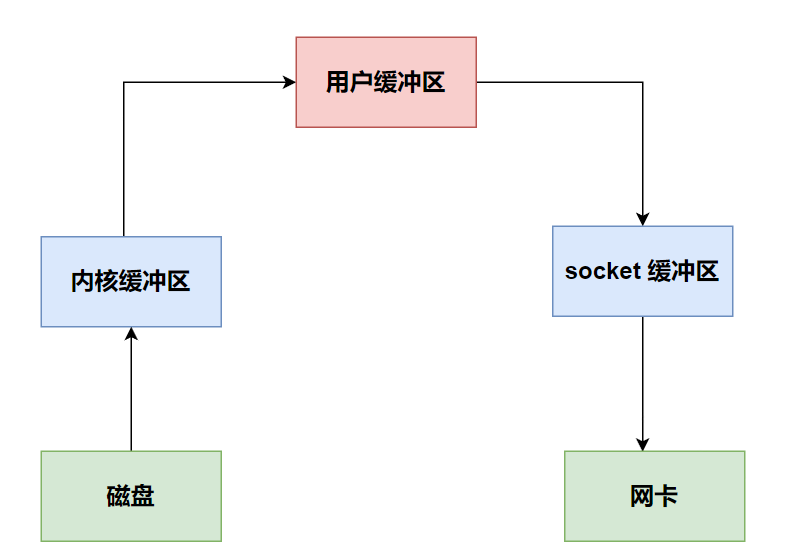
一个基本代码演示
File f = new File("helloword/data.txt");
RandomAccessFile file = new RandomAccessFile(file, "r");

byte[] buf = new byte[(int)f.length()];
file.read(buf);

Socket socket = ...;
socket.getOutputStream().write(buf);
1. java 本身并不具备 IO 读写能力,因此 read 方法调用后,要从 java 程序的用户态切换至内核态,去调用操作系统(Kernel)的读能力,将数据读入内核缓冲区。这期间用户线程阻塞,操作系统使用 DMA(Direct Memory Access)来实现文件读,其间也不会使用 cpu(DMA 也可以理解为硬件单元,用来解放 cpu 完成文件 IO)
2. 从内核态切换回用户态,将数据从内核缓冲区读入用户缓冲区(即 byte[] buf),这期间 cpu 会参与拷贝,无法利用 DMA
3. 调用 write 方法,这时将数据从用户缓冲区(byte[] buf)写入 socket 缓冲区,cpu 会参与拷贝
4. 接下来要向网卡写数据,这项能力 java 又不具备,因此又得从用户态切换至内核态,调用操作系统的写能力,使用 DMA 将 socket 缓冲区的数据写入网卡,不会使用 cpu
在此期间:
优化
而如果使用
ByteBuffer.allocateDirect(10) DirectByteBuffer 使用的是操作系统内存,也就是内核缓冲区与用户缓冲区可以看作同一个地方
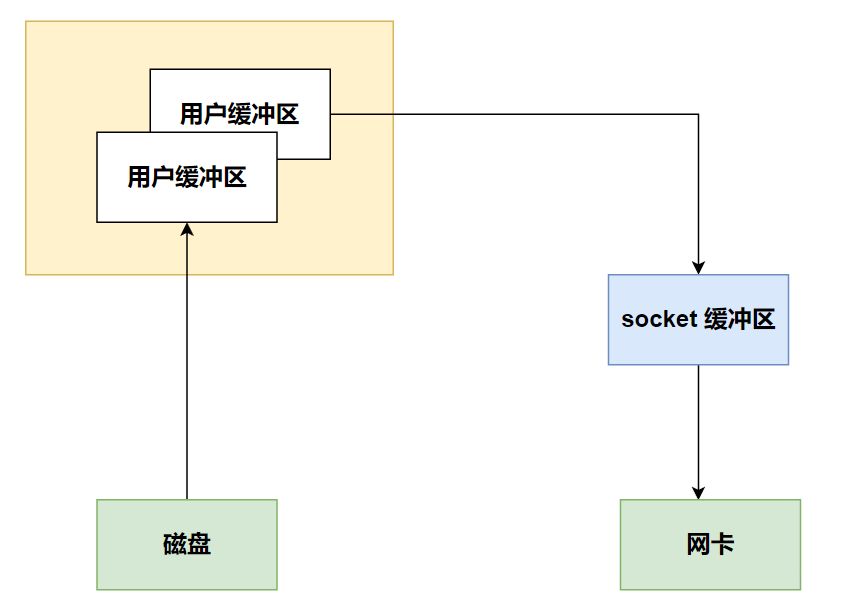
这块内存不受 jvm 垃圾回收的影响,因此内存地址固定,有助于 IO 读写
java 中的 DirectByteBuf 对象仅维护了此内存的虚引用,内存回收分成两步
DirectByteBuf 对象被垃圾回收,将虚引用加入引用队列
通过专门线程访问引用队列,根据虚引用释放堆外内存
再次优化
底层采用了 linux 2.1 后提供的 sendFile 方法,java 中对应着两个 channel 调用 transferTo/transferFrom 方法拷贝数据
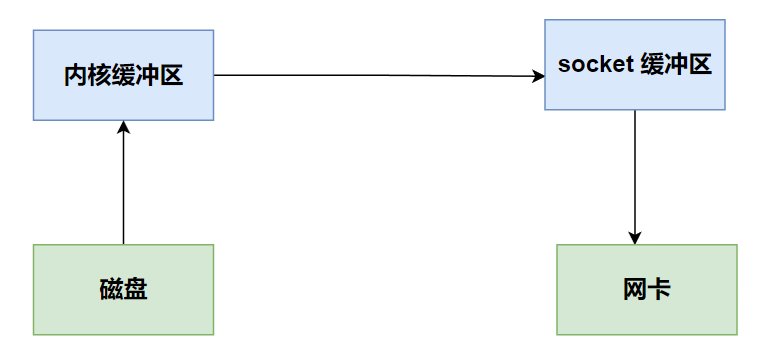
用户态切换至内核态,使用 DMA将数据读入内核缓冲区,不会使用 cpu
数据从内核缓冲区传输到 socket 缓冲区,cpu 会参与拷贝
最后使用 DMA 将 socket 缓冲区的数据写入网卡,不会使用 cpu
可以看到
只发生了一次用户态与内核态的切换
再再次优化
在linux 2.4后
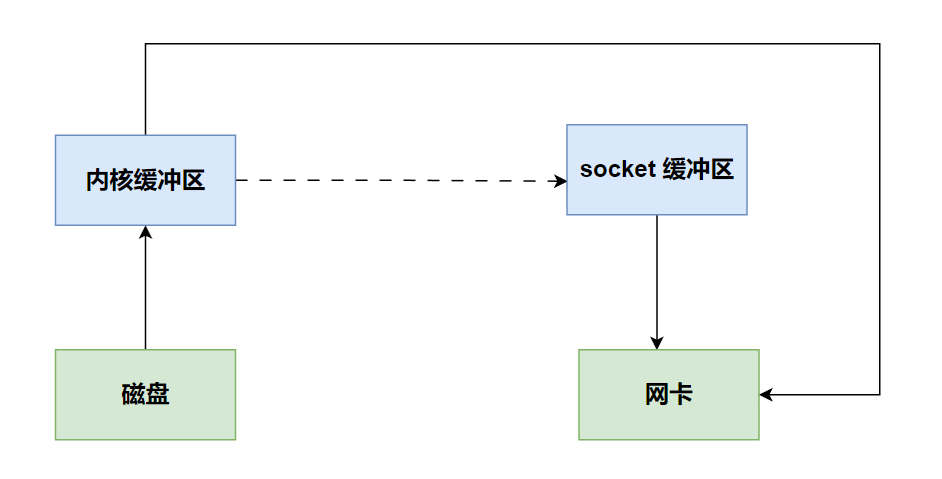
用户态切换至内核态,使用 DMA将数据读入内核缓冲区,不会使用 cpu
只会将一些 offset 和 length 信息拷入 socket 缓冲区,几乎无消耗
使用 DMA 将 内核缓冲区的数据写入网卡,不会使用 cpu
整个过程仅只发生了一次用户态与内核态的切换,数据拷贝了 2 次。所谓的【零拷贝】,并不是真正无拷贝,而是在不会拷贝重复数据到 jvm 内存中,零拷贝的优点有
更少的用户态与内核态的切换
不利用 cpu 计算,减少 cpu 缓存伪共享
总结
NIO(New I/O)中的零拷贝是指在数据传输过程中,尽可能减少CPU对数据的拷贝操作,从而提高系统的性能。在传统的IO模型中,数据在内核态和用户态之间的传输过程中需要多次拷贝,而NIO零拷贝技术则尝试减少或避免这些拷贝操作。
实现零拷贝的关键技术包括:
- 直接缓冲区(Direct Buffer):在NIO中,可以使用直接缓冲区来将数据直接存储在堆外内存中,而不是通过Java堆来进行中转。
- FileChannel的transferTo和transferFrom方法:FileChannel类提供了transferTo和transferFrom两个方法,可以直接在通道之间传输数据,而无需在用户空间和内核空间之间进行缓冲区拷贝。
- sendfile系统调用:在一些操作系统中,如Linux,提供了sendfile系统调用,可以在文件描述符之间直接传输数据,而不需要经过用户态和内核态的拷贝。